


26.3 is the release where Orchestration stops sending you back to the desktop client for many of the day-to-day tasks. Package configuration, schedule definitions and global parameters — three things you previously had to open O&DQ Desktop to manage — are now first-class screens in Timextender Data Platform.
Alongside that, we have better transparency into how your services are upgraded. Now we notify customers seven days before an automatic upgrade. Timextender Data Integration synchronization has been improved, and there is a long list of fixes for things you have told us about.
We are rolling out Timextender Data Platform 26.3 to cloud customers over the coming months. If you would like it sooner, contact support@timextender.com. On-premises customers request the upgrade from the same address.
Dive in below.
New & Improved
Create and edit packages in Timextender Data Platform
Package editing has moved to the web. There is a new Package screen that lists all packages in a Workspace which allows you to create and configure packages. The New Package screen groups packages by type and guides you in selecting the correct option.
The types you can create and configure in TDP in this release:
- Timextender, Ingest, Prepare, Deliver alongside Classic, Jet and the legacy SaaS jobs
- PowerShell and Command Line, for scripting
- Data Transfer, with source and destination browsing, Create Table, Auto Map, a full column-mapping grid, merge configuration and a preview of what the source actually returns.
- Data Provider Command, where you need to execute a script or stored procedure on a specific database.
- Azure Data Factory, Azure PowerShell (CLI), Azure Databricks, Azure Function and Power BI Refresh.
- Microsoft Fabric Notebook, which authenticates with a service principal rather than a stored secret.
- Azure Cloud Optimizer, for scaling and pausing Azure and Fabric resources on a schedule.
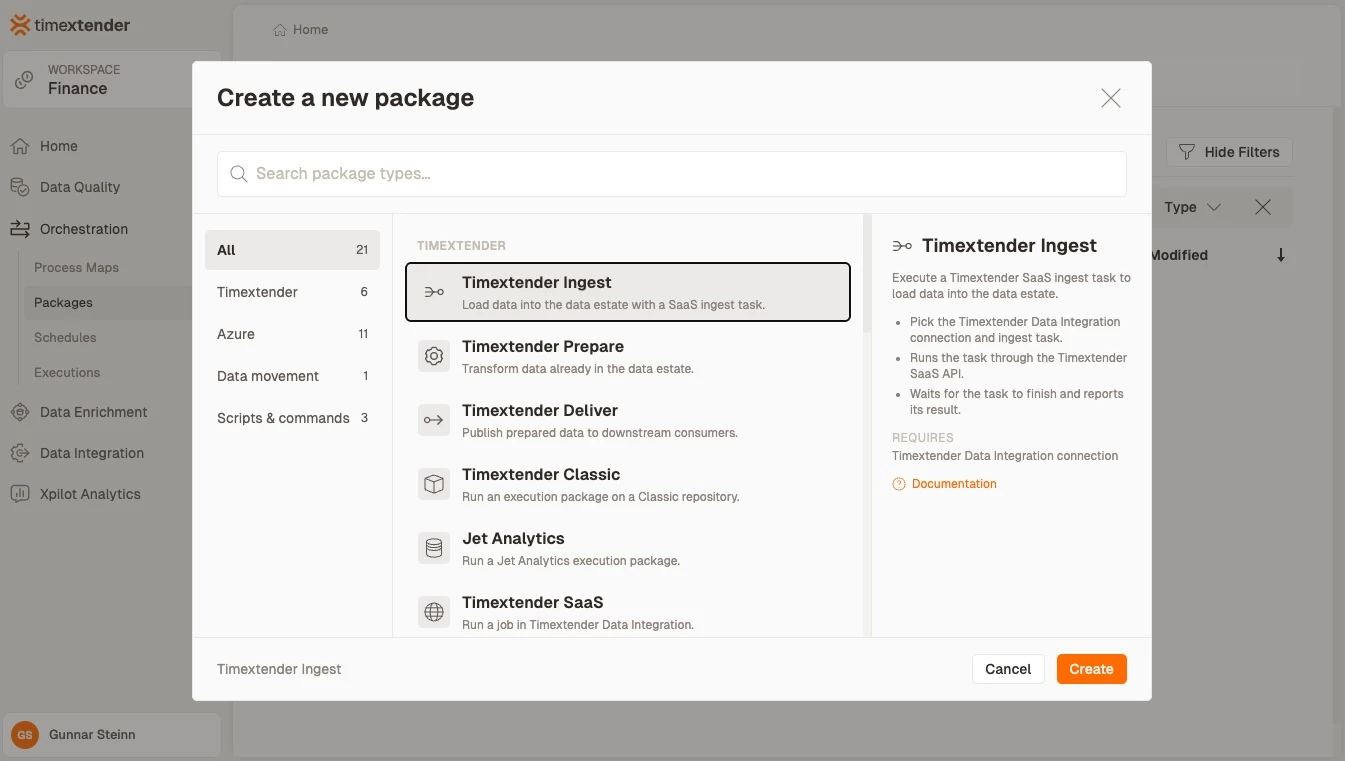
The New Package screen. Package types are grouped by product area — Timextender, Azure, Data movement, Scripts & commands — with a search box across all of them.
All existing packages from previous versions are automatically upgraded and will retain all their previous functionality.
Packages carry their own access rules rather than inheriting global ones: package-level roles are enforced in the list, inside the editor and on direct links, so a Contributor sees what they can change and a Viewer sees a read-only editor rather than a blank page. Notifications accept groups and multiple recipients on both Email on failure and Email on completion, and a package can be assigned to one or more schedules from its own Executions tab.
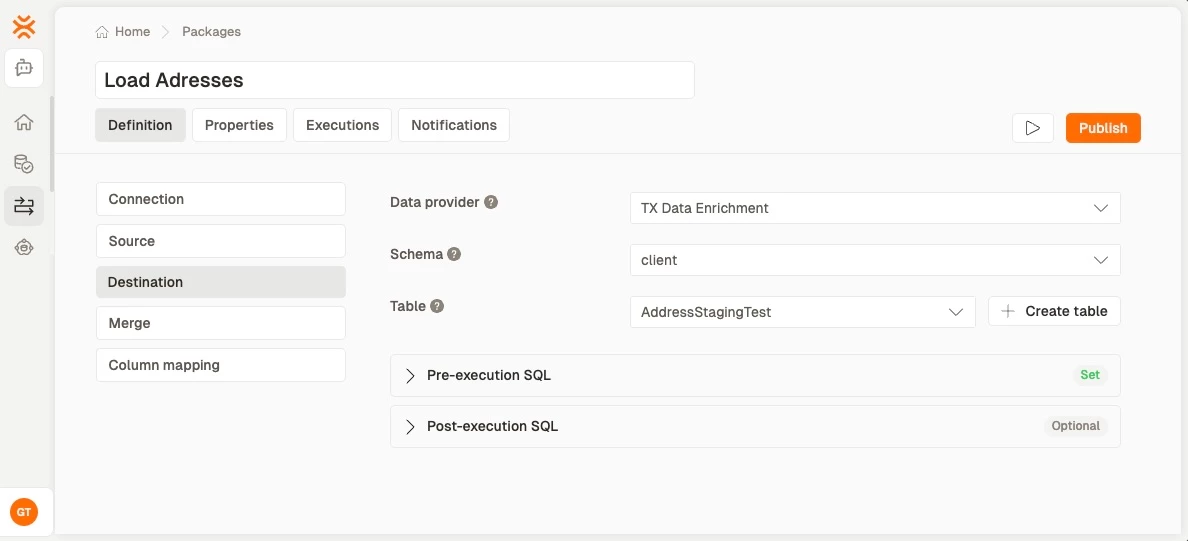
A Data Transfer package. Load columns reads both schemas, Auto map matches them by name, and each destination column can take a source column, a custom value or a merge action.
For each type that has moved, O&DQ Desktop stops offering the old editor and shows a dialog with a deep link to the right page in TDP instead.
Read more about Package configuration in our support document.
Schedules in Timextender Data Platform
This release also moves all scheduling to the web app. In the new Schedules page you can view existing schedules and verify their execution times. There you can also create new schedules and modify existing ones.
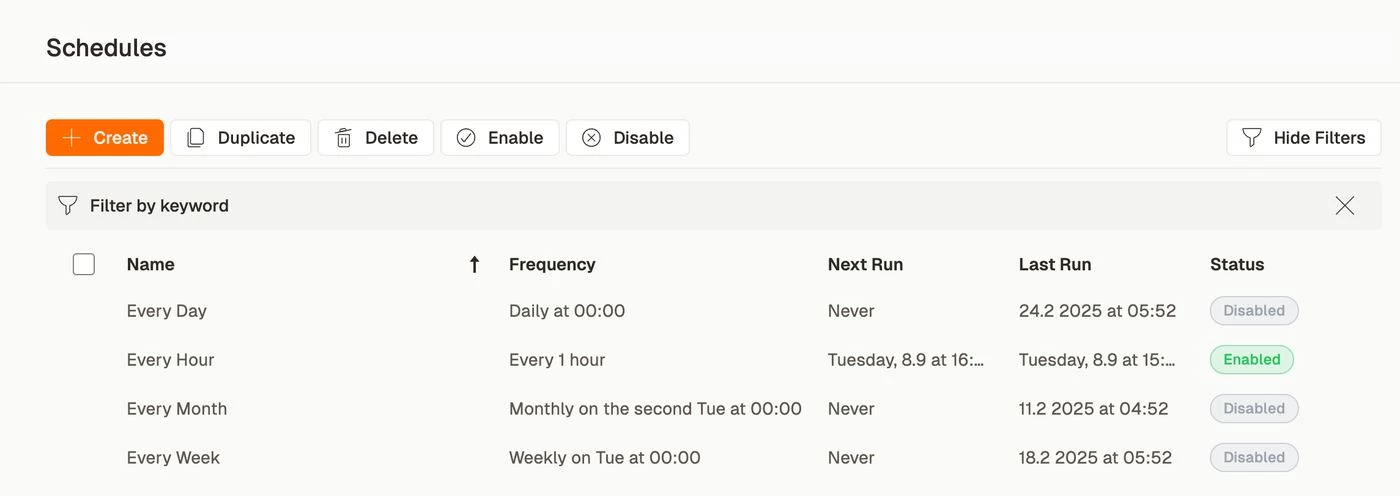
The Schedules list, with frequency, next and last run, and status. Select several rows and the Enable and Disable buttons act on all of them.
The editor covers all seven frequency types which are available in the desktop app. We simplified the UI where possible but support all options that were previously available. Daily, weekly and monthly schedules now require a start date and time, which removes a class of schedules that silently never ran. Start times convert from your local time to UTC correctly across daylight-saving boundaries, so a schedule set for 07:00 stays at 07:00 in March and October alike. For anything the standard frequencies cannot express there is a SQL view, with worked examples, a parameters panel, and a test button that runs your query and shows you the result before you save.
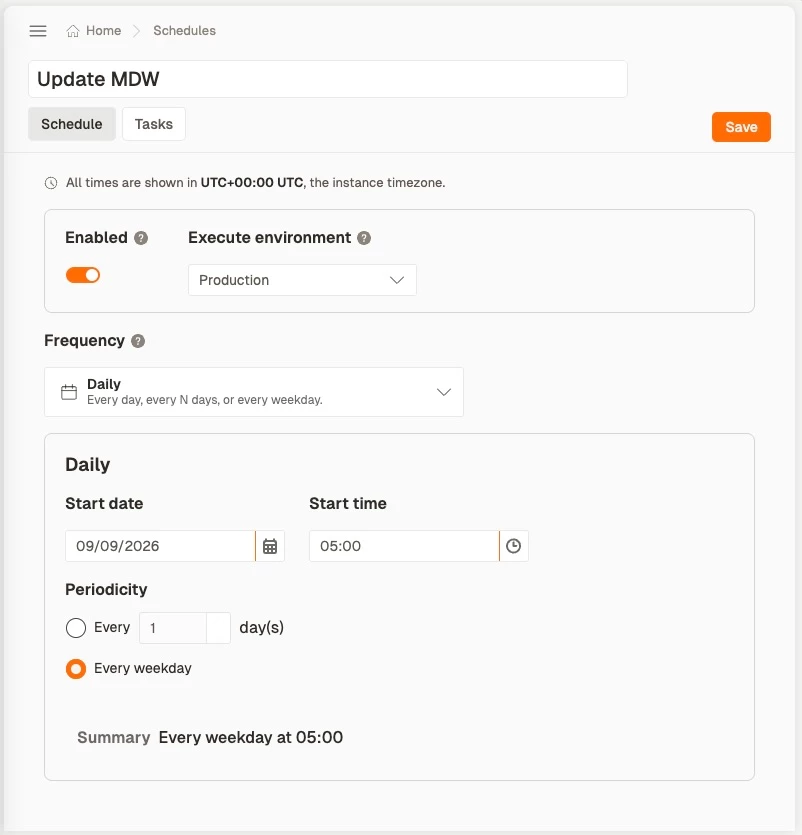
The schedule editor. Every time on the page is stated in the instance timezone, shown in the banner at the top.
The Tasks tab holds both TDP objects and the legacy Desktop task types — object groups, processes, queries, compare queries, email summaries and test groups — in one Add-task picker grouped by product area, each category showing an icon and a count. Assign a Desktop task to a schedule and it appears here; remove it and the removal syncs back the same way.
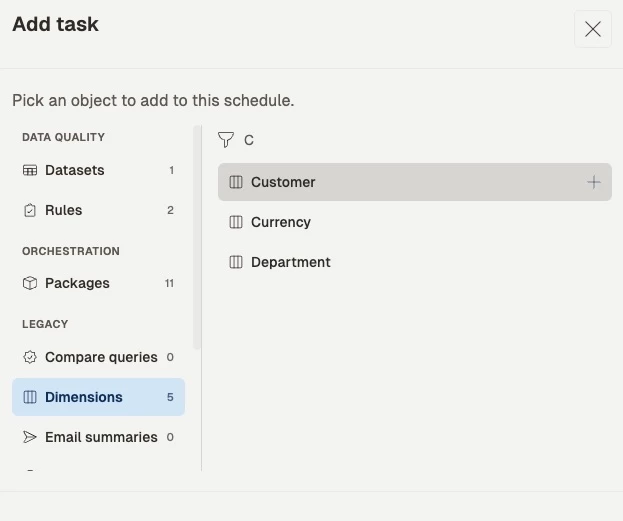
The Add-task picker, grouped by product area with a count per category. A dataset whose rules are not deployed to the execute environment is flagged before you add it.
Editing a schedule in TDP takes effect on cloud immediately rather than at the next polling interval. And Schedule Groups in O&DQ Desktop now show cloud customers a prompt pointing them to TDP.
Global Parameters in Timextender Data Platform
Global Parameters are managed in TDP Settings: create, edit, delete, and mark a parameter as encrypted so its value is never shown back to you or written to a log.
Where parameters get used, there is now a picker that inserts the right token into script and command fields, in an editor with syntax highlighting that shows you which tokens it has recognised. Deleting a parameter warns you first, listing every package, query and dataset that references it and which environment each reference is deployed to, so you find out before the deletion rather than when something fails overnight.
Existing parameters are migrated into TDP automatically when you upgrade, including ones with legacy or non-conforming names, which remain editable. Editing Global Parameters in O&DQ Desktop is disabled and replaced with an "Open in TDP" link.
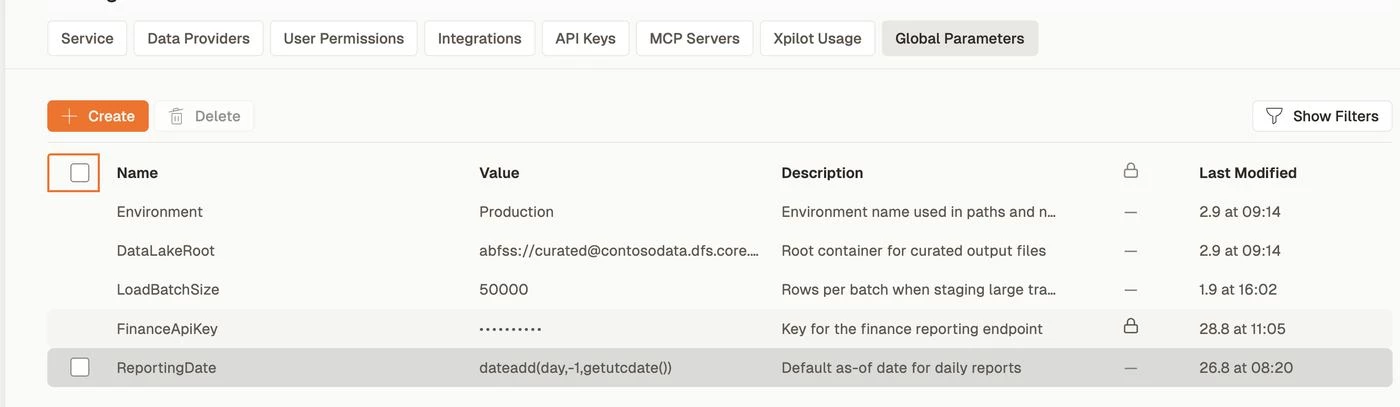
Global Parameters in Settings. An encrypted parameter never shows its value back, and every parameter carries a description and a last-modified stamp.
Seven days' notice before an automatic upgrade
Cloud customers and their partners are now emailed seven days before an automatic upgrade, and see a banner and dialog in TDP for the same window. From there you can take the upgrade immediately or postpone it. When it runs, a second email confirms the upgrade.
This changes what you experience on every release from now on, not just this one. The upgrade itself is applied for you — there is no migration to run and nothing to prepare.
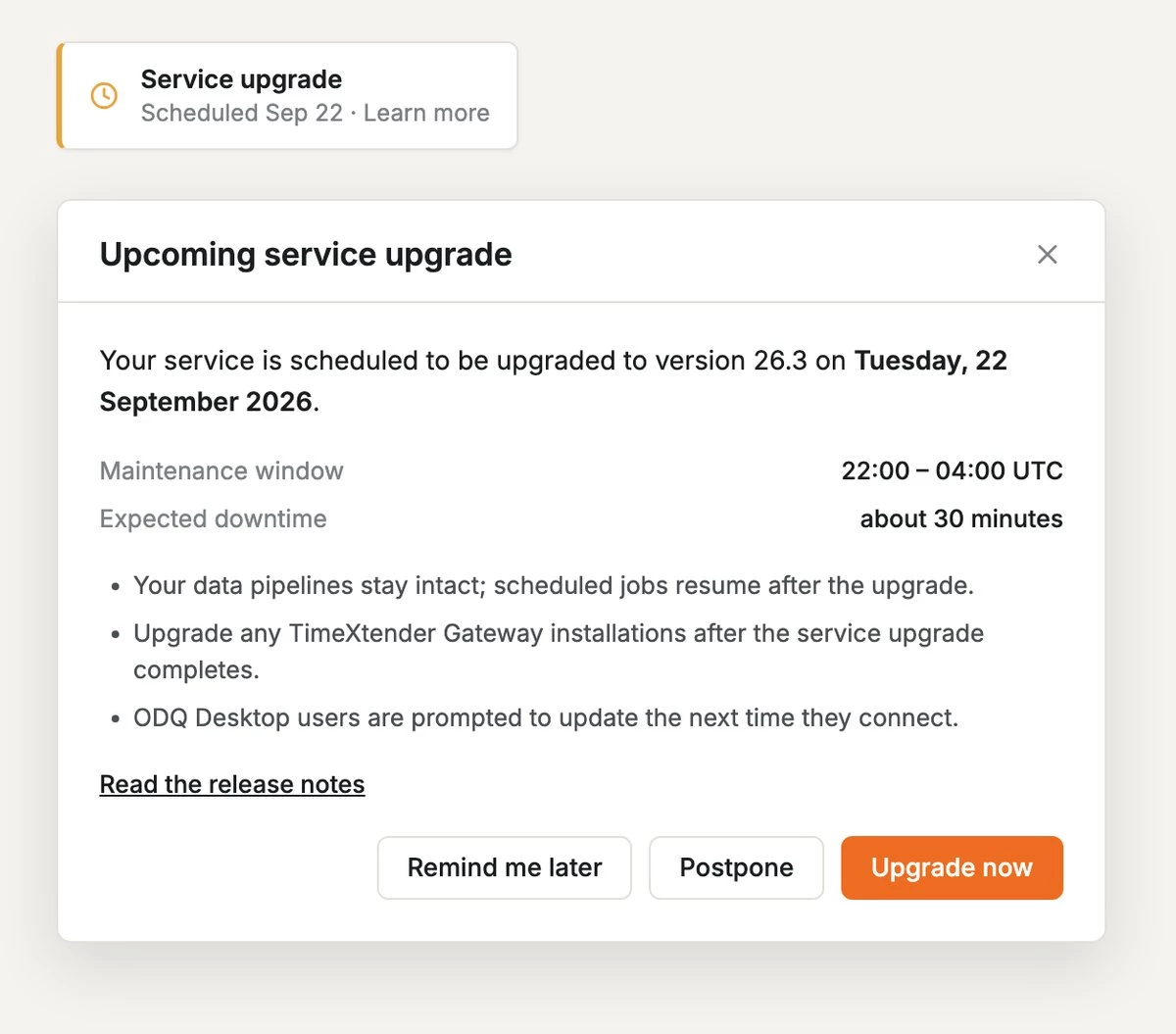
The banner and the dialog behind it: scheduled date, maintenance window, expected downtime, and the choice to take the upgrade now or move it.
Note that for customers in release 26.2 or earlier, there is no indicator in the software about upcoming upgrades. They will only be notified via email. Customers upgrading from 26.3 onwards will see the improved upgrade experience in the web app.
Environment-aware synchronization for Timextender Data Integration
26.2 introduced mapping a TDI Data Provider to a different instance per environment. After feedback from customers we made multiple improvements to the synchronization:
- Instance groups can be renamed, in the mapping grid and in the package picker, so they read as something meaningful instead of a generated key.
- Fetching instances preserves the mapping you have already saved instead of resetting it.
- Re-sync is idempotent: unchanged packages are skipped rather than rewritten, and an object group, process or orchestration map you deleted stays deleted instead of reappearing on the next run.
- Existing multi-environment packages are migrated to the new model on upgrade.
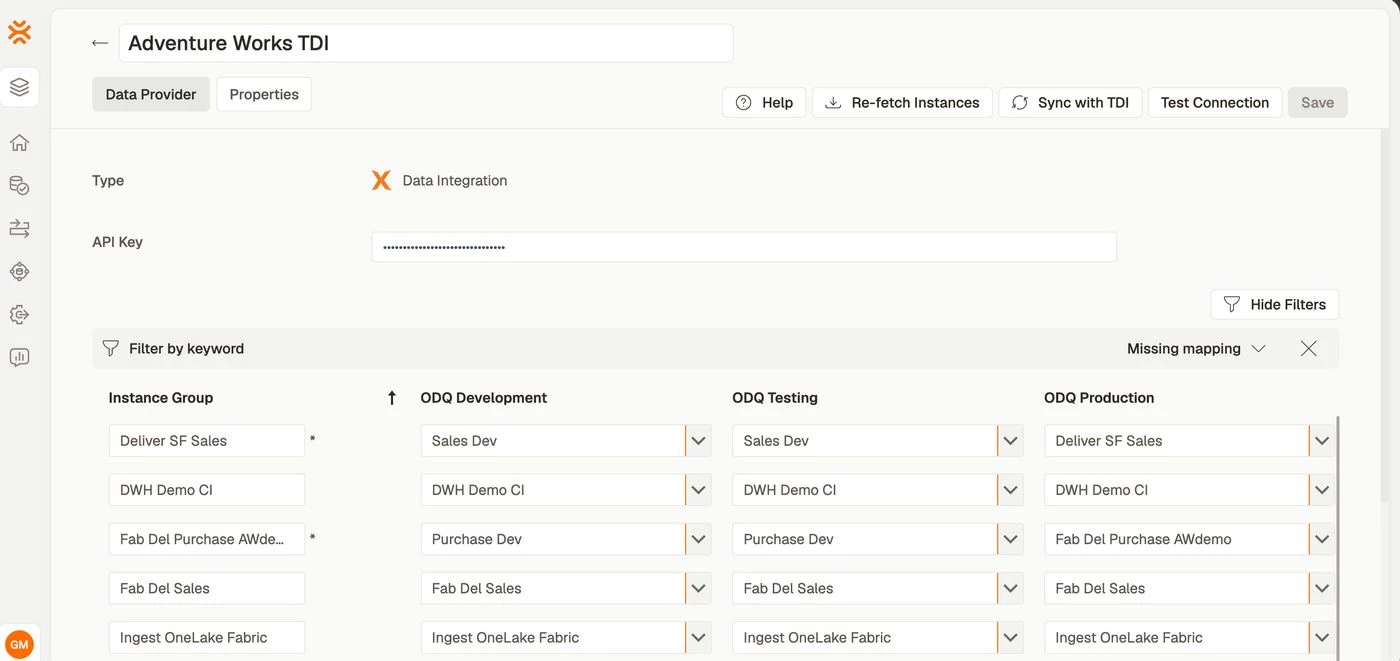
The mapping grid: one row per instance group, one column per environment, with a keyword filter and a Missing mapping filter for large estates.
For a full walkthrough — connecting Orchestration to TDI, mapping instances and scheduling against a specific environment — see Orchestrating TDI.
More robust cloud executions
We are moving our cloud execution onto new infrastructure which allows us to scale better than our current infrastructure. Timextender ingest, prepare and deliver runs now execute in this new infrastructure, with more types being added over the next few releases. There is nothing to configure and nothing that looks different day to day — the practical effect is less latency between queueing an execution until it starts and fewer executions failing for reasons that have nothing to do with your data.
Roles and privileges, completed
26.2 shipped role-based access control for TDP which we are now improving.
- Data Providers are scoped to workspaces, so a Workspace Administrator sees the providers in their own workspaces rather than every provider in the service.
- The login flow for users who get their access through Microsoft Entra ID groups is finished, including switching between the services a user has access to.
- Permission and workspace changes take effect on the next page load instead of requiring a cache clear.
- Controls you cannot use are hidden rather than shown and then refused, and direct links enforce the same rules as the navigation.
- User and role name validation accepts the names people actually use, while still rejecting the ones that broke things.
Fixed
Packages
- A published Data Provider Command package no longer loses its parameters when you edit it again.
- Packages moved between systems no longer disappear from TDP after an upgrade when the old system had been deleted.
- Moving a packages subfolder between systems in O&DQ Desktop now works.
- The package editor now explains why Save is unavailable instead of showing a disabled button with no reason given.
- Data provider errors are surfaced, so table load, column load and preview failures can be diagnosed instead of failing quietly.
- Azure package editors no longer blame the client secret for every authentication failure.
- Saving or publishing a package whose execution connection has been deleted is now blocked with a warning, rather than saving something that cannot run.
- The Timeout dropdown shows "Default" instead of "0", matching Desktop.
- Package timeout no longer appears to include retries.
- Azure Synapse package creation no longer throws null-reference errors.
- Jet Analytics packages can be opened in O&DQ Desktop again for on-prem customers.
- The first Deliver execution package now appears in Orchestration & Data Quality.
Data Transfer
- Transfers from a Fabric SQL Endpoint no longer fail with a "federated authentication token missing" error.
- Staging table creation no longer fails with "Cannot find data type long" when the source has BIGINT columns.
- Fabric SQL transfers no longer fail with a Microsoft.Identity.Client assembly error.
- A merge no longer fails with “Invalid column name” when the destination table has system columns that are not mapped.
Schedules and execution
- The scheduler no longer starts the same process twice in a rare configuration setting.
- An "Only execute between" window no longer shifts by the server's clock offset on-premises.
- Duplicate scheduled runs no longer flood the execution queue.
- Package schedule changes persist.
- Duplicating a schedule confirms what happened instead of silently creating copies.
- A stopped or flushed task can be run again from Executions.
- A process that has finished in Desktop no longer still shows as running in TDP.
- The full task name is visible in the Executions sidebar.
- The last-run timestamp no longer appears in the future.
- The Data Quality audit date no longer shows 1 January instead of the real date.
Process maps
- An object group can be run from the process map.
- Renaming a process also renames the first node inside it.
- The group details panel shows the object group name.
- Opening a process map from inside another process map no longer errors.
- Links to a process map on another system now open on that system instead of staying on the source.
- Tooltips show the correct execution time after a timezone change.
- Process maps no longer hide their titles.
- The map updates itself when a task is stopped or flushed, with no refresh needed.
Timextender Data Integration synchronization
- Renaming a TDI instance group is reflected in Orchestration object groups after a sync.
- Manually created packages no longer appear duplicated when a provider has no fetched instances.
- Orchestration no longer duplicates the sync when a new Data Provider is added.
- A Data Provider's name is no longer cleared with a false "name required" error after a save that succeeded.
- Fetched and mapped instances persist when you reopen a newly created TDI Data Provider.
- The environment tab order in Desktop is deterministic, so a Data Provider can no longer be created against the wrong environment.
- The portal no longer shows only the Production process-map environment.
- Re-syncing after adding a package in TDI updates the matching objects correctly when several instances share a GUID.
- Test connection works on a TDI data provider.
- Syncing to a different workspace works.
Users, roles and access
- A Workspace Administrator no longer has access to every Data Provider in the service.
- Orchestration light customers can see the Data Providers tab in TDP Settings.
- The Data Providers tab is visible again for TDP administrators.
- Permission and workspace changes take effect without a manual cache clear.
- An empty workspace key or name no longer blocks access to the tenant.
- A workspace with dependent datasets can no longer be removed from a Data Provider in a way that breaks them.
Notifications and email
- An invalid recipient no longer fails the whole execution — the rejected address is named instead.
- Orchestration email notifications work without a configured From address.
- Workspace notification users receive failure emails.
- Data Quality reports include the exceptions, not just the summary table.
- Removed CC receivers no longer appear in the Dependencies view, and unmapped users no longer receive mail.
- The "Welcome to Orchestration & Data Quality" email links to the new portal.
Gateway and on-premises
- Upgrading the Gateway no longer deletes the Windows service on machines that still have a legacy-named "Exmon Gateway" service. Relevant for customers which installed the gateway before 24.3
- Uninstalling the Gateway no longer leaves an orphaned service behind, and reinstalling recreates the service correctly.
- Startup failures in the execution engine now report a diagnosable cause, and its Redis connection retries transient failures instead of failing cold.
- O&DQ Desktop remembers the "Separate command for each UAT" setting on a Command Line package.
- Upgrading the Gateway by double-clicking the installer no longer fails with error 1722.
- The execution engine no longer fails to start when its Redis connection is briefly interrupted.
- Browser-cached scripts and stylesheets no longer cause errors immediately after a new deployment.
Data Enrichment
- SQL actions in the web client honour
@SelectedRowIds. - Direct user access is honoured alongside group permissions, so hierarchies that had become unreachable are available again.
- Rearranging a hierarchy no longer errors.
- The application no longer crashes on a lookup field.
- A table whose system columns have the wrong data type now shows a clear error explaining what is wrong.
- A lookup column dropdown with custom visible columns no longer fails with a callback error.
Security
- Data Transfer packages honours better the PowerShell command whitelist on cloud.
- Workspace Viewers can no longer read data-provider contents through the package editor's schema and preview endpoints.
- Fabric connections use service-principal authentication, increasing security of client secrets.
Other
- Various dark mode fixes.
- Dropdowns no longer render with a transparent background in light mode.
- Column descriptions are no longer silently cleared when the column editor detects added or removed columns.
- Dataset column editing edits the column you selected.
- "Select All" works in the Exceptions grid.
- Open exceptions are visible in the portal.
- An unexplained warning no longer appears on the TDP home screen.
- Azure Cloud Optimizer no longer reports "No Resource Groups found under these credentials" or "Index was out of range".
- A table no longer opens empty in Desktop while erroring in the browser.
- Edited schedule groups can be saved.
- The tab error icon renders correctly instead of as a missing glyph.
