



At TimeXtender, we always strive to provide effective technical support in a professional and timely manner. TimeXtender provides two main support options: Standard Support, which is included with active subscriptions, and Premium Support, which is an add-on that offers enhanced and proactive support. Both options follow clearly defined support tiers, each with its own approach to ticket initiation, prioritization, and version policy. This article provides an overview of both support options, and their respective tiers, to help you choose and follow the support option that best fits your needs.
Standard Support
Standard Support is available at no additional cost for customers with active subscription. The goal is to ensure that TimeXtender products operate in accordance with documented functionality by diagnosing and resolving unexpected errors. It does not cover consultative or project-based work such as solution and data model design, performance tuning of custom code or third‑party integrations, or full implementations, migrations, and broader data strategy work, which are handled by partners or Xpert Services.
Note: Version requirements for Standard Support apply to TimeXtender Data Integration and TimeXtender Classic (20.10). To be eligible for Standard Support on these products, customers must run one of the five latest versions that are available for download. Customers running older installations may need to upgrade before technical support can be provided under Standard Support.
Standard Support Process
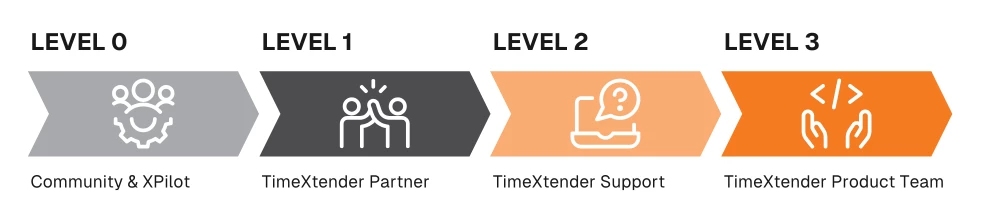
Level 0: Community & XPilot
Customers are encouraged to use self‑service resources such as the knowledge base and forums in the TimeXtender Community, our AI-powered chatbot XPilot and the TimeXtender training materials to search for answers and troubleshooting steps. These resources are ideal for how‑to questions, common errors, and best practices before raising a ticket. These self-help resources assist in rapid issue resolution without ticket creation.
Level 1: TimeXtender Partner
Customers should contact their TimeXtender partner first to investigate the issue, collect details, reproduce the problem, and resolve configuration or design questions where possible. This ensures that environment-specific or solution-specific topics are handled by the team that knows the implementation best.
Level 2: TimeXtender Support
If the partner is unable to resolve the issue, the partner submits a support ticket on the customer’s behalf and the case is assigned to a TimeXtender support agent. The support agent analyzes logs, configuration, and reproduction steps to provide a fix, workaround, or confirm the need for escalation.
Level 3: TimeXtender Product Team
Confirmed product issues are escalated from Support to the TimeXtender Product team, which investigates the root cause and may deliver product fixes, or provide further guidance.
Premium Support
Premium Support builds on Standard Support with prioritized and proactive engagement. Furthermore, Premium Support removes version requirements for TimeXtender Data Integration and TimeXtender Classic (20.10). It is designed for customers who want closer collaboration and higher responsiveness.
Key benefits include prioritized ticket handling and direct access to senior support specialists who are familiar with the customer’s environment, ensuring faster and more context-aware responses. Premium Support also includes proactive quarterly technical reviews that cover platform health, performance, risks, and roadmap alignment, along with advisory sessions on best practices across all TimeXtender product versions and early private preview access to new features and releases.
For more information regarding the advantages of premium support and pricing, please see
Premium Support Process
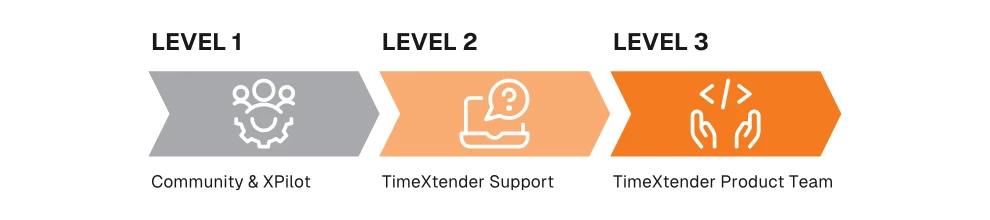
Level 1: Community & XPilot
Premium Support customers can continue to use the knowledge base and forums in the TimeXtender Community and XPilot for quick answers and basic troubleshooting, helping to clarify issues and reduce time-to-resolution before a ticket is opened.
Level 2: TimeXtender Support
Premium Support customers submit tickets directly to TimeXtender, and cases are routed to a support agent. Support agents provide troubleshooting, configuration guidance, fast escalation to senior experts, ensuring that critical issues receive rapid attention. Furthermore, Support specialists provide deeper proactive advisory and ongoing knowledge transfer.
Level 3: TimeXtender Product Team
When necessary issues are escalated to the Product team, which investigates and provides product fixes or configuration recommendations. Premium Support customers benefit from closer collaboration with the Product team, particularly around roadmap topics and upcoming releases.
Ticket submission guidelines
When submitting a ticket, either through a partner for Standard Support or directly for Premium Support, providing clear information helps TimeXtender resolve issues faster. Please include:
-
A concise problem description and an outline of the steps taken prior to the issue occurring
-
The impacted product and feature
-
The product version
-
The relevant technologies or deployment targets in the environment
-
The business impact
-
Relevant error messages as text
-
Screenshots / video recording
