



Solved

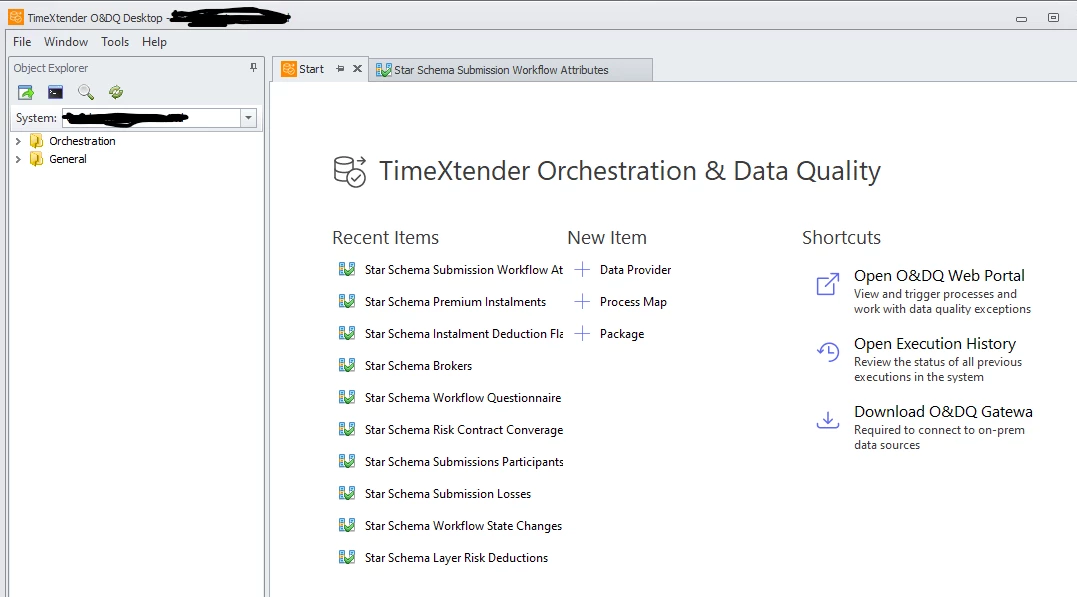
O&DQ Desktop Object Explorer missing Data Quality

  • February 4, 2026
  • 1 reply
  • 29 views

kerry_bespoke
Contributor
Forum|alt.badge.img

Good Morning, I have just updated O&DQ Desktop from 25.1 to 25.2 and I no longer have the Data Quality folder available in the Object Explorer window. I can still open the Data Quality tests I have setup from the Recent Items on the Start window. But how do I add this menu  item back in so I can see all my DQ tests and creates new ones?
 

Best answer by kerry_bespoke

This has been resolved by the O&DQ Development Team.

1 reply

kerry_bespoke
Contributor
Forum|alt.badge.img
  • Author
  • Contributor
  • Answer
  • February 5, 2026

This has been resolved by the O&DQ Development Team.