
Question

Where is the newest version?

  • February 9, 2026
  • 10 replies
  • 109 views

Forum|alt.badge.img+1

Couple of questions regardnig the new version:

  • Why does date say November 2025 for the latest release: Download TimeXtender 20.10 – TimeXtender Support. A bit confusing. Is it the latest version, or is the latest version only available in customer portail?
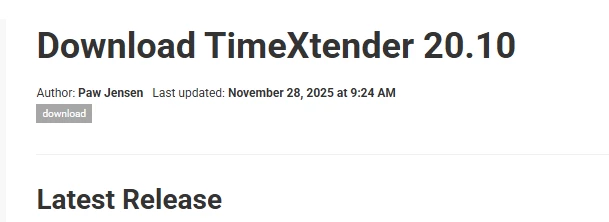
  • Here is says that V25 is TimeXtenders new focus for on-prem solution, but the lasted version on customer portail is 20.10.74.64. Where can v25 be downloaded from?
  • If upgraded to the TimeXtender Data Integration (fully cloud version), how much work is it to migrate everything from 20.10.45.X ?

10 replies

Thomas Lind
Community Manager
Forum|alt.badge.img+5
  • Community Manager
  • February 9, 2026

Hi ​@aftabp 

What you highlight is the newest version of Long Time Support (LTS) or v20.

There is no v25 release available yet. The next release of v20 will most likely be called 20.10.75.

The future Classic version could also likely be named 26.03.01 or similar. 


Regarding migration, you would first need to upgrade 20.10.45 to 20.10.74 as it has the ideal version of the migration tool.


  • Problem Solver
  • February 9, 2026

Will it be possible to keep using v20 (we're on 20.10.74) for the next million years or so? LTS sounds good, we'd like to stay on v20 including ODX for the next couple of years if possible.


Forum|alt.badge.img+1
  • Author
  • Problem Solver
  • February 9, 2026

@Thomas Lind 
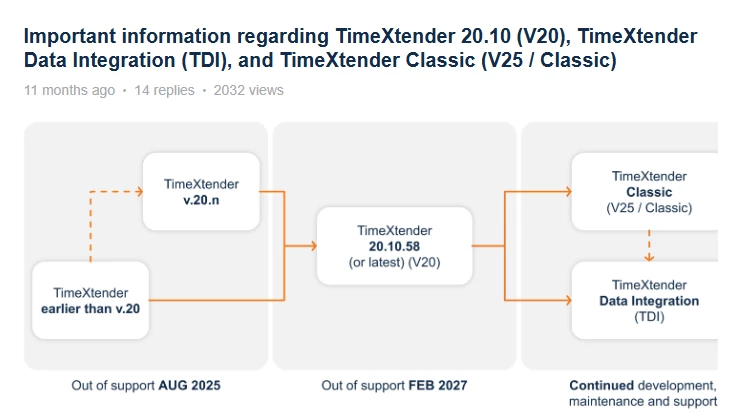
According to this diagram, v20 is supported until Feb 2027
So, there will no V25 until end 2026, may be !


Can i do a direct upgrade from 20.10.45 to 20.10.74?


Forum|alt.badge.img+1
  • Author
  • Problem Solver
  • February 10, 2026

@Thomas Lind 
Two more questons about upgrade.

  • Is it possible that i install TX on a new server, move repository to it and decomission the old one?
  • At the moment, we have both PREPROD and PROD on the same machine with two instences of TX. Does 20.10.74 support having two instences on the same machine?

Thomas Lind
Community Manager
Forum|alt.badge.img+5
  • Community Manager
  • February 10, 2026

Hi ​@aftabp 

I made a guide for that.


rory.smith
TimeXtender Xpert
Forum|alt.badge.img+8
  • TimeXtender Xpert
  • February 10, 2026

Hi,

20.10.45 and 20.10.74 are pretty much the same thing. If you are using ODX Server you will lose the SQLite local synch (and need to check the release notes on how to check that). You can run multiple environments on one machine in 20.10.x (though it isn't really a good idea in principle).

If you are going towards TDI, you will want your environments to be on separate machines and migrate from the most recent 20.10.x version to have the best migration experience.


Forum|alt.badge.img+1
  • Author
  • Problem Solver
  • February 10, 2026

@rory.smith 

The main reasons for the upgrade are: go from CData to TX Enhanced Drivers (so that we do not need to pay 250 EUR per month), and have a version that is supported (since support for ours ended in august 2025)


Thomas Lind
Community Manager
Forum|alt.badge.img+5
  • Community Manager
  • February 17, 2026

Will it be possible to keep using v20 (we're on 20.10.74) for the next million years or so? LTS sounds good, we'd like to stay on v20 including ODX for the next couple of years if possible.

Hi ​@RLB 

It is correct that we stop the support of the ODX in February 2027.

​Hi @aftabp 

If you go to the release notes, you can find when we added the enhanced data sources as an option. For a while it was actually possible to use it in earlier releases. However, there always will be bugs that exist in earlier versions, why you should upgrade to the newest one to start using the Enhanced Data sources. The good thing about them, is that similar to CData, the providers themselves can be updated with new features and bug fixes. It is not always necessary to also upgrade v20/LTS.


Forum|alt.badge.img+1
  • Author
  • Problem Solver
  • February 17, 2026

@Thomas Lind 

At the moment, I am not making any changes to the server currently in production.
The plan is to set up a new server equivalent to the one we have today and install the latest version on it. Once everything is configured and verified to be functioning correctly, the existing server will be retired.

I do, however, have a question regarding the migration process:
What is the recommended approach for importing the current repository into the new server?

Alternatively, would you suggest first installing version 20.10.45, importing the existing repository into that version, and then performing an upgrade to 20.10.74 afterward?


Thomas Lind
Community Manager
Forum|alt.badge.img+5
  • Community Manager
  • February 24, 2026

Hi ​@aftabp 

We have an old guide that was moved from legacy support

It doesn’t mention whether to upgrade before or after, but it doesn’t really matter. You can do both at once. So on the move to the other server you install the newest version there and upgrade it as part of initial setup. Meanwhile you will have the old setup running on the original server, should any issues appear.