

Overview
This article summarises how TimeXtender's AI features protect your data, credentials, and network. It covers the TimeXtender MCP Server, Xpilot Analytics, Xpilot Data Quality, and Xpilot Orchestration Error Insights. It is intended for security reviewers, compliance teams, and administrators who need to understand exactly what leaves the on-premises environment and what stays inside it.
All AI features in TimeXtender are optional. You have complete control over which features to turn on and how they are configured. TimeXtender's core data integration capabilities work completely independently of these AI features.
Our Philosophy: Customer Choice and Control
TimeXtender's approach to AI is built on four principles.
Optional by Design
All AI features are optional. You decide which features are turned on, when to turn them on, and how they are configured. Turning off any feature at any time has no effect on your existing workflows.
Flexibility in Deployment
Multiple deployment options are available to meet your security, compliance, and operational requirements. For the MCP Server you can choose between cloud-based AI services or fully on-premises local models. For other Xpilot features, regional processing options are on the roadmap.
Transparency
You should know exactly where your data is processed. This article provides complete transparency about data flows, processing locations, and options for each feature.
Your Data, Your Control
-
Your data is never used to train AI models.
-
You maintain complete control over what data is processed by each feature.
-
You can turn off any feature at any time without affecting existing workflows.
TimeXtender MCP Server
What the MCP Server Exposes
The MCP Server runs as a Windows service in your environment. AI clients authenticate with an API key or with OAuth 2.1 against your own identity provider, and can call five tools:
| Tool | Returns |
|---|---|
|
| The semantic models the caller's API key is authorised for |
|
| Views, columns, and measures for one model, with their business descriptions |
|
| The result of a query expressed in business terms |
|
| Foreign-key joins available between views in one model |
|
| An analytical query expressed as measures, dimensions and filters, resolved against the models the caller is authorised for |
Clients cannot:
-
Discover the raw database schema. The physical-schema tools
get_schemaandexecute-queryare turned off in the production build. -
Execute SQL that modifies data. The Query Validator rejects any statement that is not a
SELECTorWITH. -
See models outside their API key's scope. Scoped keys receive a filtered model list, and direct queries for unauthorised models are rejected.
-
Reach physical tables or columns that the semantic layer does not expose.
Language Model Options
-
Cloud-based: Use cloud-based agents such as Claude. Only semantic metadata and query results are sent to the AI service.
-
Fully local: Use local models (e.g. LM Studio) on your own hardware, with no external data transmission. All processing stays on-premises.
MCP Server Architecture: Zero-Access Security
The MCP Server is built on the same zero-access security model that governs the entire TimeXtender platform: it orchestrates using metadata and never accesses, moves, or stores your actual data.
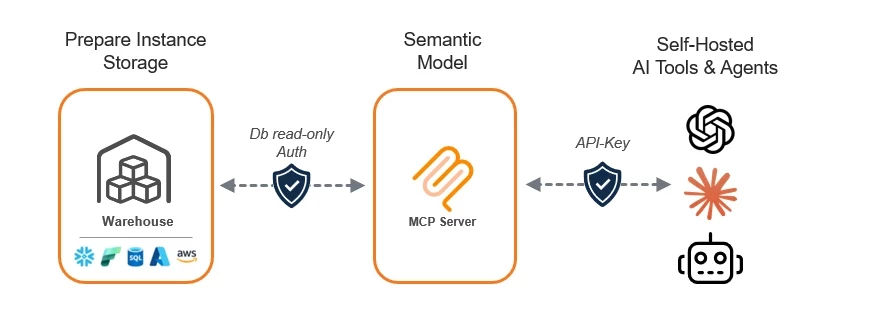
Two distinct security boundaries operate at every layer:
-
Prepare Instance Storage (Your Warehouse): Your data stays in your own Snowflake, Azure SQL, Fabric, or AWS environment. The MCP Server connects through read-only database authentication, ensuring it can query but never modify data.
-
Semantic Model (MCP Server): The server translates AI requests into safe, read-only queries using your semantic layer: table names, field descriptions, and relationships. No raw data is stored or cached by the server.
-
AI Tools & Agents: AI clients connect with an API key or OAuth. You control which tools have access and can revoke credentials at any time.
Read-Only Database Access
Use a database account with the minimum permissions required for the semantic models you have published. Read-only access is required for production deployments. Even though the Query Validator blocks write statements at the tool boundary, AI behaviour is non-deterministic and a defence-in-depth posture requires the database to refuse writes as well.
| Provider | Recommended permissions |
|---|---|
| Azure SQL Database |
|
| Snowflake |
|
| Microsoft Fabric | Member or Contributor workspace role and read access to the specific Lakehouse or Warehouse item. No roles that allow item modification or workspace administration. |
How Credentials Are Stored
The MCP Server never stores credentials in plaintext on disk. Encryption uses Windows DPAPI (Data Protection API) so that only the Windows user account that runs the MCP Server Windows service can decrypt the values.
| Secret | Storage | Encryption |
|---|---|---|
| Azure SQL password (SQL Auth) |
| DPAPI LocalMachine |
| Azure SQL client secret (Entra ID) |
| DPAPI LocalMachine |
| Snowflake password (legacy auth) |
| DPAPI LocalMachine |
| Snowflake private key password |
| DPAPI LocalMachine |
| Snowflake | File system | File system permissions only |
| Fabric client secret |
| DPAPI LocalMachine |
| HTTPS certificate password |
| DPAPI LocalMachine |
| Relay access token (cloud) |
| DPAPI LocalMachine with |
| API keys |
| SHA-256 hash only; plaintext shown once at generation |
Backing up
mcp-server.jsonand restoring it on a different machine, or under a different Windows user, leaves the DPAPI-encrypted values undecryptable. Re-enter or re-register the affected secrets after the move.
How clients authenticate
API keys are stored as SHA-256 hashes. When an HTTP request arrives, the server hashes the incoming X-API-Key value and compares it against the stored hashes using a constant-time comparison. The full list of configured keys is scanned even after a match, so the position of the matching key in the list cannot leak through response time.
A request with a missing, blank, or unrecognised key is rejected with HTTP 401 Unauthorized and a generic error body. The 401 is deliberately the same for missing, malformed, and wrong keys so an attacker cannot determine which condition was hit.
Stdio clients (Claude Desktop on the same machine) do not need an API key. The Configurator provisions a system key for the stdio path and hides it from the API Keys tab.
For the full key management workflow, see Manage API Keys for MCP Server.
OAuth 2.1 is the alternative. When it is turned on, the MCP Server accepts a bearer token from your own Auth0 or Microsoft Entra ID tenant, and validates the issuer, the audience, the token lifetime and the signature. It does not check scopes or roles, so any token passing those four checks can call every tool the server exposes.
Turning OAuth off stops the server advertising its OAuth surface, so no new connector can be set up, but it does not revoke tokens that have already been issued. To remove a connector's access, revoke it in your identity provider. See Connect to MCP using Auth0 or Connect to MCP using Microsoft Entra ID.
Audit Logging
The MCP Server records every authentication attempt, tool call, and query to:
%ProgramData%\TimeXtenderMCP\Each log entry includes the API key name (not the plaintext value), the tool that was called, the model that was queried, the query text, the row count returned, the execution time, and the correlation ID. Use the audit log for compliance review, incident investigation, and tracing a specific result back to the team, person, or tool that issued the request.
The Open Logs Folder button on the Service Management tab opens the log root in Explorer.
Cloud Connectivity (Optional)
The MCP Server runs entirely on-premises by default. Registering with the TimeXtender Data Platform from the TimeXtender Data Platform tab lets cloud-hosted AI tools, including Xpilot, call your on-prem MCP Server. Registration is optional and explicit; the server cannot register itself.
When registration is turned on, the MCP Server maintains an outbound-only SignalR connection to the TimeXtender Data Platform hub. This means:
-
No inbound firewall ports need to be opened. The cloud cannot initiate a connection to your machine.
-
The cloud can only reach the server while the outbound connection is up. If the server is offline or the connection is paused, cloud AI cannot call your models.
-
The relay access token is DPAPI-encrypted. Only the Windows user that registered the server can decrypt it on that machine.
-
Hard payload limits. The relay enforces a 2 MiB cap on raw request and response bodies. Larger payloads are rejected with HTTP 413 before any local I/O.
Use Pause in the TimeXtender Data Platform tab to temporarily stop cloud AI from reaching the server without losing the registration. Use Disconnect to remove the registration entirely.
See Register MCP Server with TimeXtender Cloud for the full registration workflow.
Xpilot Analytics
Xpilot Analytics is a conversational AI assistant for exploring and querying your semantic models. It maintains context across the questions you ask within a session, using previous results to answer follow-up questions more accurately.
What is sent off-premises:
-
Schema information and field descriptions for the models you are querying are sent to Microsoft Azure AI Foundry in EU for context.
-
Results from previous queries in the same session are included so the AI can interpret follow-up questions correctly.
-
Only the data returned by queries you have already run is included. No background scanning of your warehouse occurs.
All queries are still subject to the same semantic-layer enforcement as any other MCP Server client: read-only, scoped to your API key's authorised models, and limited to what the semantic layer exposes.
Your data is processed entirely within the European Union, your prompts and results are never used to train AI models, and everything runs inside Microsoft's compliance-certified cloud with built-in content-safety protections.
Xpilot Data Quality
Xpilot Data Quality analyses your data and generates suggested validation rules as drafts for your review. You approve rules before they are published; no rule is applied automatically.
What is sent off-premises:
-
Schema information, field descriptions, and sample data (first 100 rows) are sent to Microsoft Azure AI Foundry in EU for analysis.
-
AI-generated rule suggestions are returned and presented as drafts.
-
Your data is processed entirely within the European Union, your prompts and results are never used to train AI models, and everything runs inside Microsoft's compliance-certified cloud with built-in content-safety protections.
Xpilot Orchestration Error Insights
Xpilot Orchestration Error Insights analyses execution failures and provides diagnostic summaries and resolution suggestions.
What is sent off-premises
-
Error logs and execution context are sent to Microsoft Azure AI Foundry in EU for analysis.
-
No business data is included in error analysis, only error metadata and execution context.
-
Your data is processed entirely within the European Union, your prompts and results are never used to train AI models, and everything runs inside Microsoft's compliance-certified cloud with built-in content-safety protections.
What Leaves the On-Premises Environment
| Feature / Scenario | What is sent off-premises |
|---|---|
| MCP Server: default install, no cloud registration | Nothing. All data and queries stay on the local network. |
| MCP Server: cloud registration turned on, hub idle | A periodic SignalR keep-alive. No data, no query text, no metadata. |
| MCP Server: cloud registration turned on, Xpilot query in flight | The query text from Xpilot, the row result from your warehouse, and standard SignalR envelope metadata. Constrained by the same semantic-layer enforcement that protects on-premises clients. |
| MCP Server: local language model configured | Nothing. All processing stays on-premises. |
| MCP Server: audit and diagnostic logs | Nothing leaves the machine. Logs stay in |
| Xpilot Analytics | Schema information, field descriptions, and results from previous queries in the same session, sent to OpenAI EU. |
| Xpilot Data Quality | Schema information, field descriptions, and up to 100 rows of sample data, sent to OpenAI EU. |
| Xpilot Orchestration Error Insights | Error logs and execution context (no business data), sent to OpenAI EU. |
TimeXtender Cloud Hosting Region
The TimeXtender Data Platform is hosted on Microsoft Azure in the North Europe (Ireland) and West Europe (Netherlands) regions. All data processed through the platform, including relay traffic from registered MCP Servers and Xpilot AI features, remains within these EU regions. No data is transferred outside the European Union as part of normal platform operation.
Network Diagram
+---------------------+         outbound HTTPS / SignalR         +---------------------------+
|  Your environment   | ---------------------------------------> | TimeXtender Data Platform |
|                     |                                          |  (cloud, optional)        |
|  +---------------+  |                                          +---------------------------+
|  | MCP Server    |  |  read-only SQL
|  | Windows       |--+----> Azure SQL / Snowflake / Microsoft Fabric
|  | service       |  |
|  +---------------+  |
|         |           |
|         | local TCP
|         v
|  Stdio + HTTP clients on your network
+---------------------+

Xpilot Analytics / Data Quality / Orchestration Error Insights:

+---------------------+         HTTPS         +--------------------+
|  Your environment   | --------------------> | OpenAI (EU)        |
|  (Data Integration) |                       +--------------------+
+---------------------+
  Analytics:    schema info + prior session query results
  Data Quality: schema info, field descriptions, sample rows (up to 100)
  Orchestration: error logs + execution context only (no business data)
Future Roadmap
Regional Alignment
-
AI processing regions will align with your TimeXtender Data Integration instance region, reducing latency and simplifying compliance.
Compliance and Hardening Checklist
Use this checklist when bringing the MCP Server into production:
-
The Windows service runs under a dedicated service account, not
LocalSystemor a domain administrator -
The Windows service account is the only non-administrator with read access to
mcp-server.jsonand any.p8key files on disk -
The database account used by every provider is read-only and scoped to the views the models expose
-
HTTPS is configured on the Service Management tab with a certificate from a trusted CA whose Subject matches the Canonical URI
-
API keys are scoped to the minimum set of models each client needs, named for the team or person responsible
-
Audit logs are forwarded to your SIEM or log retention solution from
%ProgramData%\TimeXtenderMCP -
If cloud registration is turned on, outbound network egress is permitted only to the documented TimeXtender hub URL
-
If cloud registration is not needed, the TimeXtender Data Platform tab is left in the Not connected state
