SUBMITTED

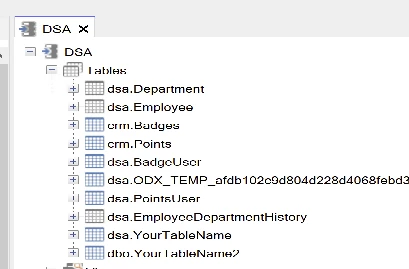
Add option to hide schema name in front of table name

  • December 2, 2025
  • 5 replies
  • 33 views

Hi,

We are using TX 20.10.45.64. It looks like schema names are in front of our table name. Is there a way to disable this feature?
 Thanks for your help.

5 replies

Christian Hauggaard
Community Manager
Forum|alt.badge.img+5

@Timmm I believe the schema is always shown, as tables can exist in multiple schemas. Can you please explain why you would like to hide schema? 


  • Author
  • Contributor
  • December 2, 2025

I am used to work with TimeXtender Data Integration (Non-desktop version), and this version did not show the schemas in front of the table name. 

I would like to hide them because we are reorganizing our enviroment. We would like to get rid of some schema's. Thats why. 


Christian Hauggaard
Community Manager
Forum|alt.badge.img+5

@Timmm the schema is also shown in TDI

I will convert this question to a product idea


  • Author
  • Contributor
  • December 2, 2025

Ah check. It has been a while, so i must rembered it differently. 

Thanks for converting it to a product idea. 

Have nice day!


rory.smith
TimeXtender Xpert
Forum|alt.badge.img+8
  • TimeXtender Xpert
  • December 2, 2025

Hi,

the tables are always going to live in a schema as the default one in SQL Server (dbo) is still a schema. As soon as you start allocating tables to separate schemas inside the same BU/DWH layer using Table Settings, you need to see the schema. Similarly, if you assign schema behaviours to push certain types of tables to different schemas (dbo for valid, etl for other) it is necessary to see.

I guess it might be an option to hide the schemas, but I suspect that might be confusing.