IMPLEMENTED

Add Retries to Jobs

Related products:TimeXtender Data Integration
  • October 9, 2023
  • 6 replies
  • 63 views

erik.van.mastrigt
TimeXtender Xpert
Forum|alt.badge.img+3

In ODX Server v20 there is the option to restart a Transfer if failed, similar like the mechanism on Execution Packages.
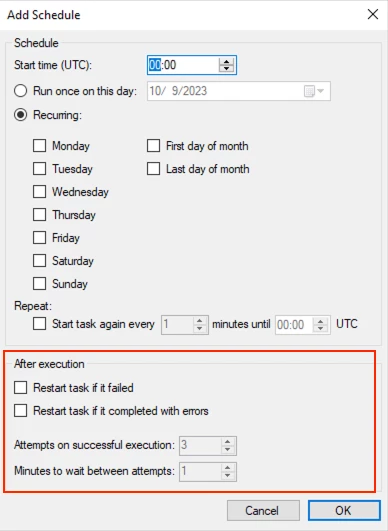
 

In TX/ODX Server v21 the scheduling of Transfers is handled by Jobs, but the option to restart a task if it fails is missing:
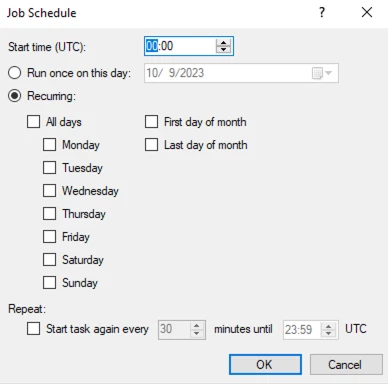
 

Especially some of our REST API data sources return an error. The retry/restart option is crucial here.


6 replies

JTreadwell
Community Manager
Forum|alt.badge.img+5
  • Community Manager
  • May 6, 2024

Thanks for the feedback @erik.van.mastrigt, This is now possible by scheduling your jobs with Exmon Process Orchestration which is now part of every TimeXtender SaaS license. See here for more information:


And don’t worry! this integration will be improved even further in the future.


rvgfox
Problem Solver
Forum|alt.badge.img+4
  • Problem Solver
  • May 7, 2024

 Yes @JTreadwell it’s sound good, but Exmon Process orchestration, NOT it’s part of every TimeXtender SaaS license, it’s only include in Premium and Enterprise...


Christian Hauggaard
Community Manager
Forum|alt.badge.img+5
SUBMITTEDIMPLEMENTED

JTreadwell
Community Manager
Forum|alt.badge.img+5
  • Community Manager
  • May 7, 2024

That’s right @rvgfox, you can buy the FULL version of process orchestration which can execute all types of 3rd party services such as ADF, Power BI, Fabric notebooks etc.

However, an exclusive version of process orchestration restricted to TimeXtender jobs and execution packages is now part of every TimeXtender SaaS license. Please see this post for more info:


erik.van.mastrigt
TimeXtender Xpert
Forum|alt.badge.img+3

Thanks @JTreadwell In my opinion a retry mechanism should not be an exclusive feature (Exmon). I have examples of APIs that do recommend performing a retry when the initial load fails. That makes this an essential feature.

I would suggest that this idea stays open as a feature request for all versions/licenses of TimeXtender.


JTreadwell
Community Manager
Forum|alt.badge.img+5
  • Community Manager
  • May 8, 2024

Hey @erik.van.mastrigt. There seems to be a bit of confusion around the use of process orchestration, so I want to make sure I’m being clear here. 

  1. The TimeXtender product suite now includes all Exmon products. (Some are available for an additional subscription fee). This includes two versions of process orchestration:
    1. Full Exmon Process Orchestration: can execute all types of services like PowerShell, ADF, Fabric notebooks, Power BI etc. This version is available for an additional subscription fee. 
    2. TimeXtender exclusive Process Orchestration: can only execute TimeXtender Jobs, tasks, & packages. All TimeXtender SaaS customers have access to this version for no additional cost
  2. You can register, download, & configure this orchestration software as shown in the video above or this KB article
  3. With this Included solution you can configure:
    • Orchestration of TimeXtender jobs, tasks, & packages
    • Email notifications of any job, task, & package
    • Execution Retries of any job, task & packages.
    • Web-based process status visualization, historical logs, & remote execution of any job, tasks, & packages. 

The Process Orchestration solution I’m referring to does NOT require any additional purchase, you just need to request a user from the banner at app.TimeXtender.com


In the future, we will be making additional improvements for a more seamless experience. However, the functionality being requested here (and more) is now possible.