SUBMITTED

Azure Key vault as source for login information

  • October 16, 2019
  • 13 replies
  • 95 views

About Azure key vault: https://docs.microsoft.com/en-us/azure/key-vault/basic-concepts

We - as well as many other - add signin information (either just username and password, or whole connection strings) to Azure key vault.

Example user scenario: You have a script that need to connect to a database and fetch some data. As you are concerned with security you do not want username and password to be written in the script. Instead you use a secret, stored in key vault, to get a connection string that the script can use.

You, as a user with access to keyvault, run the script. The script connects to keyvault and fetches the connection string and uses it to connect to the database. No password or username is floating around.

If the username or password changes, the connection string is updated in the keyvault and everything continues to work.

For Discovery Hub the scenario is mutch the same - so Discovery Hub should just store the reference to the keyvault and get the password (or the whole connection string) from the keyvault.

If the username or password changes - it is updated in the keyvault - and Discovery Hub will continue to work - as it get's the username/password from the key vault.

This would free us from needing to update username and password in Discovery Hub when needs to rotate or by other means change the passwords.


Best regards, Trond-Eirik

13 replies

Forum|alt.badge.img

Hi Trond-Eirik Kolloen

Thanks for submitting your idea.
Your continued feedback on our product is very important to us. 

I have passed your input to our R&D department for further evaluation.

At the time of this posting, the current product roadmap is focused on a major evolution in foundational pieces of our software including splitting the development into ODX, MDW, Semantic Layer, and User Portal. With this evolution, we will continue to see incredible innovation in the product that may exceed your expectations or make the need for this feature obsolete.

Don't hesitate to let me know if you have any questions or would like to discuss further.

Thanks!


  • Starter
  • March 3, 2022

Fully aware that this is a dated request, but since we use TimeXtender in a corporate environment we have the same requirement and would like to see secrets stored in Azure key vault.

Please consider reopening this request.


AvanWijnen
Employee
Forum|alt.badge.img
  • Employee
  • May 3, 2022

Thanks for bringing this to our attention.

In our upcoming release we will introduce a brand new solution for this.

License Keys, Client Secrets, Source Credentials will all be managed from the TimeXtender portal where you save your credentials. This will be securely behind a login and user access can be defined.


daniel
TimeXtender Xpert
Forum|alt.badge.img+8
  • TimeXtender Xpert
  • October 9, 2023

Dear all,

Is there a way to connect your Azure Keyvault to the portal?
It might be safe a secure behind a login wall, but this data is now stored in a TX enviroment which gives security officers and architects the jitters.


daniel
TimeXtender Xpert
Forum|alt.badge.img+8
  • TimeXtender Xpert
  • October 18, 2023


Thomas Lind
Community Manager
Forum|alt.badge.img+5
  • Community Manager
  • October 18, 2023

Hi @daniel 

Can you explain why it is specifically the Azure Key vault that is needed?

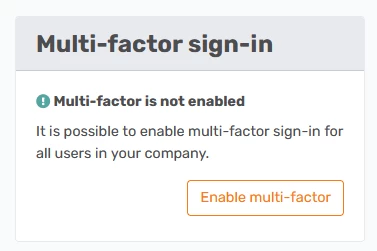
The way it works now is that you can set up an user account to use 2fa

All users will then need to use an authentication program to log in to the portal.

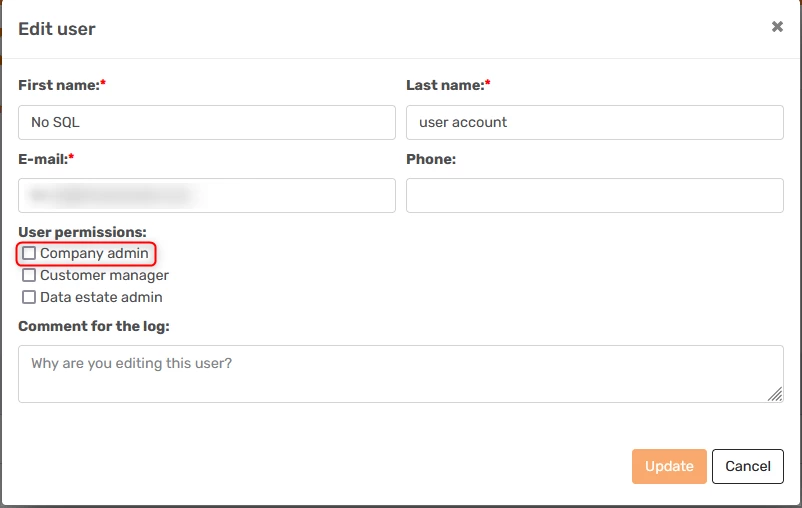
In a company only a few users should have the Company Admin right.

The rest should:

  • If it is a partner have Customer Manager rights
  • If it is a customer have Data estate admin rights to the admin and no rights to the developers like in the image above. You can then give rights to the individual users on the instances.

That is how it works currently. How would Azure key vault be a benefit to this?


daniel
TimeXtender Xpert
Forum|alt.badge.img+8
  • TimeXtender Xpert
  • October 18, 2023

Dear @Thomas Lind ,

Security officers and archtiects of customers are not comfortable with the fact that we have to store sensitive information (login information) with an other company (in this case TimeXtender's Azure servers).

They would rather see the info passed through instaid of stored that TimeXtenders ‘location’.


bitmetric_barry
Explorer

Echo this request, this is a concern that often comes up in our conversations with (potential) clients. Many companies these days insist on having a central keystore. Sure, you can sometimes convince them to bend the rules if it's really urgent or a top priority, but companies tend to see this as a downside of TX. Especially since TX typically needs access to all those important data sources spread throughout an organization, which greatly increases the impact if something does go wrong.

When it comes to the risk of a data breach, it's a pretty big deal. If I were in TX's shoes, I'd seriously consider offloading this part to a third-party with a solid reputation. It takes a load off and lets experts handle the security stuff.

Even if TX has the Fort Knox of security are 100% sure your data won't leak, the whole business of storing and updating credentials in multiple places is just a recipe for mix-ups and headaches. So, having a central keyvault for managing credentials is not just about security; it's about keeping things simple and error-free.


  • Starter
  • May 21, 2024

@Paul McLeod Bespoke Analytics 😀


Forum|alt.badge.img

Hi community, similar to Daniels comments, I also have a customer in the POC phase that is insisting sensitive credential are not stored on a 3rd party’s server. If this is a deal breaker for them, what are the alternatives as of today (Nov 2024)?


rory.smith
TimeXtender Xpert
Forum|alt.badge.img+8
  • TimeXtender Xpert
  • November 6, 2024

Hi,

storing local credentials in Azure Keyvault would be a great addition depending on how it is rolled out. You would, after all, not want to build something that forces Azure regardless of the infrastructure choices made by customers.

I guess there are a couple of different situations going on:

  • credentials for customer resources stored in TX cloud repositories: these should be storable in Azure Keyvault, but to enable testing of connections from the portal you will still need an App Registration to touch the Keyvault or that option should be sacrificed. Will make it harder to quickly change infrastructure I expect.
  • credentials for TX resources: these will need to be managed by TX (currently through auth0), but could be user-managed if the client publishes an Enterprise Application that TimeXtender grants access to the keyvault they store for that customer or something similar


Forum|alt.badge.img

I understand your first point around being technologically agnostic when it comes to data hosting platforms. I don’t see the issue with the Azure app registration / managed identities (they are currently being used with the Portal for ODX storage and ADF). I guess this client just wants to keep all credentials contain within their own private network. 

Anyway that being said, this is just the way it is for now. I assume there is nothing added to the development roadmap derived from the earlier discussions?


rory.smith
TimeXtender Xpert
Forum|alt.badge.img+8
  • TimeXtender Xpert
  • November 6, 2024

Hi,

some resources are hosted by the customer, some are hosted by TimeXtender. You can even have TimeXtender host ExecutionEngines for you. TimeXtender's resources run in TimeXtender's Tenant and therefore may need access to resources hosted in a customer's Tenant. 

There are solutions available to deal with this technically like multi-tenant App Registrations. This does mean that the policies deployed into a customer's Tenant may interfere. Otherwise you could allow the Enterprise App associated with TimeXtender access to part of your Keyvault space.

If you currently must have all credentials in local infrastructure, you can use TimeXtender Classic though that also does not support Azure Keyvault.


I don't know whether this is actively on the roadmap or not, the Idea has quite a lot of upvotes.