SUBMITTED

Bulk Loading / Aggregating Excel Online with same names

  • February 29, 2024
  • 14 replies
  • 98 views

Hello,

We use a system that creates new Excel files every day for different services such as the Canteen, Conference, and Kiosk. Each file is named with the date it was created, like canteen_products_2023-12-27. Is it possible to set up the ODX (Operational Data Exchange) in such a way that it can connect to Excel Online and automatically select all the files that start with canteen_products_ without specifying the exact date in the file name? This way, we could automatically process all files related to canteen products regardless of the date they were created.

Best regards, Marius

14 replies

daniel
TimeXtender Xpert
Forum|alt.badge.img+8
  • TimeXtender Xpert
  • February 29, 2024

Dear @Marius Ramdahl ,

I believe the CDATA connector can bulk load files with the same name.
 

This is for CSV files and im not sure if this connector works with either Excel Online as Excel files, but maybe the CSV way to get multiple files will also work for the Exel Online connector?

Hope this helps

= Daniel


  • Author
  • Explorer
  • February 29, 2024

hi Daniel

Ty for respons, the trouble is that I can’t find  a way to aggregate files with the CData Provider for Microsoft Excel Online 2023, I se that is an option in the CSV connector.


daniel
TimeXtender Xpert
Forum|alt.badge.img+8
  • TimeXtender Xpert
  • February 29, 2024

Dear @Marius Ramdahl ,

I'm not familiar with the MS Excel 2023 Online connector, sorry. maybe try to copy the settings or when you connect to the file or folder use a wildcard (*) and see if that works?


= Daniel


  • Author
  • Explorer
  • February 29, 2024

I understand @daniel but I dont have that option in the connector, they are not alike. 


rory.smith
TimeXtender Xpert
Forum|alt.badge.img+8
  • TimeXtender Xpert
  • February 29, 2024

Hi @Marius Ramdahl ,

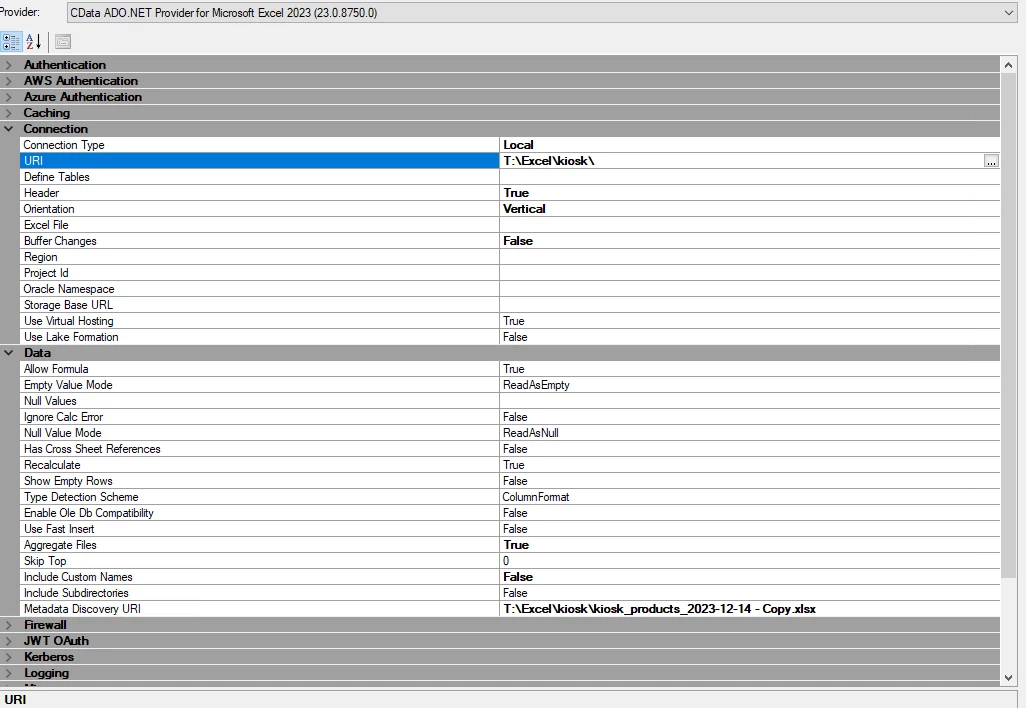
the only way to load Excel files in aggregate mode is if the files are local. The regular Excel provider then allows you to specify a folder for the URI and aggregate the files. Note that if you are able to map a share then that still counts as local.

In the new release this would be the Microsoft Excel connector.

See:

CData ADO.NET Provider for Microsoft Excel - AggregateFiles

CData ADO.NET Provider for Microsoft Excel - Establishing a Connection


  • Author
  • Explorer
  • February 29, 2024

Hi @rory.smith 


I have tested this and the connector dosent respons when I set the connector to filepath, it works fine if I put in the whole path to the file in URI or in Excel File. But only the data from the specific URI is shown in the transfear. 


rory.smith
TimeXtender Xpert
Forum|alt.badge.img+8
  • TimeXtender Xpert
  • February 29, 2024

Hi,

are all the files in the folder using the same structure? I do not know whether you can filter or whether it needs all files to have identical structure. Also I encountered the following: "The property BufferChanges must be set to false when the property AggregateFiles is set to true”. BufferChanges is true by default. I also seem to encounter some issues where CData wants the URI to be an Excel File instead of a folder and it only pulls that one file.

I specified the MetadataURI to one file and also added a sub-directory with a file inside and set IncludeSubdirectories to True but that did not help.

Turning on logging and running Test Connection and fixing any issues before synchronizing helps.


I found a few things that are strange:

  • the aggregatefiles definitions implies you can specify a path to a folder, but the connector only accepts a file. The documentation certainly implies a folder should work
  • subfolders are simply ignored
  • synchronize will succeed if you point to a folder even though the metadata content is empty
  • if you do Test Connection, you discover whether TX is actually finding the file

Perhaps someone from TX has done this successfully before, I cannot get it to work (new release, most recent CData Connector).


rory.smith
TimeXtender Xpert
Forum|alt.badge.img+8
  • TimeXtender Xpert
  • March 1, 2024

Hi,


so it looks like one of my colleagues came across this as well: 

In my opinion the documentation for the Excel connector(s) should be amended for now and this functionality added by CData (a lot of connectors have generic settings that do not always work for that specific connector at the moment).


Hi  @rory.smith 


Thanks for the update and I agree with you on that the documentation is not correct for this connector.

Seems like they are not in a hurry to fix this issue.


In the light of this information does anyone have an idea for a workaround to extract excel workbook dynamic? 


Thomas Lind
Community Manager
Forum|alt.badge.img+5
  • Community Manager
  • March 1, 2024

Hi @Marius Ramdahl 

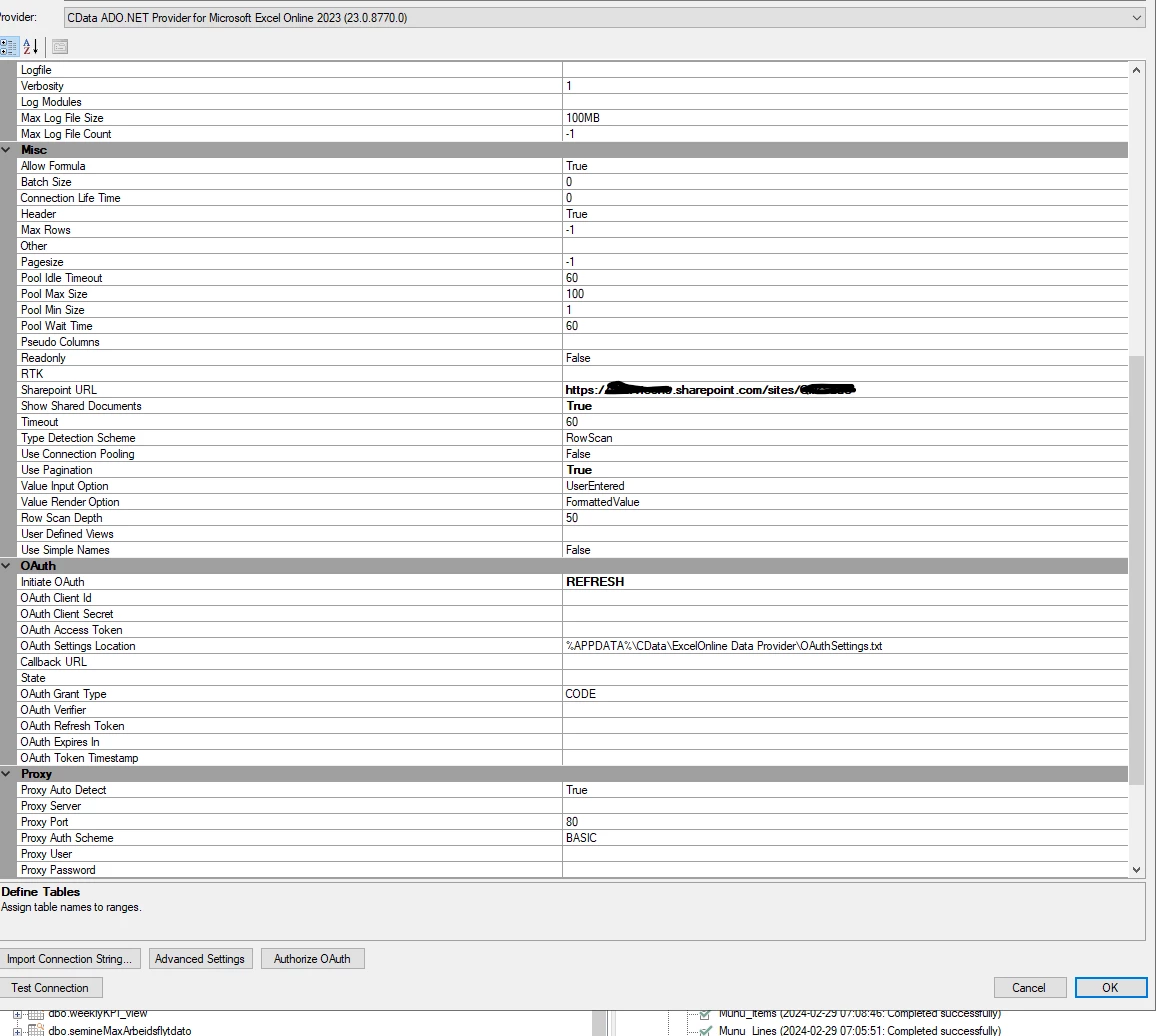
I had this case with CData three months ago about a different version, so you could try it with the newest release 23.0.8770.0 and see if it is made to work in that one.


rory.smith
TimeXtender Xpert
Forum|alt.badge.img+8
  • TimeXtender Xpert
  • March 1, 2024

Hi @Thomas Lind ,


I am running the most recent TimeXtender (6xxx) and newest version of the CData connector, issue is still there.


Hi @Thomas Lind  

It dident work for me witht he newest version. 

Is there some alternativ I could use here?


Thomas Lind
Community Manager
Forum|alt.badge.img+5
  • Community Manager
  • March 5, 2024

Hi @Marius Ramdahl 

I was trying to figure out alternate ways, like for example using RSD files. But they seem very limited compared to the ones generated for other data sources so not dynamic input seems to be possible.

So I am pretty much out of ideas.

The only thing you could do is the following, but it does require a lot of possible manual work.

You can generate a canteen_products.xlsx file. This should contains a days data. What you then do is connect to that and add it as a table in your DWH instance. You set this table to run with history and sets a field to be the natural key and if possible one that contains the date of the data. If no date field exists to use for this there is a method where you generate a custom field and adds a custom query that gives todays date. You set this field as type I update. This means that whenever it runs and it is a different date than today it will add the content of the source.

This method used to be a way to check on what stock you had on a given day over a period.

So once you have this you need to do the following. Every day you delete the existing canteen_products.xlsx file and todays file while renaming it to canteen_products.xlsx. As long as it keeps having the same name and you do not synchronize the data source it should just add the new data on execution. Once in to the ODX the DWH table will handle the rest.

The issue with all this is how to do the delete, transfer and rename part. I have done something like this with CSV files and a bat file, but I have no idea if it works for excel files or if it works for the specific location where the files are stored in.


Christian Hauggaard
Community Manager
Forum|alt.badge.img+5

@Marius Ramdahl I have converted this to a product idea