

SUBMITTED

Change name of measure in TX without resulting in error in Power BI

Related products:TimeXtender Data Integration
  • February 23, 2023
  • 7 replies
  • 46 views

tess.broersen
Starter
Forum|alt.badge.img

Hi there! 

When you change a name of a DAX measure in TimeXtender, this always results in visuals crashing in the connected Power BI report when those visuals use the measures which names have been changed.

It would be nice if Power BI could recognize the name change, without having to remove the measure with the old name from the visual and then having to add that same measure again to make the visual work again. 

Have a nice day! :)

7 replies

rvgfox
Problem Solver
Forum|alt.badge.img+4
  • Problem Solver
  • February 23, 2023

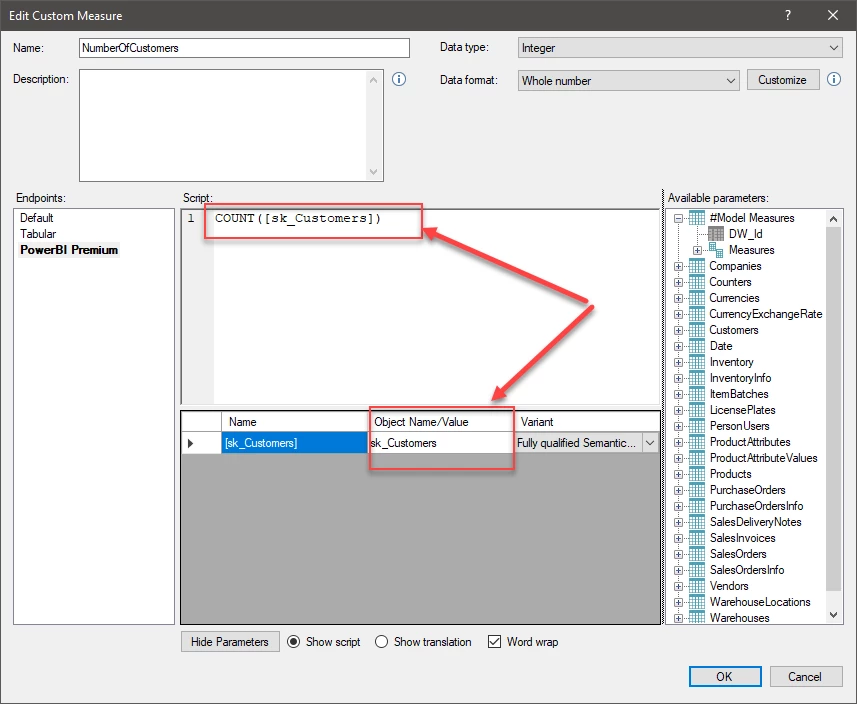
@tess.broersen The names must be parametrized:


tess.broersen
Starter
Forum|alt.badge.img
  • Author
  • Starter
  • February 23, 2023

Hi there,

Thanks for your reply!

Sadly that doesn't change anything. If you change the name of the measure itself in TX, deploy&execute and then Refresh the Power BI report, a visual that was already using that measure before the name change, will always crash after the name change.


rvgfox
Problem Solver
Forum|alt.badge.img+4
  • Problem Solver
  • February 23, 2023

@tess.broersen Yes it’s true, one Power Bi visual always use the name of the measure that it has in creation time.

This is always the case independent of TX.


tess.broersen
Starter
Forum|alt.badge.img
  • Author
  • Starter
  • February 24, 2023

@rvgfox 

That's also not the case actually. When you use Power BI only (without the use of TX) and you change a name of a measure, nothing happens. A visual using that measure keeps working after changing the name of the measure. 

So it seems to be an issue that is related to using DAX measures in TX. 


rvgfox
Problem Solver
Forum|alt.badge.img+4
  • Problem Solver
  • February 24, 2023

@tess.broersen It’s true if you build the measure using Power bi Desktop, but with TX it’s use XMLA endpoint.


rory.smith
TimeXtender Xpert
Forum|alt.badge.img+8
  • TimeXtender Xpert
  • February 24, 2023

Changing the measure name in TimeXtender means the XMLA structure (whether in Analysis Services or in Power BI Premium Capacity) is changed. If you change something in Power BI you are not changing the Tabular Database structure just changing the Power BI app.


If you were to publish a dataset to Power BI premium and had many Power BI dashboards loading this data, changing the structure of that dataset would logically also break the dashboards if they were not somehow adjusted to reflect the new structure. TimeXtender can only reach up to the Tabular database level and does not reach into any consumers of those models. Fundamentally you should be careful of changing names or removing them, it is better to add new and after a grace period phase out the old.


tess.broersen
Starter
Forum|alt.badge.img
  • Author
  • Starter
  • February 27, 2023

Ah yes, that makes sense @rory.smith

Thanks for the clear explanation. :)