SUBMITTED

Change source table of a semantic table

  • June 18, 2020
  • 4 replies
  • 24 views

andri
Contributor
Forum|alt.badge.img+1

I've encountered this a few times where I need to change an underlying source fact table because of a design change in the development of a semantic model. Currently, you have to add a new table, configure all relationship again and create all measures again. This requires a lot of manual work that is prone to errors. Being able to substitute a source table with another table or a view with the same field names could be very useful.

4 replies

Forum|alt.badge.img+1

Agreed.  I'm running into a scenario where I have 3 very large fact tables in the semantic model.  In order to cut down on dataload times in the DW, we are considering splitting a given fact table into several tables.  Since the bulk of the data is historical legacy data, we can load it once and forget it in the DW.

However, that would require unioning the fact tables back together in a view to drive the semantic layer facts.  Since there are well over 100 calculated measures in the fact table, which have already been validated... it would be easiest to repoint the semantic layer table's source.


  • Problem Solver
  • September 3, 2025

I've just discovered that it's indeed not possible to change the source (mapping?) of a table in a semantic model. We are migrating some models to an on prem SSAS instance that has no access to the MDW tables, so as a solution I've created a new on prem MDW database just for that specific SSAS instance. That works in theory except I'll have to change seventy trillion measures, relations, etc.

This is very frustrating actually. I’m now considering to write a few update statements in the repository database directly.


rvgfox
Problem Solver
Forum|alt.badge.img+4
  • Problem Solver
  • September 3, 2025

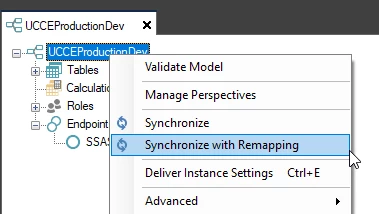
I think that it’s possible with:


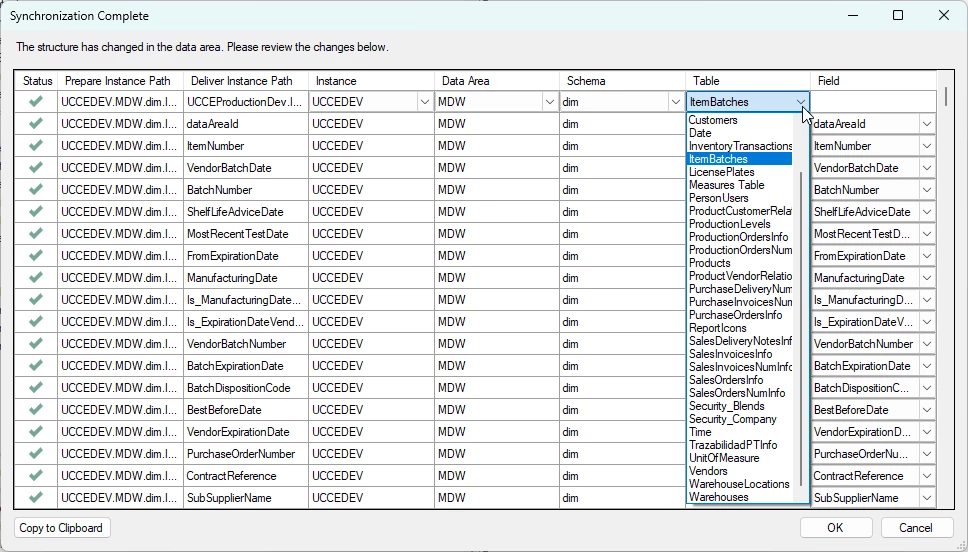
And here, you can change the table using another one with the same fields:


  • Problem Solver
  • September 3, 2025

That's interesting!


I'm using Classic (20.10.66) though so there is no Synchronize option.