SUBMITTED

Custom Error Text on Data Validation Warning?

Related products:TimeXtender Data Integration
  • February 28, 2018
  • 5 replies
  • 23 views

Is there a way to customize the error text so that in the log it will read something other than "Field X does not comply with validation rule y"

5 replies

Forum|alt.badge.img
  • Contributor
  • March 6, 2018

Hi there,

I don't think there is a native way to alter the log message, but there's always more than one way to do things!

If I may ask, what exactly are you hoping to see instead of the normal error message?


  • Author
  • Starter
  • March 6, 2018

Hey,

I'm not looking for anything specifically. Just that if there are multiple validation rules with different conditionals applied to the same field, they are both returned with the same error message with no reference to the conditionals underneath.

Thanks for your response.


Forum|alt.badge.img
  • Contributor
  • March 6, 2018

Hello again,

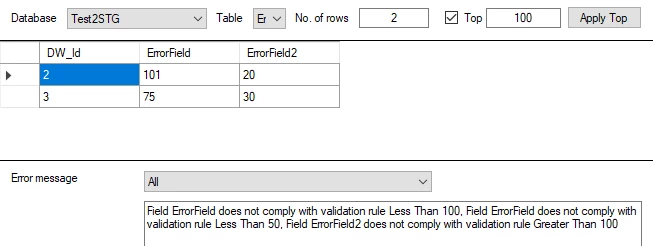
I tried this out on my own installation, and I found that if a row breaks more than one validation rule, the errors tab will list all of the rules it breaks, and only the rules it breaks: 

Perhaps I am misunderstanding what you are asking for - can you provide any additional clarification?

Thanks for helping me understand!


  • Author
  • Starter
  • March 6, 2018

Thanks for your response,

Yes, there may be a bit of misunderstanding with what I'm asking. In your second screen shot there are error messages. "Field ErrorField does not comply with validation rule Less Than 100......."

Is there a way to customize those error messages?


Forum|alt.badge.img
  • Contributor
  • March 6, 2018

Hi again,

I'm afraid there's no built-in way to do that. 

I will convert this question to an idea.