

Hey, in the documentation on executions/jobs I found the following information on setting up emails as notifications for succeeded and failed executions:
- Enter the information for the SMTP server you want to use under Mail Server.
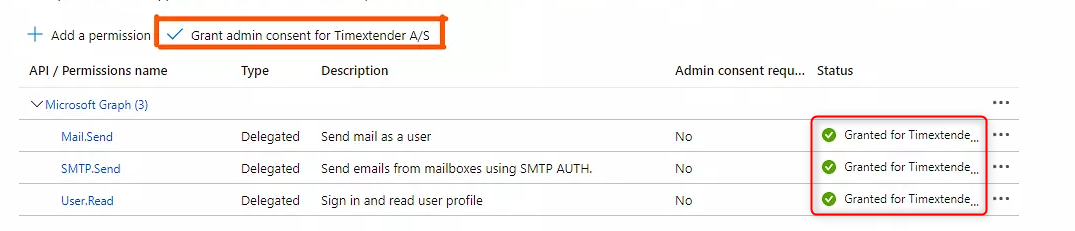
- Since October 1st, 2022 Microsoft has ended basic authentication on email on online SMTP servers. To deal with this you need to add an Application (client) id for an app to use for this and the Tenant ID for your company. The app you use needs the following permissions.
-
You need the three options, (Mail.Send, SMTP.Send and User.Read) set on your app
-
You need a Admin to grant consent for the three settings.
-
The user account you add as the From Email and the User name needs to run without Multi-factor Authentication.
-
- If you use GMail to authenticate, it is not possible to use email and an std password. Here you need to turn on 2-step authentication for your email account and then use the App Password in the password field.
- Since October 1st, 2022 Microsoft has ended basic authentication on email on online SMTP servers. To deal with this you need to add an Application (client) id for an app to use for this and the Tenant ID for your company. The app you use needs the following permissions.
My question:
We have a policy that MFA is required for every account, and we do not want to make an exception for this.
“The user account you add as the From Email and the User name needs to run without Multi-factor Authentication.”
Are there any plans to support for example a client secret setup, to authenticate with the App registration using a client secret? For now this means we cannot use email notifcations, which prevents us from monitoring our TX environment.
Kind regards,
Rutger







