SUBMITTED

Hide data source credentials

  • May 4, 2023
  • 5 replies
  • 37 views

Forum|alt.badge.img+2

For compliance reasons, it would be good if we could add users in our client’s organization to the portal and have them input credentials to their data sources, without anyone else being allowed to view their passwords.

If I am not misstaken, I have heard talks about this feature. Is this something that’s in the works?

Even if a client user has created the data source, I can still see the password in the data source settings by clicking on the "eye" icon:
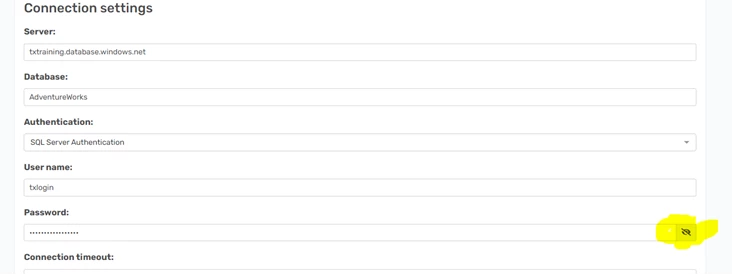
Is there any setting that can be configured to keep passwords secret?


5 replies

rory.smith
TimeXtender Xpert
Forum|alt.badge.img+8
  • TimeXtender Xpert
  • May 4, 2023

@pontus.berglund ,

good point: I would prefer if it is impossible to see passwords. Otherwise the portal forms a way of getting passwords you should not have. It is fairly common for IT / DBA staff to fill out credentials for connections with the expectancy that you cannot sniff them.


Christian Hauggaard
Community Manager
Forum|alt.badge.img+5

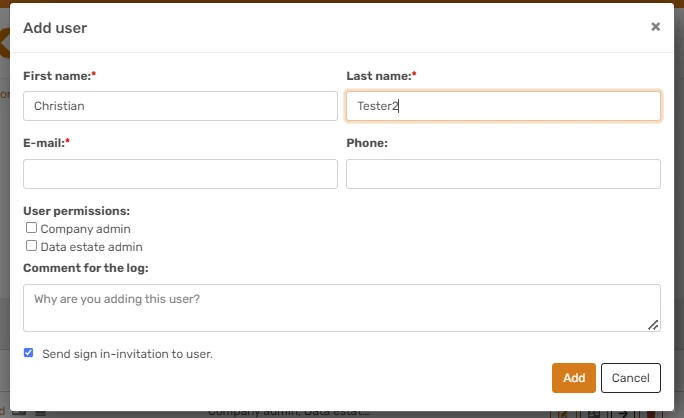
Hi @pontus.berglund currently if you create a user that does not have Data estate admin permissions they cannot view/unhide data source credentials. However, if they have data estate admin permissions then they can unhide and edit data source credentials. 

Would the use case you describe above be fulfilled by creating data estate admin users for those users that need to configure and enter credentials for data sources, and creating other users without the data estate admin permission and granting them access to instances that they are allowed to work with in TimeXtender Desktop? If not please let us know which aspects of the use case are not fulfilled by the current functionality


Forum|alt.badge.img+2

Hi @Christian Hauggaard,

I am afraid that would not work. I have a made test user and tried different configurations of permissions, but I don’t see it working as you described. If a user does not have data estate admin permissions, he can’t view existing data sources, nor can he add new ones.

I have tested these configurations, please let me know if I am missing anythin: 

  • If I remove both company admin and data estate admin from the test user, the user can only see instances I have granted it access to, but he can’t edit the instances, he can’t map data sources to the ODX instance and he can’t add new data sources nor edit existing ones.
  • If I only give him company admin permissions the only thing I can see change is that he now has the permission to change his own (and other users) permissions, like e.g. adding data estate admin to himself.
  • If I only give him data estate admin then he can see and edit every instance, map data sources to ODX, add/edit data sources and see passwords.

Even if the user with only data estate admin permissions would have access to view “unsensitve” parameters of existing data sources but not the passwords, and would be able to create their own data sources, it would not fulfill the clients needs.

The client’s need is that me as the “consultant developer” is able to create instances, data sources, and basically eveything else in the portal, except for being able to view passwords to existing data sources. If we had the option to “encrypt” passwords on specific data sources, this would also fulfill the need.


Christian Hauggaard
Community Manager
Forum|alt.badge.img+5

Thank you for describing the use case in more detail.

Regarding your comment “If a user does not have data estate admin permissions, he can’t view existing data sources, nor can he add new ones”, this is the same as what I am referring to “currently if you create a user that does not have Data estate admin permissions they cannot view/unhide data source credentials” (since the user cannot view existing data sources or add new data sources).

I will convert this question to an idea.


Forum|alt.badge.img+2

Ok great, thank you!