


SUBMITTED

Identify instance versions and compatible TimeXtender version

  • December 4, 2023
  • 8 replies
  • 114 views

MartinMemelink
Contributor
Forum|alt.badge.img

When installing a newer TimeXtender version than the instance, I get this error message:
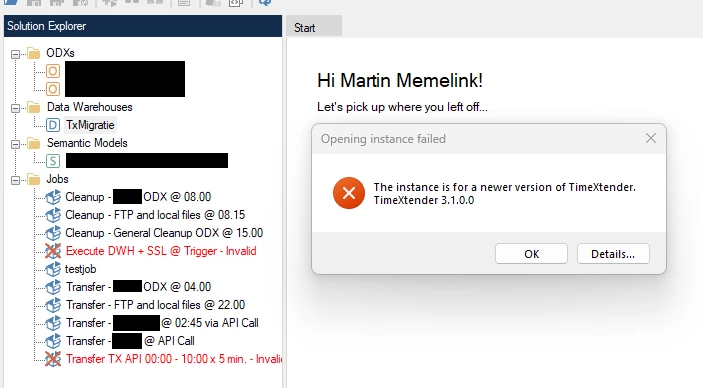
 

Two jobs are also crossed out and display an error about an incompatible version:

 

Where do I find out which version I should install?

And how does the displayed instance version (3.1.0.0) map to the software version (6436.1)?

8 replies

devin.tiemens
TimeXtender Xpert
Forum|alt.badge.img+6
  • TimeXtender Xpert
  • December 4, 2023

Hi,

Are you able to open the instance by selecting OK? Often you will be asked to upgrade the instance to the new version.

To fix the jobs you probably have to run the timextender execution server configuration agian and add the instances that are used.

Kind regards,

Devin


erik.van.mastrigt
TimeXtender Xpert
Forum|alt.badge.img+3

Hi,

I think the question is how a developer can see which version to install on his/her local machine, rather than how to get the instances running.

In larger environments not every TX developer has access to the server. So if you open TX Desktop from your local device, log in with your credentials and get an error like this: how do you know which particular version of TX Desktop you have to install in order to match with the repository?

Of course you can ask around and see if there’s an admin available, and admins should communicate after upgrading, but it would be better to have a clear message telling you which version to download and install.


Forum|alt.badge.img+1
  • Employee
  • December 6, 2023

The repository version number is an extended property on the repository database. For the TimeXtender Saas version, we may need to check that for you. However, you can look in the following folders to see what versions of TimeXtender have been installed on the system:

C:\ProgramData\TimeXtender\ODX SaaS

C:\ProgramData\TimeXtender\TimeXtender SaaS

The above folders will contain subfolders that are the TimeXtender version numbers, and when you connect to a repository that is of a lesser version number, the application should prompt you to upgrade to the new or current version.

For the TimeXtender Saas version, we may need to check the repository database for you to confirm the version of the repository that that instance is on. If you are already using the must current version of TimeXtender and getting a message that the repository is of a newer version, then please enter a support ticket and we will look into that further.


Christian Hauggaard
Community Manager
Forum|alt.badge.img+5

@MartinMemelink Upon receiving this error message we recommend upgrading to the latest version of TimeXtender. Moreover, when upgrading TimeXtender we recommend informing all users within the company using timextender, so that everyone is working on the same version.


rory.smith
TimeXtender Xpert
Forum|alt.badge.img+8
  • TimeXtender Xpert
  • December 8, 2023

Hi @Christian Hauggaard,

while that is generally sound advice there are sometimes reasons to go to a specific version of TimeXtender that is not the latest. You want to avoid accidentally upgrading an instance to a newer version than the organisation wants because this may have consequences. In v20 you would get some feedback on the versions of your software and the repository you are connecting to if they mismatched. As there is no listing of which application version matches which repository version, it becomes a guessing game.


In the new release there is also no TimeXtender version number visible apart from Help > About. As customers are no longer directly able to revert a repository database it would be good to avoid needing to engage with support to revert instance repository databases. In fact, I do not even know if that is possible which means strict care needs to be taken to avoid having to put a lot of pressure on R & D in case an unforeseen issue becomes a blocker for a customer's production emvironment for instance.


MartinMemelink
Contributor
Forum|alt.badge.img
  • Author
  • Contributor
  • December 8, 2023

So there is no way to see which desktop version the instance is configued for. And updating to the latest version could lead to other issues if the instance was configured for an older version?

I think it definitely would be useful to be able to see the instance version information in the portal.

 @rory.smith  Woops I accidentally marked your reply as the answer, can I undo this?
(Sorry, I'm still new to the community..)😇


Thomas Lind
Community Manager
Forum|alt.badge.img+5
  • Community Manager
  • December 11, 2023

Hi @MartinMemelink 

There is not currently a way to see what version the instances you use are currently on. I think the idea is that it should not be necessary to see what version you are on to use our program.

If you have many people using TX where the ODX instance is running on one server and the developers connect to this on their own machines you will need to be sure everyone is upgrading at the same time or they will get errors such as this.

With this it was the upgrade itself which needed to be done in a specific order to avoid this error message, not that some users were on newer versions where other parts had been upgraded?


Christian Hauggaard
Community Manager
Forum|alt.badge.img+5

I have converted this post to a product idea