


SUBMITTED

Ingest instance to all for cross domain authentication of users

Related products:TimeXtender Data Integration
  • July 22, 2024
  • 3 replies
  • 35 views

tito.paterson
Starter

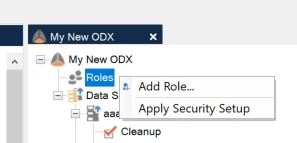
As part of our offerings, we have a managed service where we have a set of boxes on one for the Ingest instance and TimeXtender Data Integration (TDI) application on one domain, but also have SQL servers on a different domain. We utilize a specific user for monitoring but because we haven’t added it into the “Roles” part of the Ingest instance in TDI, the permissions for the user keeps on getting removed. It would be good for the Ingest instance to look across domains.



3 replies

rory.smith
TimeXtender Xpert
Forum|alt.badge.img+8
  • TimeXtender Xpert
  • July 23, 2024

Hi @tito.paterson ,


when you say different domain: do you mean Windows AD / Entra domains? If you are using Entra I would consider using Azure Lighthouse to push your users into customers’ Entra and therefore allow finding them.


As your TDI VM is using its domain-join to look for users and you cannot look in other domains, you will not be able to find any other users. On Prepare instances you have the ‘drop roles created by application’ option to keep externally managed roles alive but this does not exist for the Ingest instance. I also don't know how this would work for ADLS-backed Ingest instance.


tito.paterson
Starter

Hi @rory.smith,

These are windows AD accounts. 

We have a SQL server one domain (Box1) and then the Ingest server and TDI application on another (Box2). The issue is, every time I run a pull on a data source, it removes permissions on a user that we utilize for monitoring on Box1. So, what it would be good is that we can specify that, that specific user on Box1 “DOMAIN\Monitoring” can be seen by the application and we specify that permissions that have been assigned, not be dropped.


rory.smith
TimeXtender Xpert
Forum|alt.badge.img+8
  • TimeXtender Xpert
  • July 24, 2024

Hi,


Are these completely separate domains or part of a forest? And if they are part of a forest, are there trust relationships between domains? If so, you should theoretically be able to get it to work by adding the monitoring user in a role in the Ingest instance. See also: https://stackoverflow.com/questions/5890174/cross-domain-sql-server-logins-using-windows-authentication for the requirements (back when that post was made).

There is currently an issue in certain circumstances (hybrid AD / Entra domain in my case) where TimeXtender cannot determine what domain it is joined to, making it impossible to use the search dialogue from within TDI to set up roles. You may be affected by that if you are getting an error message when using the Search button in the Ingest Server to add logins to roles.


I think having parity in the options between Prepare instance and Ingest instance is important: being able to leave rights set by other applications in place makes things easier and is possible for Prepare instances (and 20.10.x) already.

