


IMPLEMENTED

Make Ingest data source settings (Filter Rows, Incremental Load etc.) transportable

Related products:TimeXtender Data Integration
  • March 4, 2025
  • 2 replies
  • 34 views

erik.van.mastrigt
TimeXtender Xpert
Forum|alt.badge.img+3

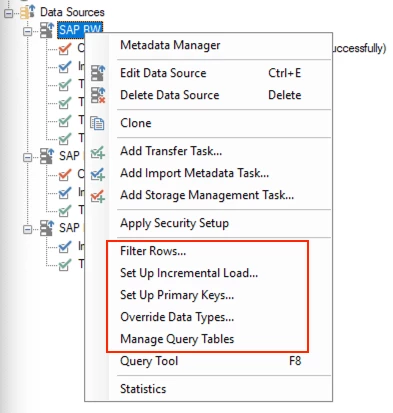
In case you have similar data sources which all have the same settings of

  • Filter Rows
  • Set Up Incremental Load
  • Set Up Primary Key
  • Override Data Types
  • Manage Query Tables

you have to manually enter the details one by one. When you have a lot of rules to set up, it’s quite time consuming.

It would be beneficial if you can easily copy these settings to another data source on the same or a different Ingest instance.
 

I can also think of scenario’s where it would be beneficial to copy tasks between data sources/instances.


2 replies

MartinMemelink
Contributor
Forum|alt.badge.img

This would be very useful and time saving. We could use it to quickly roll out the same data source in different TDI implementations, or quickly apply the implementation’s properties to its sources.

I'm also missing this ability in the instances, for example on DSA-tables where the same logic (mappings, data selection rules, incremental rules, etc.) needs to be applied on a large number of tables. It would be a big time saver to have a 'clone logic from example’ option.


JTreadwell
Community Manager
Forum|alt.badge.img+5
  • Community Manager
  • June 23, 2026

Delivered. You can now configure a data source once in the Metadata Manager — override data types and mark primary keys in the same view — then export those settings and import them into another source of the same type, instead of redoing the work each time. It shipped in TimeXtender Data Integration 7376.1 (May 28, 2026; Public Preview 7361.1 from May 13). Thanks for the detailed write-up, Erik.

Release notes: https://support.timextender.com/product-updates/timextender-data-integration-7376-1-3958
Documentation: https://support.timextender.com/ingest-107/metadata-manager-2635