SUBMITTED

Make migration from Tabular to Power BI premium endpoint in Deliver instance easier, regarding custom measures

Related products:TimeXtender Data Integration
  • April 5, 2024
  • 3 replies
  • 57 views

bas.hopstaken
TimeXtender Xpert
Forum|alt.badge.img+5

We have a customer that is migrating from Azure Analysis Services to the Power BI Premium/XMLA endpoint. While the custom measure syntax is still the same (DAX), all custom measures needs to be recreated and mapped to the tables/colums/measures in the ‘Power BI premium’ endpoint of the custom measure. This can be a lot of work, especially when it are a lot of custom measures. We’ve created a ticket for this as well (#29795).

It would be way better if the DAX syntax can be entered in the custom measure window in a ‘DAX’ endpoint that will be mapped/deployed to both Tabular (on prem and Azure) and Power BI/XMLA endpoints.


3 replies

Thomas Hjermitslev
Community Manager

Hi Bas,

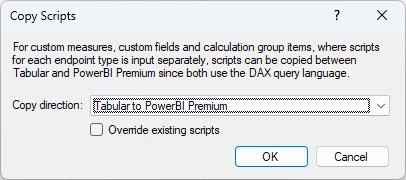
It seems to me that the Copy Scripts feature we introduced in TimeXtender Data Integration 7017.1 could help with this issue - or did I misunderstand what you’re trying to do?

Right click semantic model → Advanced → Copy Scripts...


bas.hopstaken
TimeXtender Xpert
Forum|alt.badge.img+5
  • Author
  • TimeXtender Xpert
  • February 3, 2026

Hi ​@Thomas Hjermitslev , 


This helped a lot. However, in my opinion, it would be better to have three types of “endpoints” in the Custom Measure window.

DAX: Deploys to Tabular (on-prem and Azure), XMLA/Fabric
SET Analysis: Deploys to QlikView, Qlik Sense, and Qlik Cloud
Tableau: Deploys to Tableau

This is because the syntax for these endpoints is exactly the same.


rory.smith
TimeXtender Xpert
Forum|alt.badge.img+8
  • TimeXtender Xpert
  • February 3, 2026

Hi,

I agree the naming / clustering could be better - Power BI Premium is not really a thing anymore.

I think it is useful to separate measures by language and endpoints by infrastructure, but naming is actually a bit tricky.

<pedantic mode>

  • PBI: DAX
  • Qlik: Backus-Naur Formalism (QV and QS have some slight syntax differences, not sure about Qlik Cloud), Set Analysis is a part of Qlik expressions 
  • Tableau: formally VizQL, but also others like Python and R. I'm not sure what TimeXtender actually supports here

</pedantic mode>


Endpoints would be something like:

  • SSAS Tabular
  • (SSAS Multidimensional)
  • Power BI
    • XMLA
  • Qlik
    • QV
    • QS
    • QC
  • Tableau
    • .tsv
    • (TC) in the future
  • CSV
  • REST
  • MCP