



SUBMITTED

Please fix the Query Tables editor in Data Source Settings

Related products:TimeXtender Classic
  • March 20, 2026
  • 2 replies
  • 23 views

sten.lomme
Participant
Forum|alt.badge.img

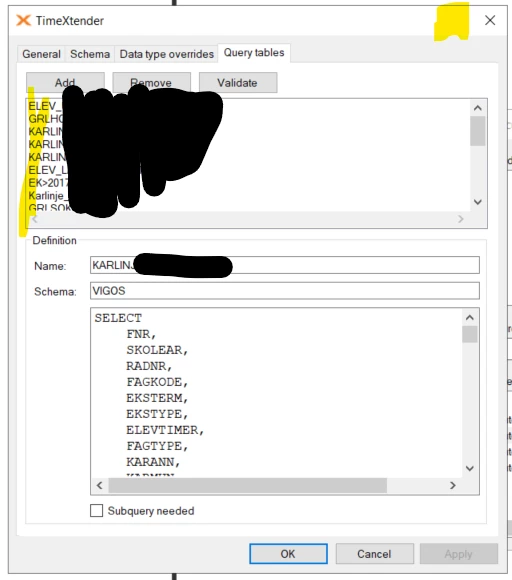
The Query Tables editor is exremely impractical to work with. We have quite a few Query Tables and the issues are:

  1. The list of current query tables is not sorted in any way. The sorting seems totally random. Even when you create new query tables. Please allow sorting of this list. Alphatecially is 10x improvement.
  2. Please make it possible to maximize the Data Source Settings window. This would include the Query Tables editor. With larger SQL statements it is extremely cumbersome to use the tiny window. It is not even possible to make the window larger by dragging its edges.

 

2 replies

rory.smith
TimeXtender Xpert
Forum|alt.badge.img+8
  • TimeXtender Xpert
  • March 20, 2026

Sorting, resizing, copy-pasting what you select should work the same way in every dialog. Starting with this one would really help though :-)


sten.lomme
Participant
Forum|alt.badge.img
  • Author
  • Participant
  • March 20, 2026

Sorting, resizing, copy-pasting what you select should work the same way in every dialog. Starting with this one would really help though :-)

Ditto. It should be a quick fix with massive pain relief :)

