



SUBMITTED

See which tables were executed in the execution queue

Related products:TimeXtender Data Integration
  • May 6, 2025
  • 2 replies
  • 24 views

darrirafn
Starter
Forum|alt.badge.img

Hi there,

I’d really love a quick and easy way to see which tables are being executed in the execution queue. Let’s take this example, I’m executing six tables separately: 
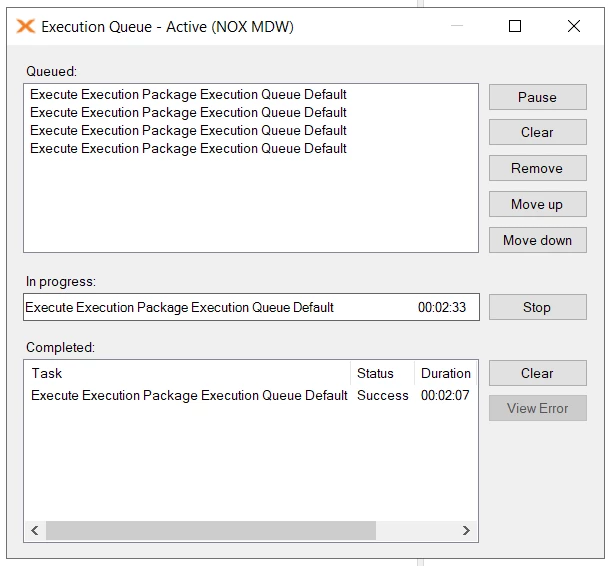
 

I’d like to see in which order they are being executed and which ones finished successfully. I can see which table had an error if I choose View Error of course. 

I know about the execution log but I think this could be much simpler and user friendly by displaying it somewhere in the queue or with a button similar to View Error. 

2 replies

oscarcleve
Contributor
Forum|alt.badge.img+2
  • Contributor
  • May 6, 2025

rory.smith
TimeXtender Xpert
Forum|alt.badge.img+8
  • TimeXtender Xpert
  • May 6, 2025

Hi,

if you drag tables from the interface onto the queue window (and choose all steps), you can see what table it is. Right-click > Execute runs the default package with whatever you right-clicked (table, schema, data area, etc.) and it just lists the package name in that case.

Please upvote the other requests as well :-)



