SUBMITTED

Synchronize subset of tables in the source.

  • October 17, 2023
  • 12 replies
  • 109 views

sierd.zuiderveld
Contributor
Forum|alt.badge.img+1

We have some datasources that have over 5000 tables. The can also have quite the amount of columns. 

Now when we synchronize the source, this can take up a few minutes. 


I thought that, when we use “Select tables..”  that the synchronize would only query the tables within that those selection rules. 
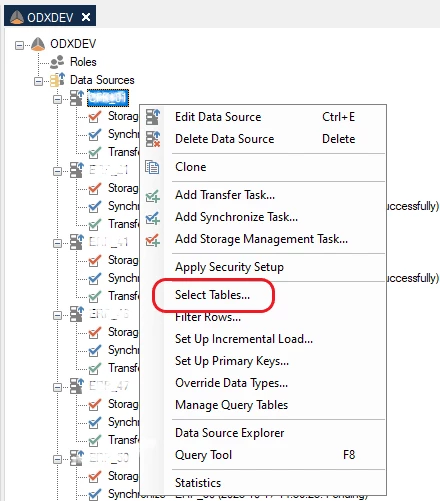
 

However we do not see this in the query on the database. Is this a feature or a 🐛 ? 


Here is the query 

SELECT
t.[TABLE_SCHEMA],
t.[TABLE_NAME],
c.[COLUMN_NAME],
c.[DATA_TYPE],
c.[CHARACTER_MAXIMUM_LENGTH],
c.[NUMERIC_PRECISION],
c.[NUMERIC_SCALE],
c.[DATETIME_PRECISION],
c.[ORDINAL_POSITION],
c.[IS_NULLABLE],
prim.[CONSTRAINT_NAME] AS [PRIMARY_KEY_NAME],
t.[TABLE_TYPE]
FROM [INFORMATION_SCHEMA].[TABLES] t

INNER JOIN [INFORMATION_SCHEMA].[COLUMNS] c
ON t.[TABLE_CATALOG] = c.[TABLE_CATALOG]
AND t.[TABLE_SCHEMA] = c.[TABLE_SCHEMA]
AND t.[TABLE_NAME] = c.[TABLE_NAME]
LEFT OUTER JOIN (
SELECT tc.[CONSTRAINT_NAME],
tc.[CONSTRAINT_SCHEMA],
tc.[CONSTRAINT_CATALOG],
cc.[TABLE_NAME],
cc.[COLUMN_NAME]
FROM [INFORMATION_SCHEMA].[TABLE_CONSTRAINTS] tc
INNER JOIN [INFORMATION_SCHEMA].[CONSTRAINT_COLUMN_USAGE] cc
ON tc.[CONSTRAINT_NAME] = cc.[CONSTRAINT_NAME]
AND tc.[CONSTRAINT_SCHEMA] = cc.[CONSTRAINT_SCHEMA]
AND tc.[CONSTRAINT_CATALOG] = cc.[CONSTRAINT_CATALOG]
AND tc.[TABLE_NAME] = cc.[TABLE_NAME]
AND tc.[TABLE_CATALOG] = cc.[TABLE_CATALOG]
AND tc.[TABLE_SCHEMA] = cc.[TABLE_SCHEMA]
WHERE tc.[CONSTRAINT_TYPE] = 'PRIMARY KEY'
) prim

ON t.[TABLE_CATALOG] = prim.[CONSTRAINT_CATALOG]
AND t.[TABLE_SCHEMA] = prim.[CONSTRAINT_SCHEMA]
AND t.[TABLE_NAME] = prim.[TABLE_NAME]
AND c.[COLUMN_NAME] = prim.[COLUMN_NAME]

ORDER BY t.[TABLE_SCHEMA], t.[TABLE_NAME], c.[ORDINAL_POSITION]


 

12 replies

Christian Hauggaard
Community Manager
Forum|alt.badge.img+5

Hi @sierd.zuiderveld 

Could you please confirm which data source you are using in this case?


sierd.zuiderveld
Contributor
Forum|alt.badge.img+1

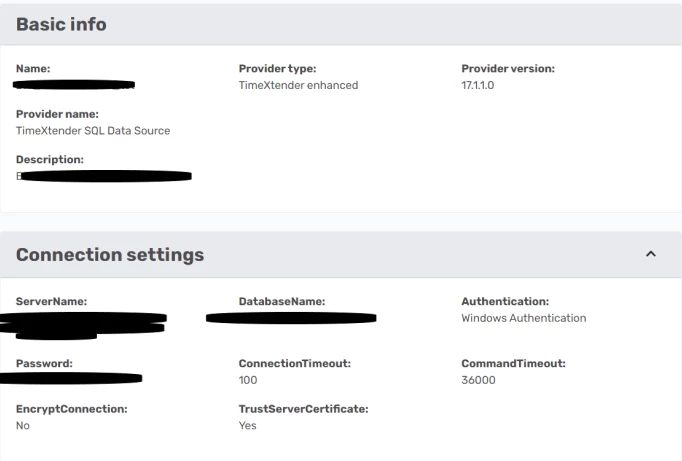
Of course, we are using the TimeXtender SQL Data Source. Version 17.1.1.0


Thomas Lind
Community Manager
Forum|alt.badge.img+5
  • Community Manager
  • October 18, 2023

Hi @sierd.zuiderveld 

It is synchronizing the tables of the data source that are in the Transfer tasks. So if you have more than one with a different selection it will be those.

You seem to state that it had all the 5000 tables added as available tables after the sync task was complete. Can you show this?

Also how does the rules you made to select the tables look? I mean was it a select all tables with this part in the name or a individual table selection?


I would attempt to prove this as a bug the following way.

Add all tables, run the sync task, and note the time.

Add one table, run the sync task, and note the time.

Add half tables, run the sync task, and note the time.

It should obviously take less time for when it only syncs 1 table compared to all or half.

Still I am not sure it would be a bug unless it took the same amount or longer with the two other options.


sierd.zuiderveld
Contributor
Forum|alt.badge.img+1

Hey @Thomas Lind , good idea, I have the following results from the tests: 

1 datasource with 844 tables/views. One of them has the schema TX, this is the one we would like to transfer. 
 

Datasource level - Select tables: Schema = TX (1 table out of 844)
Transfer: Include all tables. (1 out of all (1))
Sync time:
    -    1.    1 min 37 sec
    -    2.    1 min 38 sec
    -    3.    1 min 41 sec
    
Datasource level - Select tables: Schema = TX (1 table out of 844)
Transfer: schema = TX  (1 table out all (1))
Sync time: 
    -    1.    1 min 38 sec
    -    2.    1 min 47 sec
    -    3.    1 min 38 sec
    
Datasource level - Select tables: All    (844 tables)
Transfer: schema = TX (1 table out of 844)
Sync time: 
    -    1.    1 min 39 sec
    -    2.    1 min 44 sec
    -    3.    1 min 40 sec


Datasource level - Select tables: ALL        (844 tables)
Transfer: schema = ALL     (844 tables)
Sync time: 
    -    1.    1 min 43 sec
    -    2.    1 min 46 sec
    -    3.    1 min 44 sec


So, whilst there is a little difference, it seems like it still queries all tables. This makes sense as the query being executed on the source db is indifferent per setting. 


Thomas Lind
Community Manager
Forum|alt.badge.img+5
  • Community Manager
  • October 18, 2023

Hi @sierd.zuiderveld 

Good, I will ask if there is an explanation for this behavior.


Thomas Lind
Community Manager
Forum|alt.badge.img+5
  • Community Manager
  • October 19, 2023

Hi @sierd.zuiderveld 

I got an answer to this question.

It will always read all tables and then filter away those not included. If it is a big problem with performance then add it has to be a feature suggestion on improving this behaviour

So it is as suggested in the query you found, that it reads all tables when you synchronize.

To change this it would be an feature request (idea).


rvgfox
Problem Solver
Forum|alt.badge.img+4
  • Problem Solver
  • October 19, 2023

@sierd.zuiderveld 

Yes it’s a problem, I’m using a SQL database with SAP R/3 with thousands of tables.

To solve it I’ve created a new DB in the server and views in the schema TX to map to the tables that I need.


sierd.zuiderveld
Contributor
Forum|alt.badge.img+1

@Christian Hauggaard  Can you convert the question to an idea? Thanks. 

Thank you @Thomas Lind 


rory.smith
TimeXtender Xpert
Forum|alt.badge.img+8
  • TimeXtender Xpert
  • October 19, 2023

This is quite important for many ERP systems as these can have 100s of thousands of tables. In 20.10.x quite a few sources allowed very detailed control over the metadata being requested which was very useful.


sierd.zuiderveld
Contributor
Forum|alt.badge.img+1

@Thomas Lind, @Christian Hauggaard 
Do you have any idea if this will be implemented in the near future? 


Thomas Lind
Community Manager
Forum|alt.badge.img+5
  • Community Manager
  • December 13, 2023

Hi @sierd.zuiderveld 

I don’t know if it will be a general feature, but there is some changes being done to the SAP data source, which is the one you are having this issue on.


  • Contributor
  • March 12, 2024

@Thomas Lind we still have a problem with synchronizing one of our SQL data sources. I've concluded it also has to do with metadata in that database, but it could be very helpful if we can at least limit the amount of objects the query want to get information of.

In your latest reaction you mentioned changes to the SAP Data Source, but we use TimeXtender SQL data sources (v18.0.1.0) so those changes will not benifit us. Can this also be improved in the TimeXtender SQL data source?