

SUBMITTED

Use Azure SQL repo with AAD & MFA

  • March 27, 2023
  • 9 replies
  • 68 views

Forum|alt.badge.img+2

Hello,

We designed our TX solution in Azure and set up an Azure SQL db as our repository database with a specific Azure AD group (which contains our developers) as ‘Azure Active Directory admin’. Our organization has enforced MFA, which unfortunately makes it impossible for us to connect to our Project Repository through AAD authentication. The option is simply not available:
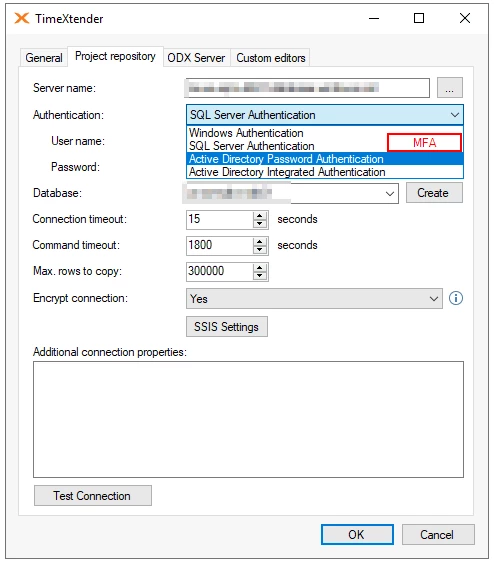
Have you encountered this before? How can we work with this? It would be really nice to use the ‘Azure Active Directory admin’ setting instead of working with sql logins.


 

9 replies

Thomas Lind
Community Manager
Forum|alt.badge.img+5
  • Community Manager
  • March 28, 2023

Hi Kaj

If you change the Authentication Option to Active Directory Universal with MFA, how would it be able to run a scheduled execution. It would need to be able to somehow resolve the request to apply a code to continue, or you would have it fail and could then manually update the access and it would run a while before again failing.

My point is that, MFA and scheduled executions do not work, that is why we have a different option for executing the Azure Analysis services endpoints.

The new options should be the service principal or the managed identity authentication options.

https://devblogs.microsoft.com/devops/demystifying-service-principals-managed-identities/


Forum|alt.badge.img+2
  • Author
  • Contributor
  • March 29, 2023

Hi Thomas,

With respect to Service Accounts that run these executions, I completely agree with what you are saying.

My question was mainly on the developers that are  working in TX. Normally, you would see that these developers connect to the repository and DWH databases with a SQL login. We would like them to do this with their personal account. That said, the organization has enforced MFA so we cannot do this using the available ‘Active Directory Password’ option. Was wondering what your opinion is on this.


Thomas Lind
Community Manager
Forum|alt.badge.img+5
  • Community Manager
  • March 29, 2023

Hi Kaj

Regarding specific access for developers we actually got this as a request before. Specifically about what “projects” or ODX data sources they were allowed to work on.

So that is what the feature where you can choose what users can use what instance is about. It is the Users with access feature.

However, you are working with the LTS or 20.10.x version when you experience this issue. MFA is something that could be applied, but it would only be able to work for development environments, the additional environment would need to run with service accounts.

You should add it as an idea. Both for LTS and the current v21 releases. It is not a bug, so it may not be added for a future LTS release, but if Microsoft decides that basic authentication is not allowed for accessing SQL databases, it would probably be a good reason add it.


rory.smith
TimeXtender Xpert
Forum|alt.badge.img+8
  • TimeXtender Xpert
  • March 29, 2023

Hi Thomas,


Microsoft already strongly pushes to leave SQL Server authentication behind and MFA is the current default in Azure policy. I do not expect that Microsoft will remove SQL Server authentication in a hard way, but may use soft power to enforce this as they are already doing now. In fact, service accounts in Azure are generally already an issue to get compliance exceptions for. There are different ways to solve this in Azure, so perhaps bringing the signal to R&D is the most valuable step.


Thomas Lind
Community Manager
Forum|alt.badge.img+5
  • Community Manager
  • March 29, 2023

It is definitely a need that should be handled somehow in our program.


Christian Hauggaard
Community Manager
Forum|alt.badge.img+5

@KajEmergo @rory.smith As Thomas mentions above, the issue described relates to the legacy version (20.10) and not the new version (v6xxx). Firstly because the TimeXtender repositories are not accessible in the new version (v6xxx) currently. Secondly, because in the new version, if we consider SQL data sources and instances using SQL storage with SQL authentication, these credentials are entered in the TimeXtender Portal by an administrator, which means that the developers will not need access to these SQL Server Authentication credentials, in order to work on the instances.


rory.smith
TimeXtender Xpert
Forum|alt.badge.img+8
  • TimeXtender Xpert
  • March 30, 2023

Hi @Christian Hauggaard ,

the same issue exists with the connection to MDW instances in the new release. What you would want is be able to differentiate between changes through executions as performed by service accounts and changes pushed manually by developers.

In the current portal you cannot use the Azure AD with MFA option either. Using SQL Server authentication bundles all access under one login, which means there is less auditing detail available. A minimum impact solution would allow the service account (with MFA exemption) to use either Azure Integrated (if the VM is domain-joined) or Azure AD Password to connect, where developers use Azure AD MFA to connect.


Christian Hauggaard
Community Manager
Forum|alt.badge.img+5

Thanks for the input. I will convert this question to an idea.


FlorisW
Explorer
  • Explorer
  • June 22, 2026

We ran into this issue right now after removing ADFS running the TimeXtender application on an Azure VM in the same network boundaries as the SQL repo database.

Although the technique, MSAL, the TimeXtender application uses does support MFA, it depends on the kind of flow used. If ‘non-interactive flow’ is uses instead of ‘interactive authentication flow’ which is more appropriate for the functionality in this case(nothing to do with scheduled jobs), then it should be able to give the MFA popup.

For now we are stuck to go back to SA, or Relaxing Conditional Access (both security trade-off)...