My current employer uses a DWH with a lot of views (with unions and so on), which leads to slow execution packages.
I would like to enhance the performance (rebuilding the views is one thing). But i woud also like to enhance the performance with indexing.
So i have setup up one of our Dimension tables as seen below:
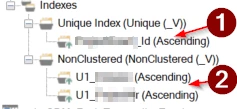
Is our SupernaturalKey (SNK)
Are our PK's
What would you guys recommend?
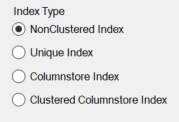
Which type of indexing for SNK (nonclustered, unique index, Columnstore Index, Clusttered ColumnStore Index)?
Which type of index do you recommend for PK's (nonclustered, unique index, Columnstore Index, Clusttered ColumnStore Index) ?
Which type of indexing SNK and PK in fact tables?
Best answer by daniel
When doing the ETL ‘naitive’ in TimeXtender (with Lookups and add related record and such) TX automatically creates the indexes on which the joins will take place. I believe that these are non clustered Indexes so usually when I have to create Views i make the columns that I am joining have these indexes. For PK's I use the ‘Add to primary’key function on the underlying and in the newly created table.
So:
Which type of indexing for SNK (nonclustered, unique index, Columnstore Index, Clusttered ColumnStore Index)? nonclusterd, as TX usually created these automatically. For the rest it depends on the use of this column later in the flow.
Which type of index do you recommend for PK's (nonclustered, unique index, Columnstore Index, Clusttered ColumnStore Index) ? Same as 1.
Which type of indexing SNK and PK in fact tables? Usually my SNK's are not the PK's for my table. I will still add the original PK's to my fact tables. This bc I want to be able to find records for testing purposes and mybe some joining by the business users later. the SNK has no business value or purpose besides being able to relate the DIM and FACT. You can always put a index on this column if you want (bc you are joining on the column later). But do keep in mind that creating and maintaining indexes also costs performance.
Some unwanted advice: try to avoid the views unless you have to. Doing it TX naive is the best way to go.
When doing the ETL ‘naitive’ in TimeXtender (with Lookups and add related record and such) TX automatically creates the indexes on which the joins will take place. I believe that these are non clustered Indexes so usually when I have to create Views i make the columns that I am joining have these indexes. For PK's I use the ‘Add to primary’key function on the underlying and in the newly created table.
So:
Which type of indexing for SNK (nonclustered, unique index, Columnstore Index, Clusttered ColumnStore Index)? nonclusterd, as TX usually created these automatically. For the rest it depends on the use of this column later in the flow.
Which type of index do you recommend for PK's (nonclustered, unique index, Columnstore Index, Clusttered ColumnStore Index) ? Same as 1.
Which type of indexing SNK and PK in fact tables? Usually my SNK's are not the PK's for my table. I will still add the original PK's to my fact tables. This bc I want to be able to find records for testing purposes and mybe some joining by the business users later. the SNK has no business value or purpose besides being able to relate the DIM and FACT. You can always put a index on this column if you want (bc you are joining on the column later). But do keep in mind that creating and maintaining indexes also costs performance.
Some unwanted advice: try to avoid the views unless you have to. Doing it TX naive is the best way to go.
We are currently rebuilding the views low_code to eventually avoid (and delete) them :).
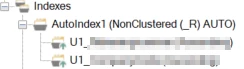
The SNK's in my DIM are build up out of two PK's, and then stored in the key-store. So TX automatily sets Nonclustered index on the two PK's (the PK's start with U1).
(SCREEN OF Indexes of my DIM)
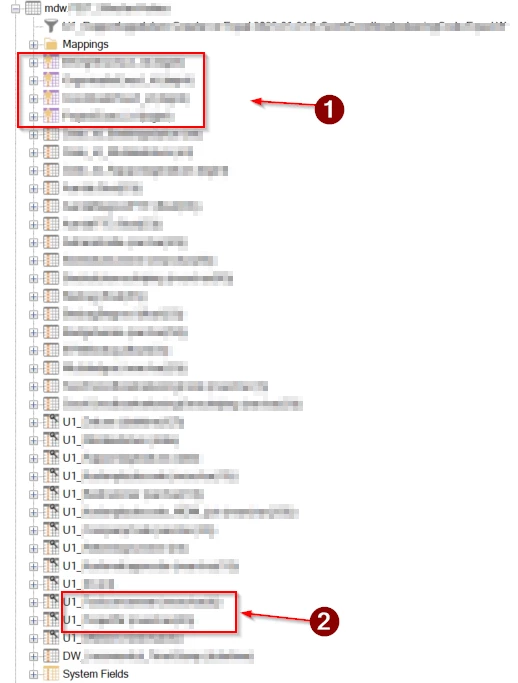
SCREEN OF MY FACT TABLE
MY fact table contains these two U1's (2. On screenshot) and the SNK (1. On screenshot), which only reads from the keystore to make the connection DIM - FACT. We need these U1's (2. On Screnshot) in our fact, otherwise we are not able to build a SNK in our Fact dimension.
Which fields should i index in my fact table? TX doesnt seem to do it auto in my fact.
as @daniel says: stick to TimeXtender native stuff where you can, and customize where you must. This means quite a lot of indexing is done automatically. All tables have clustered primary keys on DW_Id (in the SQL world). Additionally, under normal settings, primary keys lead to non-clustered indexes with a unique constraint. Source tables of conditional lookups will automatically get indexes covering the lookups. This means that none of your tables will be heaps, and common TimeXtender ‘gestures’ are already covered by indexes that will also change with any changes you make.
If you create Aggregate tables (different grain than the source table PK) or Custom Views, you will likely want to add indexes to cover those. If you are opening up your MDW layer to users’ queries, it is very useful to understand the type of questions they have of the data as you can then decide on good indexes to speed those queries up. You might want to use something like https://www.brentozar.com/first-aid/ to analyze the goings on as creating indexes is not free.
The query store (on by default in recent SQL Server and Azure SQL) has standard reports in SSMS that will show you missing indexes but you should not blindly trust this. The query store is also really useful to measure whether changes actually improve things - people usually want to have some kind of catch-all process, but there is no such thing: measure before and after with real data and be sure the difference isn't affected by hot vs cold caches and the like.
As index analysis often leads to people finding themselves wanting to maintain indexes, I will drop some links here:
Columnstore indexes are really only beneficial in MDW in specific circumstances.
If you are running a project started in older versions of TimeXtender, you may want to use the Performance Recommendations feature (right-click project > Performance Recommendations > Find.. as there were situations where TimeXtender would not generate indexes in some situations that can be automatically resolved.