
Solved

Incremental Load in BU fails

  • June 26, 2026
  • 5 replies
  • 71 views

Forum|alt.badge.img+2

I have followed this guide to set-up an Incremental load on a table in BU:
Incremental Loading in a Business Unit (BU) in TimeXtender Classic | Community

However, during the deploy i get an error:

Data source Incr Loads
Validation status: Valid
Message: OK

Staging Database ODX
Validation status: Valid
Message: OK

Table: Incr_Load
Validation status: Valid
Message: OK

Incremental Load
Validation status: Error
Message: Incremental load is not supported on this table.

Details:

Data source Incr Loads ...
TimeXtender.DataManager.UserErrorException

It says in the guide that:
 

When the option is enabled and the table is deployed, TimeXtender performs the following:

  1. Initial Full Load: The system fully loads the table.
  2. Setting content of the _I Table: This table records the largest incremental field value from the given load


I am attachig a video of where i get an error.
What am i doing wrong?
Best answer by Thomas Lind

Hi ​@aftabp 
 

I will share my suggestion here as well for others to see.

The Enhanced Rest provider does not support Incremental load at this point. So while you can turn it on, it will fail with the error you see. You can use incremental load on REST data sources in TDI, so it may be added eventually.
 
You can still do something so it behaves like it is using Incremental load.
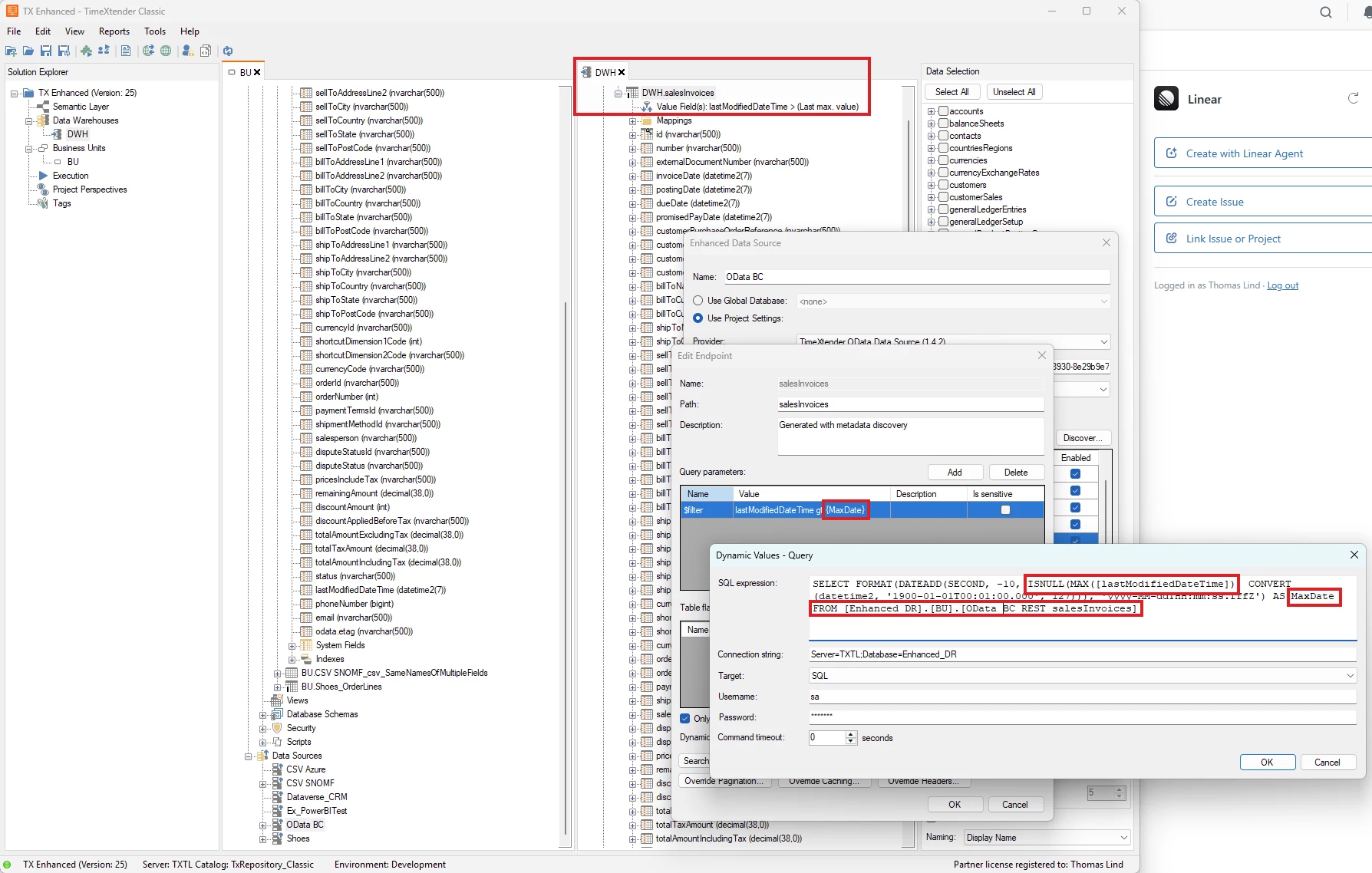
I set the DWH version of a table to run with incremental load without deletes and use a field from the source table to check. Normally you use the DW_TimeStamp, but for this I chose a specific datetime field of the source table.

I use a dynamic SQL query to pull a MaxDate from the table that I then use as a Query Parameter. The source is a Microsoft API, and it always supports $filter with a value like fieledname gt (greater than) datetime.

SELECT FORMAT(DATEADD(SECOND, -10, ISNULL(MAX([lastModifiedDateTime]), CONVERT(datetime2, '1900-01-01T00:01:00.000', 127))), 'yyyy-MM-ddTHH:mm:ss.fffZ') AS MaxDate FROM [Enhanced_DR].[BU].[OData BC_REST_salesInvoices]

I also connect to the staging database that contains the table. The important part of the SQL query is that it needs to support a date that will be used on the first execution. I found that this only allowed a 30-day filter. So the 1900-01-01 isn't actually valid, so if I needed to run a full load or similar, I would need to add a date that isn't older than the current day - 30.
 
The downsides with this method, compared to actual incremental load, are that the SQL needs to be added to all endpoints and that you have to set it up for the DWH level. Once the real incremental feature is added, it will be easy to change as the method currently used in TDI is very similar to this.
 
Venlig hilsen / Best regards
Thomas Lind

5 replies

Forum|alt.badge.img+2
  • Author
  • Problem Solver
  • June 26, 2026

Just an update
✅ I have tried the same thing with CData on an older version (TX Legacy) and it works.
❌ Also, for TX Enhanced Connectors, i have tired it on couple of other tables (from a completly different Data Source) and i get the same error

Incremental Load
Validation status: Error
Message: Incremental load is not supported on this table.

This means that the issue is not with with the source table.

Any help is appriciated


Forum|alt.badge.img+2
  • Author
  • Problem Solver
  • June 30, 2026

Any suggestions here ​@Thomas Lind or ​@Christian Hauggaard ?


Thomas Lind
Community Manager
Forum|alt.badge.img+5
  • Community Manager
  • July 1, 2026

Hi ​@aftabp 

I made an Zendesk ticket for this. It seems to fit better in that location


Thomas Lind
Community Manager
Forum|alt.badge.img+5
  • Community Manager
  • Answer
  • July 1, 2026

Hi ​@aftabp 
 

I will share my suggestion here as well for others to see.

The Enhanced Rest provider does not support Incremental load at this point. So while you can turn it on, it will fail with the error you see. You can use incremental load on REST data sources in TDI, so it may be added eventually.
 
You can still do something so it behaves like it is using Incremental load.
I set the DWH version of a table to run with incremental load without deletes and use a field from the source table to check. Normally you use the DW_TimeStamp, but for this I chose a specific datetime field of the source table.

I use a dynamic SQL query to pull a MaxDate from the table that I then use as a Query Parameter. The source is a Microsoft API, and it always supports $filter with a value like fieledname gt (greater than) datetime.

SELECT FORMAT(DATEADD(SECOND, -10, ISNULL(MAX([lastModifiedDateTime]), CONVERT(datetime2, '1900-01-01T00:01:00.000', 127))), 'yyyy-MM-ddTHH:mm:ss.fffZ') AS MaxDate FROM [Enhanced_DR].[BU].[OData BC_REST_salesInvoices]

I also connect to the staging database that contains the table. The important part of the SQL query is that it needs to support a date that will be used on the first execution. I found that this only allowed a 30-day filter. So the 1900-01-01 isn't actually valid, so if I needed to run a full load or similar, I would need to add a date that isn't older than the current day - 30.
 
The downsides with this method, compared to actual incremental load, are that the SQL needs to be added to all endpoints and that you have to set it up for the DWH level. Once the real incremental feature is added, it will be easy to change as the method currently used in TDI is very similar to this.
 
Venlig hilsen / Best regards
Thomas Lind


Forum|alt.badge.img+2
  • Author
  • Problem Solver
  • July 1, 2026

Thank you for the clarification, ​@Thomas Lind 

For those like me (with no TDI), how long do we have to wait for incremental load function for TX Enhanced Rest connection