

Can I preserve my source field names when synchronizeing my fields?
I dont want spaces and periods replaces by an underscore, my current workaround is to edit the fields manually when I use the tables in my prepare instance.
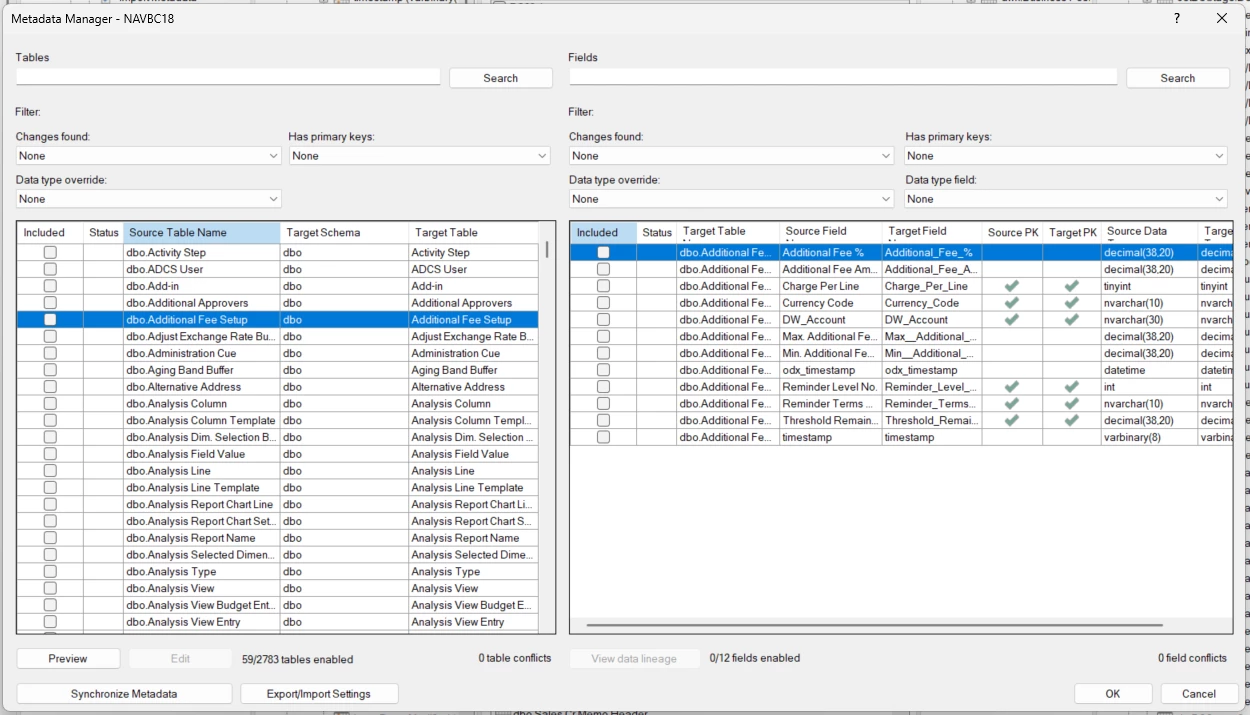
Can I preserve my source field names when synchronizeing my fields?
I dont want spaces and periods replaces by an underscore, my current workaround is to edit the fields manually when I use the tables in my prepare instance.
Best answer by Christian Hauggaard
Hi
Unfortunately there is no data source setting that can preserve these characters in the target field names today. There are two separate reasons, one for each character:
Periods never actually make it into the SQL database on the Business Central side. When BC/NAV creates its SQL schema, it replaces the characters in its own "convert identifiers" list (by default ."/'%][) with underscores, so for example the field "No." is physically stored as the column [No_]. The "Read invalid identifiers" option you may have seen on the data source connection reads this same character list from the BC database, and the provider uses it to resolve the physical object names in the source when querying. It can therefore not be used to bring the periods back, since they were already replaced by Business Central before the data source reads anything.
Spaces are converted by the ingest layer because they are not valid in the storage formats an Ingest instance can use. Parquet and Delta (Azure Data Lake, OneLake, Lakehouse) do not allow spaces or the characters ,;{}()= in column names, so these are replaced with underscores when tables are synchronized. This conversion is applied outside of the "Invalid identifiers" setting, so editing that list will not change it.
Your current workaround, renaming the fields in your Prepare instance, is the recommended approach. The renames are kept when you synchronize the table.
If you would like to see support for preserving the original source field names, for example as display names, please feel free to create a post in the Ideas section
Enter your E-mail address. We'll send you an e-mail with instructions to reset your password.



