Solved

Loading Parquet using TimeXtender classic (dynamics fo synapse link)


I'm currently loading Parquet "tables" in TX Classic with the following setup:

  • Using Synapse Serverless to read Parquet files and expose them as external tables

  • Connecting via SQL Server authentication

This works, but I’m looking for a better approach.

Is there a way to read Parquet "tables" directly in TX Classic? The Enhanced Data Source seems limited to reading or aggregating files, not treating them as tables.

Alternatively, could I replace Synapse Serverless with Fabric Serverless? The main blocker is authentication—TX doesn't appear to support SQL providers with service principal (OAuth) authentication, only SQL Server authentication, which we’d prefer to avoid.

Any suggestions, recommendations or workarounds would be appreciated.
 

Best answer by Thomas Lind

Hi ​@TX_Dave 

The Parquet provider has the same connection options as all the other file based providers.

Connection Settings

It is the same method in the portal version as the classic version only the menus look different.

It reads a file and converts it to a table.

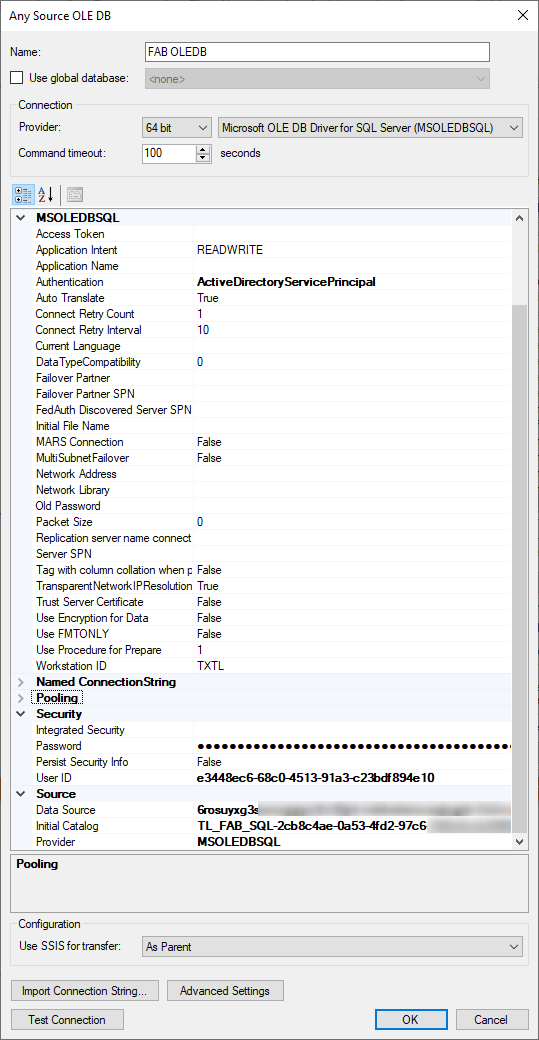
Your synapse question about using options other than SQL Authentication can be done like so.


Also whether SQL or this is more secure I don’t know. Once the client id and secret is added there is not much difference in how it can be used compared to using a SQL authentication option or a Azure Password option.

View original

6 replies

rory.smith
TimeXtender Xpert
Forum|alt.badge.img+8
  • TimeXtender Xpert
  • May 14, 2025

Hi,

when you say “treat as tables” I take it you mean something like reading delta lake structures (i.e. many parquet files combined to form a table-like structure) or do you mean being able to query parquet like the SQL Analytics endpoint for Fabric allow you to do?

You should be able to use the normal SQL connector and Entra auth to connect to Synapse Serverless as far as I am aware. You may need to filter out synonyms (that used to be an issue).

Fabric SQL Analytics endpoints behave like SQL server except for the fact that Fabric manages the synchronisation to the underlying resource and that may be out of date by some minutes. Fabric SQL is basically Azure SQL DB serverless.


Thomas Lind
Community Manager
Forum|alt.badge.img+5
  • Community Manager
  • Answer
  • May 14, 2025

Hi ​@TX_Dave 

The Parquet provider has the same connection options as all the other file based providers.

Connection Settings

It is the same method in the portal version as the classic version only the menus look different.

It reads a file and converts it to a table.

Your synapse question about using options other than SQL Authentication can be done like so.


Also whether SQL or this is more secure I don’t know. Once the client id and secret is added there is not much difference in how it can be used compared to using a SQL authentication option or a Azure Password option.


  • Author
  • Starter
  • May 14, 2025

Thank you, this was exactly what i was looking for.

I’ve considered the OLEDB provider, but the field Authentication did not have a dropdown.

Now ive put in the string ‘ActiveDirectoryServicePrincipal’, i can easily connect to synapse or fabric sql endpoint using SPN.

Now I have some new options; thanks!


  • Author
  • Starter
  • May 14, 2025

One more question though, now i am reading up on the subject:

Provider options to connect TimeXtender to a SQL Server Data Source – TimeXtender Support

The link provided states the SQLOLEDB provider is old.
And I should use the ‘CDS (Custom Data Source) provider for SQL’


But cant find any documentation how to setup this CDS?
Should i just continue using OLEDB?


Thomas Lind
Community Manager
Forum|alt.badge.img+5
  • Community Manager
  • September 29, 2026

Hi ​@TX_Dave 

Sorry for not responding earlier.

You use CDS providers for the ODX data source version of SQL, otherwise you use the Any Source versions. Custom data sources require you to download one. This was generally what was done before we started using CData providers. So pre 2017. The only one I really used was the one for Google Analytics.


Christian Hauggaard
Community Manager
Forum|alt.badge.img+5

​@TX_Dave we have released updates to the Dynamics AX adapter so that it can now connect to a Microsoft Fabric SQL Analytics Endpoint, to support Link to Fabric for F&O given that Microsoft is retiring Export to Data Lake.

Please let us know if you have any questions

https://support.timextender.com/business-unit-149/microsoft-fabric-sql-provider-for-the-dynamics-ax-adapter-4100?tid=4100&fid=149