

Hi all,
Our TimeXtender is currently growing and growing, which is a good thing. However, I’m experiencing performance issues during TimeXtender execution and would appreciate guidance on both technical optimization and cost-efficient scaling.
As my execution packages become unpredictable regarding execution times, i’m running into issues with PowerBI starting it’s refresh without TX being finished.
- TimeXtender Version: 7158.1
- TX O&DQ Version: 26.1.0.23
- ODX: Azure Data Lake Gen2
- Execution VM:
- OS: Windows Server 2022 Datacenter Azure Edition
- Size: Standard D8s v5 (8 vCPUs, 32 GB RAM)
- Production Instance: SQL Server Storage
- Azure SQL Database:
- Tier: General Purpose (Provisioned)
- Compute: 2 vCores
- Storage: 65 GB
I’m currently integrating data from about 15 sources, distributed across 5 ERP systems.
I played around with execution package threads some time ago and i’m using 12 parallel threads for a while now. This package as a total task count of 540. During execution (mainly data loads), I observe:
Log IO consistently hitting 100%, CPU frequently 90–100%.
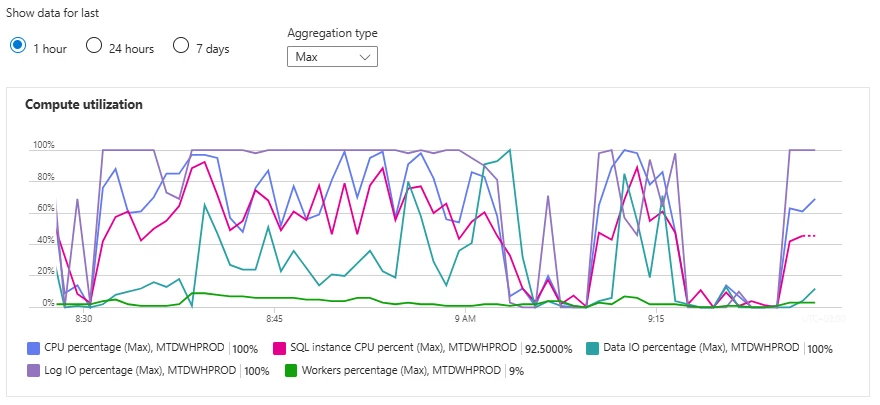
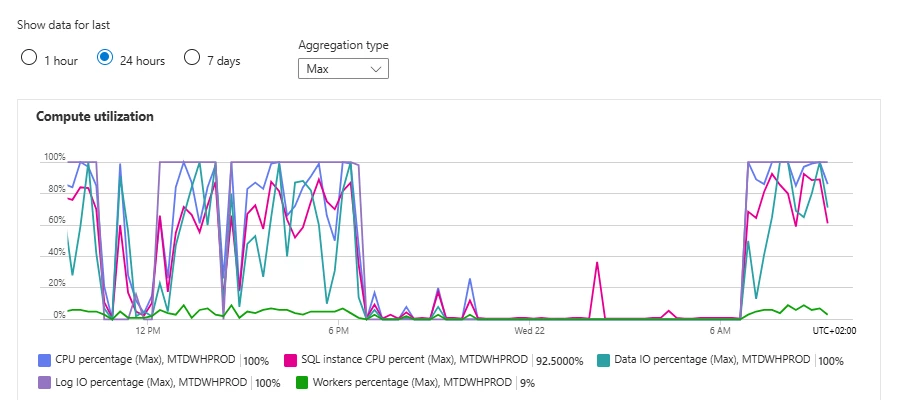
We expect to add 2 new companies soon, one with ± 11 databases & one with ± 6 databases. Based on the following useful blog I am thinking about upgrading the SQL Database service tier to Business Critical to improve the Log IO percentage. However, as the CPU is also high, the vCores increase is also something to think about. From a cost management perspective it’s not something I get too happy about.
What would be a good approach to test this and be able to scale back when done testing?
What Azure SQL Database Service Tier and Performance Level Should I Use? | Community
I know there’s also some optimization to be done on my end for reducing data loads. However, I’m not sure if this is the key issue. Some ERP’s don’t have a (reliable) LastModifiedTS. Is there a TX best practice for reducing dataload or incremental loading for ERP’s without CDC or a last modified timestamp, with handling deletes?
Goal:
- Create a reliable future proof data architecture with predictable costs
- Create reliable end-to-end executions processes so users always have reliable data
I am now to advice to the organisation on how to proceed and what the plan will be. Any advice on this case would be much appreciated :)