

Overview
This article walks through connecting the TimeXtender MCP Server to a Microsoft Fabric Lakehouse or Warehouse on the Prepare Instance Config tab. Microsoft Fabric is supported in Early Access.
Fabric requires Entra ID (Service Principal) authentication. SQL Authentication is not available for Fabric. The MCP Server uses the service principal to acquire a Power BI access token, then connects to the workspace's SQL analytics endpoint over TDS.
Prerequisites
- A Fabric workspace containing the Lakehouse or Warehouse the semantic model will query
- Permission in Microsoft Entra to register an application, or an Entra administrator who can register it for you
- Permission in Fabric to add the service principal to the workspace, or a workspace administrator who can do so for you
- The SQL analytics endpoint hostname for the workspace (found in the workspace settings, see below)
Register the Service Principal in Microsoft Entra
- Sign in to the Microsoft Entra admin centre
- Navigate to Applications → App registrations → New registration
- Enter a Name (for example,
TimeXtender MCP Server) - Set Supported account types to Accounts in this organizational directory only
- Leave the Redirect URI blank
- Click Register
- On the application overview page, record the following values:
- Application (client) ID
- Directory (tenant) ID
- Click Certificates & secrets → New client secret
- Enter a description, choose an expiry, and click Add
- Copy the Value of the new secret immediately. The value is shown only once. This is the Client Secret.
The client secret is encrypted with Windows DPAPI before being stored in mcp-server.json. It is not retrievable from the Configurator after save.
Grant the Service Principal Access to the Fabric Workspace
The service principal needs two layers of permission: workspace membership and item access. Grant both before testing the connection.
- Open the Power BI service or the Fabric workspace view
- Open the workspace that contains the Lakehouse or Warehouse
- Click Manage access
- Click Add people or groups
- Search for the service principal name (the one you registered in Entra) and select it
- Assign a role of Member or Contributor. Viewer is not enough for the MCP Server to read from the SQL analytics endpoint.
- Click Add
If your Fabric tenant requires service principals to be enabled before they can access Fabric APIs, ensure a Fabric administrator has turned on Service principals can use Fabric APIs in the Fabric admin portal under Tenant settings → Developer settings.
Get the SQL Analytics Endpoint Hostname
Each Fabric Lakehouse and Warehouse has a SQL analytics endpoint with a hostname of the form:
<workspace>-<id>.datawarehouse.fabric.microsoft.comTo find the exact value:
- Open the workspace in Fabric
- Click the Lakehouse or Warehouse item
- Click Settings (gear icon)
- Find the SQL analytics endpoint section
- Copy the Server name value. It ends in
.datawarehouse.fabric.microsoft.comor, for some Fabric capacities,.pbidedicated.windows.net.
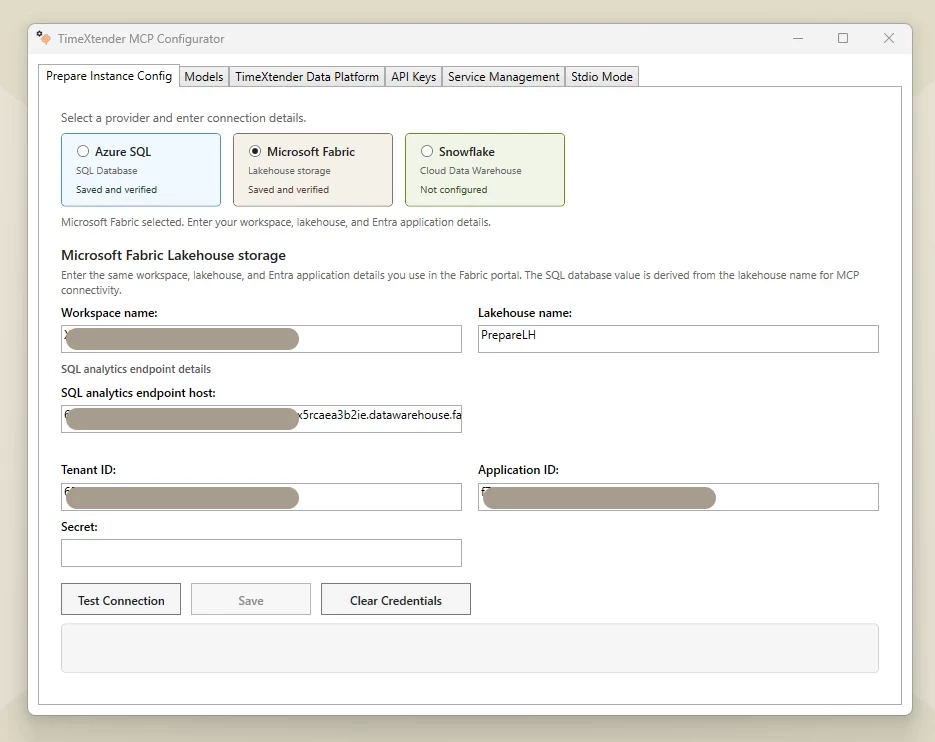
Configure the Provider in the Configurator
- Open the TimeXtender MCP Configurator
- Click the Prepare Instance Config tab
- Set the Database Type to Microsoft Fabric
- Fill in the connection fields:
| Field | Value | Notes |
|---|---|---|
| Server | The SQL analytics endpoint hostname | For example, |
| Database | The Lakehouse or Warehouse name | The display name as shown in the workspace |
| Workspace | The Fabric workspace name or ID | Used in audit logs and error messages |
| Item | The Lakehouse or Warehouse name | Used in audit logs and error messages |
| Tenant ID | Directory (tenant) ID from the Entra app | A GUID |
| Client ID | Application (client) ID from the Entra app | A GUID |
| Client Secret | The Value of the secret you created | Stored DPAPI-encrypted on disk |
- Click Test Connection. A successful test returns a version string from the Fabric SQL analytics endpoint.
- Click Save to persist the provider. The provider now appears in the Provider dropdown on the Models tab.
Test the Path End-to-End
- Go to the Models tab
- Click Add Model, browse to a semantic model JSON file backed by this Fabric warehouse, and pick Microsoft Fabric in the Provider dropdown
- Click Test Connection on the model card. A green status badge confirms the MCP Server can reach the Fabric objects referenced by the semantic model.
Troubleshooting
Test Connection fails with "Login failed for user"
The service principal is registered in Entra but has not been added to the Fabric workspace. Open the workspace in Fabric, click Manage access, and add the service principal as Member or Contributor (not Viewer).
Test Connection fails with "AADSTS7000215: Invalid client secret"
The Client Secret is wrong or has expired. Generate a new secret in the Entra app registration's Certificates & secrets page, copy the Value (shown once), and paste it into the Client Secret field in the Configurator. Click Save and retry.
Test Connection fails with "AADSTS50034: The user account does not exist"
The Tenant ID or Client ID is wrong. Open the Entra app registration and copy the Directory (tenant) ID and Application (client) ID values exactly as shown on the overview page.
Test Connection fails with "Cannot open server requested by the login"
The Server field does not point at a valid Fabric SQL analytics endpoint, or the hostname is missing the suffix. Confirm the value ends in .datawarehouse.fabric.microsoft.com or .pbidedicated.windows.net. Re-copy it from the workspace's SQL analytics endpoint settings.
Test Connection fails with "AADSTS500011: The resource principal named ... was not found"
Service principal access to Fabric APIs is not enabled at the tenant level. A Fabric administrator must enable Service principals can use Fabric APIs in the Fabric admin portal under Tenant settings → Developer settings.
Test Connection passes but the Models tab Test Connection fails
The service principal can authenticate, but it lacks read permission on the specific tables the model uses. Check item-level permissions on the Lakehouse or Warehouse and grant the service principal at least Read on the required items.
