
Solved

Pause Schedule Using Orchestration for service windows

  • November 7, 2025
  • 3 replies
  • 169 views

Forum|alt.badge.img

Hi,

We have been using Orchestration to schedule our TDI execution packages and Ingest tasks, and have tasks running every other hour. We now have a new requirement to be able to pause our schedule for service windows of a couple of hours every 2nd month. 

Does anyone know how to pause the schedule using Orchestration or some other tool?

Any help is greatly appriciated.


Best,

Leo

Best answer by Christian Hauggaard

Hi ​@leo.noharet 

Schedules can be manually disabled and then re-enable them after the maintenance/service window. The schedules can be disabled either in the individual schedules or in the schedule groups

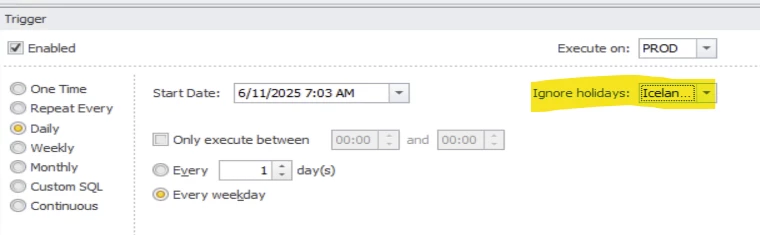
Alternatively, a holiday list can be setup, and then the schedules can be set to “ignore holidays property”


However this would pause the schedule for the entire day for the days set in the holiday list

In order to define a custom schedule excluding certain hours on specific dates, please use the “custom sql” option to define frequency. For more information please see the custom trigger section in the following article:


3 replies

Christian Hauggaard
Community Manager
Forum|alt.badge.img+5

Hi ​@leo.noharet 

Schedules can be manually disabled and then re-enable them after the maintenance/service window. The schedules can be disabled either in the individual schedules or in the schedule groups

Alternatively, a holiday list can be setup, and then the schedules can be set to “ignore holidays property”


However this would pause the schedule for the entire day for the days set in the holiday list

In order to define a custom schedule excluding certain hours on specific dates, please use the “custom sql” option to define frequency. For more information please see the custom trigger section in the following article:


Forum|alt.badge.img
  • Author
  • Starter
  • November 26, 2025

Thanks for your response ​@Christian Hauggaard.

My use case requires pausing the schedule only for one hour on specific dates, so it looks like the Custom SQL approach is my best option. However, I ran into some issues while setting it up.

I’m unsure about how the database connection needs to be configured. Does the database being queried need to be set up as a Data Provider in Orchestration? Or is it possible to query my TDI tables using my existing TDI Data Provider? 


Christian Hauggaard
Community Manager
Forum|alt.badge.img+5

@leo.noharet It is only possible to query the O&DQ database, given that you have access. If you require access then please submit a support ticket requesting access to your O&DQ database.

However based on what you describe then this should not be necessary and it should be possible to make a select statement that returns the next run datetime.


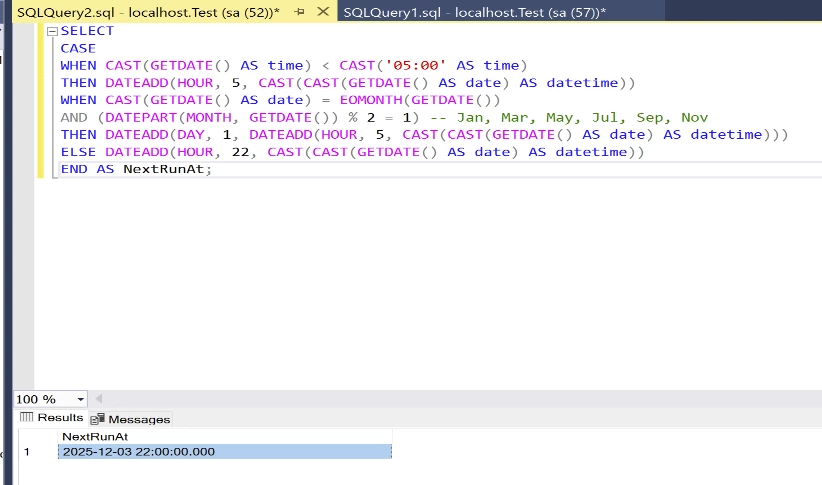
The column does not require a name so the following:

SELECT
CASE
WHEN CAST(GETDATE() AS time) < CAST('05:00' AS time)
THEN DATEADD(HOUR, 5, CAST(CAST(GETDATE() AS date) AS datetime))
WHEN CAST(GETDATE() AS date) = EOMONTH(GETDATE())
AND (DATEPART(MONTH, GETDATE()) % 2 = 1)
THEN DATEADD(DAY, 1, DATEADD(HOUR, 5, CAST(CAST(GETDATE() AS date) AS datetime)))
ELSE DATEADD(HOUR, 22, CAST(CAST(GETDATE() AS date) AS datetime))
END;

Here’s what each part of the SELECT is doing, step by step.

  • GETDATE() returns the current date and time from the SQL Server instance.​

  • CAST(GETDATE() AS date) strips off the time portion to get “today” as a pure date; casting back to datetime lets fixed times like 05:00 or 22:00 be added.

  • CAST(GETDATE() AS time) < CAST('05:00' AS time) checks whether the current time is before 5:00 AM today. If true, the expression chooses today at 05:00 as the next run

  • DATEADD(HOUR, 5, CAST(CAST(GETDATE() AS date) AS datetime)) constructs “today at 05:00” by taking today’s date (midnight) and adding 5 hours

  • EOMONTH(GETDATE()) returns the calendar date of the last day of the current month; comparing it to CAST(GETDATE() AS date) detects that “today is month-end.”​

  • DATEPART(MONTH, GETDATE()) % 2 = 1 evaluates whether the current month number is odd (Jan=1, Mar=3, etc.), which matches “every 2nd month starting with January” for skipping the 10 PM run on those month ends

  • WHEN today is the last day of an odd month AND time is after 5 AM, the CASE branches to skip the 10 PM run and instead returns the following day at 05:00 by adding one day and five hours to today’s midnight.

  • ELSE DATEADD(HOUR, 22, CAST(CAST(GETDATE() AS date) AS datetime)) covers all other cases by returning “today at 10:00 PM” (22:00).

The end result is:

SELECT returns one datetime that is either today at 05:00, today at 22:00, or tomorrow at 05:00 based on the current time and whether today is the last day of an odd-numbered month.

  • Before 5 AM today: it returns today 05:00.

  • After 5 AM on a normal day: it returns today 22:00.​

  • After 5 AM on the last day of Jan/Mar/May/Jul/Sep/Nov: it skips 22:00 and returns tomorrow 05:00.​

The select statement you define in the custom SQL trigger will execute to find the next run datetime when you save in the desktop client and when the schedule runs