


Question

Arrays in JSON

  • January 20, 2026
  • 4 replies
  • 47 views

Forum|alt.badge.img

I have been trying to sort out something out,

My JSON looks like this:
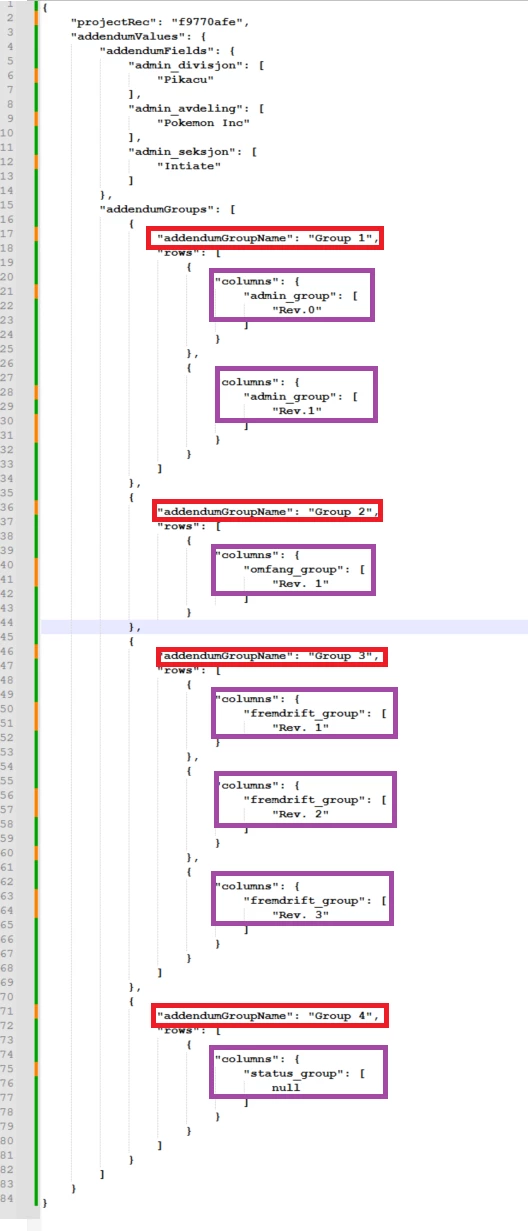
addendumGroupName occurs multiple times. Here, its 4 times but in other cases it occurs between 1 to 50.
columns can be one or multiple 

I am trying to list all addendumGroupName and all columns under each addendumGroupName without doing this:


json/addendumValues/addendumGroups[2]/addendumGroupName[0]
json/addendumValues/addendumGroups[2]/rows[0]/columns/fremdrift_group[0] 
json/addendumValues/addendumGroups[2]/rows[1]/columns/fremdrift_group[0]
json/addendumValues/addendumGroups[2]/rows[2]/columns/fremdrift_group[0]  

So i tried this (with an without [*] at the end of column name):

	<attr name="addendumGroupName"			xs:type="string" readonly="false"		other:xPath="/json/addendumValues/addendumGroups[*]/addendumGroupName[*]" />
<attr name="fremdrift_group" xs:type="string" readonly="false" other:xPath="/json/addendumValues/addendumGroups[*]/rows[*]/columns/fremdrift_group[*]


and for JSONpath:

<api:set attr="detailsIn.DataModel" value="FLATTENEDDOCUMENT" />
<api:set attr="detailsIn.EnablePaging" value="TRUE" />

<api:set attr="detailsIn.JSONPath"
value="$.;$.addendumValues;$.addendumValues.addendumFields;
$.addendumValues.addendumGroups;
$.addendumValues.addendumGroups[*].addendumGroupName;
$.addendumValues.addendumGroups[*].rows[*];
$.addendumValues.addendumGroups[*].rows[*].fremdrift_group" />

But i keep on getting NULL in the columns for addendumGroupName and fremdrift_group

What am i doing wrong?
4 replies

Forum|alt.badge.img
  • Author
  • Problem Solver
  • January 20, 2026

Here is the whole code


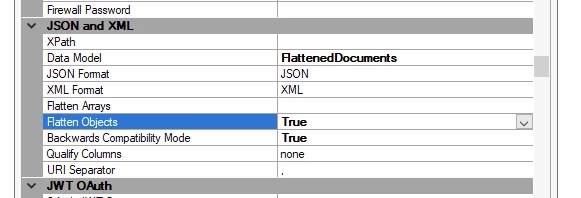
My datasource is also set to FlattenedDocuments:


<api:script xmlns:api="http://apiscript.com/ns?v1" xmlns:xs="http://www.w3.org/2001/XMLSchema">

<!-- Schema information and column definitions for TimeXtender integration -->
<api:info title="addendumGroups" desc="Generated schema file for TimeXtender." xmlns:other="http://apiscript.com/ns?v1">
<!-- Attributes for the main JSON structure -->
<attr name="projectRec" xs:type="string" readonly="false" other:xPath="DUMMY" />

<attr name="addendumGroupName"
xs:type="string"
readonly="false"
other:xPath="/json/addendumGroupName" />


</api:info>

<!-- Base URL and settings -->
<api:set attr="urlbase" value="https://URL" />

<api:set attr="touchIn.DataModel" value="DOCUMENT" />
<api:set attr="touchIn.JSONPath" value="$." />
<api:set attr="touchIn.URI" value="[urlbase]/api/Project/GetProjects" />
<api:set attr="touchIn.ElementMapPath#" value="/json/projectRec" />
<api:set attr="touchIn.ElementMapName#" value="file_id" />

<api:set attr="detailsIn.DataModel" value="FLATTENEDDOCUMENTS" />
<api:set attr="detailsIn.EnablePaging" value="TRUE" />
<!--
<api:set attr="detailsIn.JSONPath"
value="
$;
$.addendumValues.addendumGroups[*];
$.addendumValues.addendumGroups[*].addendumGroupName;
$.addendumValues.addendumGroups[*].rows[*];
$.addendumValues.addendumGroups[*].rows[*].columns.*
" />
-->

<api:set attr="detailsIn.JSONPath" value="$" />
<api:set attr="detailsIn.ElementMapPath#" value="$.addendumValues.addendumGroups[*]" />
<api:set attr="detailsIn.ElementMapName#" value="group_item" />


<api:set attr="detailsIn.URITemplate" value="[urlbase]/api/Project/GetProjectByRec/{file_id}" />

<!-- The GET method corresponds to SELECT. Here you can override the default processing of the SELECT statement. The results of processing are pushed to the schema's output. See SELECT Execution for more information. -->
<api:script method="GET">
<api:set attr="touchIn.URI" value="[touchIn.URI]" />
<api:call op="jsonproviderGet" in="touchIn" out="touchOut">

<!-- Clean projectRec -->
<api:set attr="touchIn.cleanedProjectRec"
value="[touchOut.file_id | trim()]" />

<!-- Replace projectNumber in URI -->
<api:set attr="detailsIn.URI"
value="[detailsIn.URITemplate | replace('{file_id}', [touchin.cleanedProjectRec])]" />
<api:call op="jsonproviderGet" in="detailsIn" out="detailsOut">

<api:set attr="out.projectRec" value="[touchOut.file_id | allownull()]"/>


<api:set attr="out.addendumGroupName" value="[detailsOut.group_item.addendumGroupName | allownull()]" />


<!-- Push the final flattened record -->
<api:push item="out" />
</api:call>
</api:call>
</api:script>

</api:script>


Thomas Lind
Community Manager
Forum|alt.badge.img+5
  • Community Manager
  • January 21, 2026

Hi ​@aftabp 

If you use our own TX REST provider and set up Table Flattening, you can aggregate areas by using a asterisk *. Then it would be the areas below that were merged together.

Using that your root node would be.

addendumValues/addendumGroups/rows/columns

However, I don’t know how well it would work when your names for fields changes.


Forum|alt.badge.img
  • Author
  • Problem Solver
  • January 22, 2026

@Thomas Lind 
I dont know what you mean by usning my own TX REST provider.
Also, i dont mind spliting my code in mupltiple files, one for each addendumGroupName, as there are not more than 4


Thomas Lind
Community Manager
Forum|alt.badge.img+5
  • Community Manager
  • January 22, 2026

Hi ​@aftabp 

If you use Relational instead of FlattenedDocuments without using RSD files, it will not attempt to merge it all into one, but create one table for each part.

You are using CData and RSD files. I suggest using this:

You can achieve the same result, possibly more like what you want using that.

