Solved

How to define string-based date identifier in TX Enhanced Connector

  • June 16, 2026
  • 4 replies
  • 56 views

Forum|alt.badge.img+2

Hi,
In one of my CData connections i have a RSD file for an endpoint with the follwing code for startPeriod and endPeriod
 

<api:set attr="out.TodayDate" 					value="[dummy | CURRENT_DATE()]"/>
<api:set attr="out.StartPeriodYear" value="[out.TodayDate | year()]"/><api:set attr="out.StartPeriod" value="[out.StartPeriodYear | insert(4,01)]"/>
<api:set attr="out.EndPeriod" value="[out.StartPeriodYear | insert(4,12)]"/>

This i refer to in POST statement in 

{
"fromValue": "{startPeriod}",
"restrictionType": ">=",
"columnName": "period",
"relDateCrit": ""
},
{
"fromValue": "{endPeriod}",
"restrictionType": "<=",
"columnName": "period",
"relDateCrit": ""
}

Is this the correct way - instead of hard coding? 
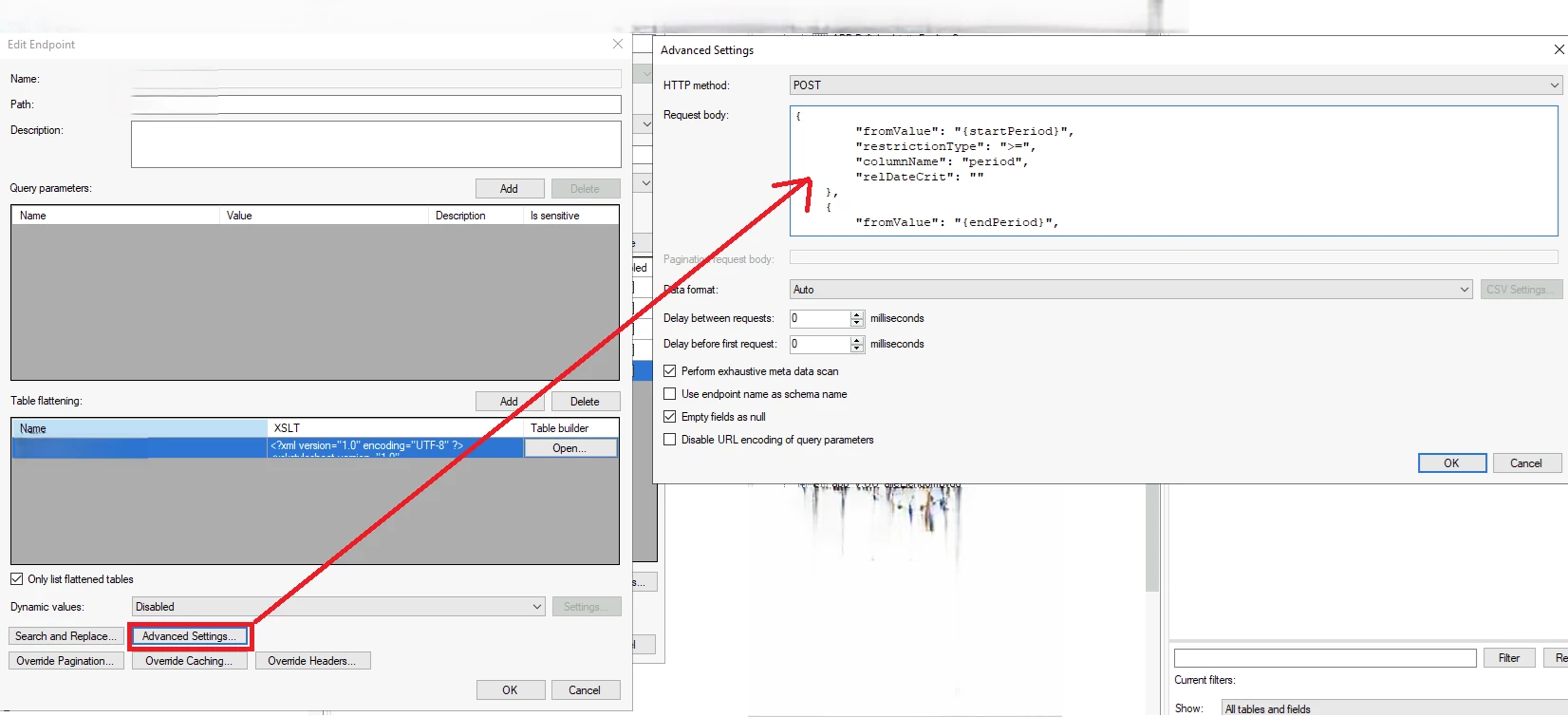


Name Value
todayDate CURRENT_DATE()
startPeriodYear year(todayDate)
startPeriod insert(startPeriodYear, 4, '01')
endPeriod insert(startPeriodYear, 4, '12')


And then, in the window above:

{
"fromValue": "{startPeriod}",
"restrictionType": ">=",
"columnName": "period",
"relDateCrit": ""
},
{
"fromValue": "{endPeriod}",
"restrictionType": "<=",
"columnName": "period",
"relDateCrit": ""
}


Best answer by aftabp

@Thomas Lind I have managed to solve the issue with your last post.
I guess what happend was that you posted the sugestion while i was writing my post.

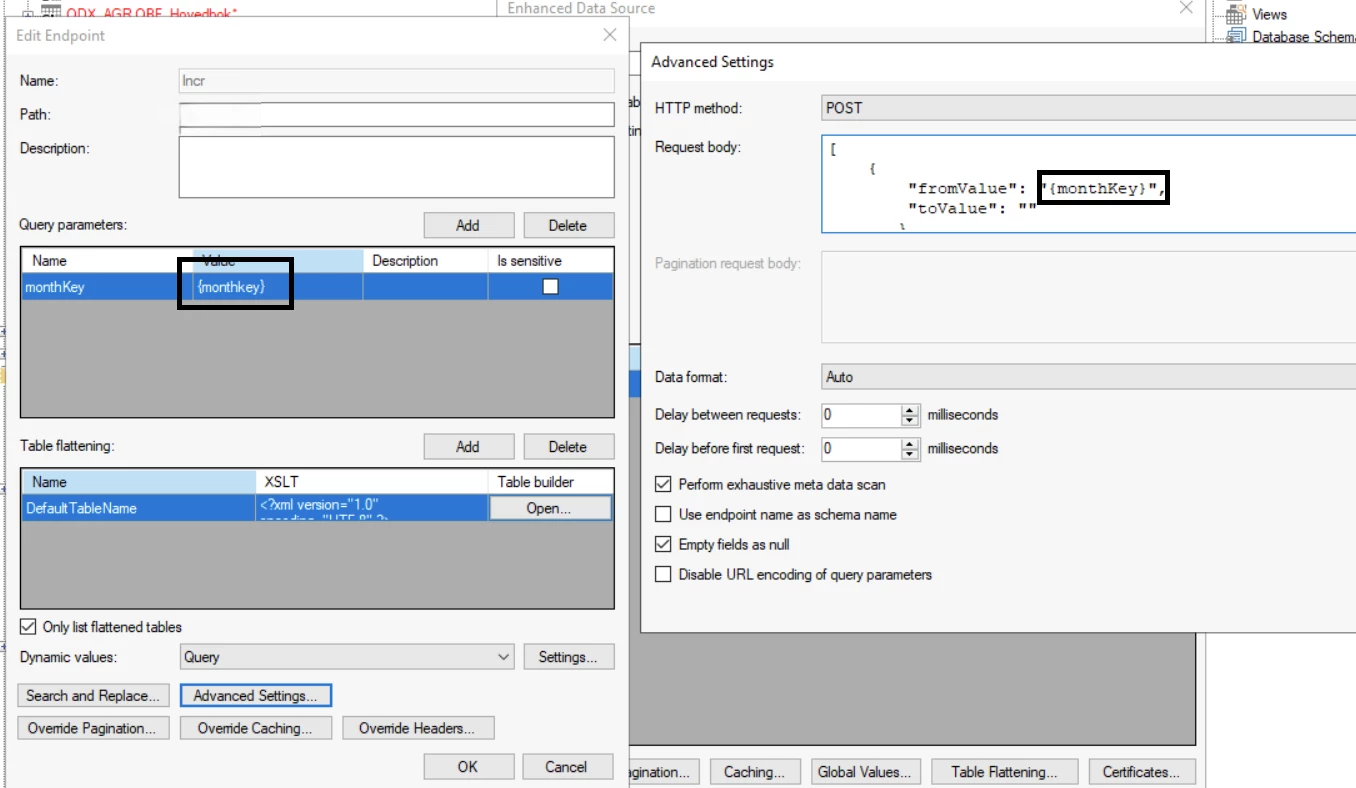
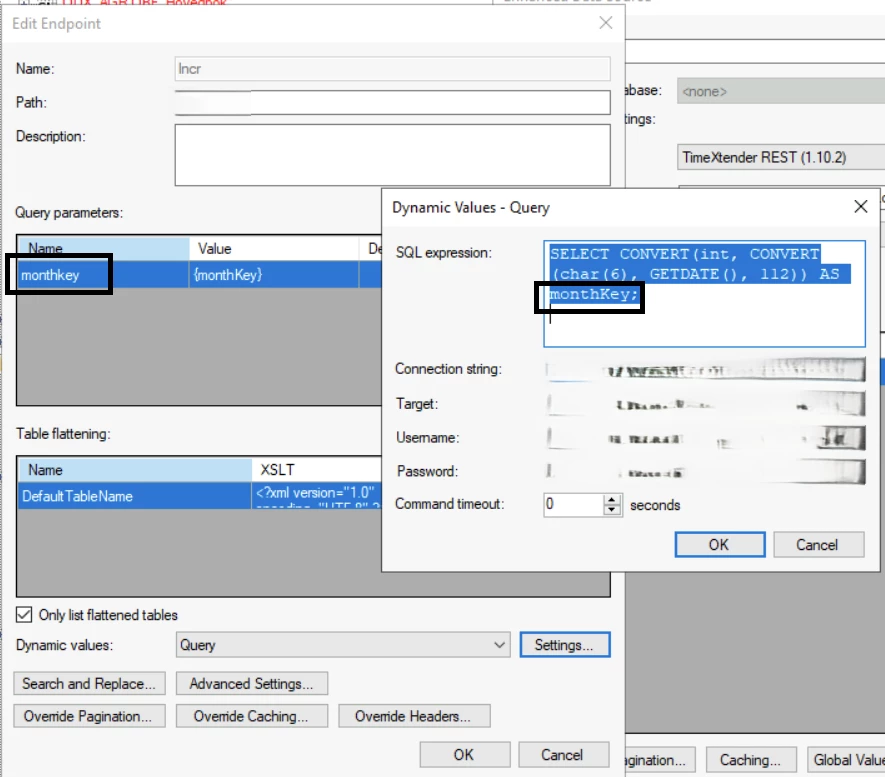
However, when i moved futher, i found out that the parameters in TX Enhanced Connector are case sensitiv.
In my query, i have called the variable monthKey (with capital K), while in QueryParemeters i have monthkey (with lower-case k). That caused an issue and my table was always empty. 


The same goes for the variable defined in POST:


After i have the same upper-case and lower-case at both places, the issue was resolved​​.
Thank you for help​​​​​

4 replies

Thomas Lind
Community Manager
Forum|alt.badge.img+5
  • Community Manager
  • June 23, 2026

Hi ​@aftabp 

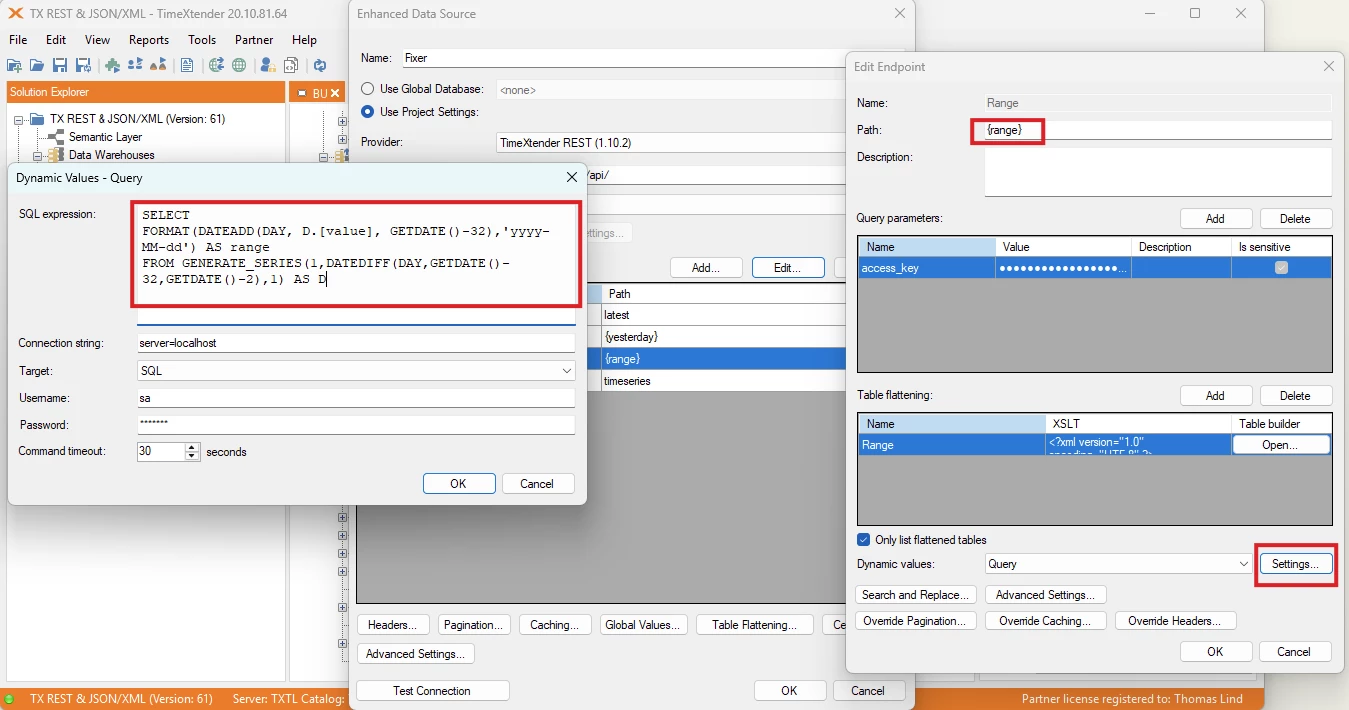
You can use this as a guide.

While it is for TDI it is the same procedure and you use the same fields, but in a different setup.

One difference I will share is that I have an improved way to get my date range.

The query is returned as strings and would be usable in your post commands similar to how I use it.

SELECT
FORMAT(DATEADD(DAY, D.[value], GETDATE()-32),'yyyy-MM-dd') AS range
FROM GENERATE_SERIES(1,DATEDIFF(DAY,GETDATE()-32,GETDATE()-2),1) AS D


Forum|alt.badge.img+2
  • Author
  • Problem Solver
  • June 23, 2026

Can someone help me with this.
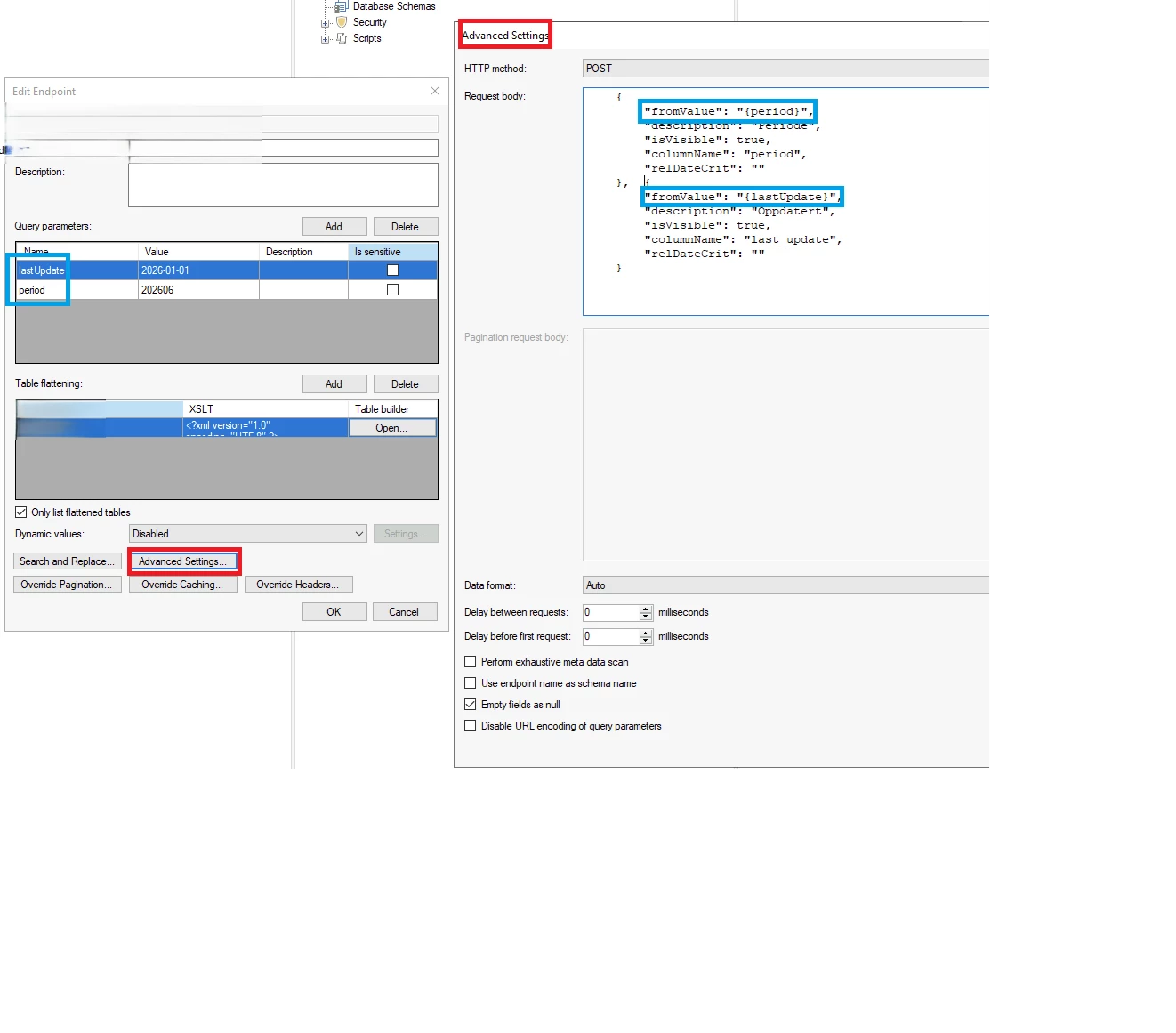
This doesnt actually work:


When i do this, the endpoint thinks that lastUpdate and period are parameters.
However, they are not. They are varibles in POST statment.
This is what the log shows:
 

results?lastUpdate=2026-01-01&period=202606

The point is that, the paramters should replace the variables in POST stament.
How do i do it?


Thomas Lind
Community Manager
Forum|alt.badge.img+5
  • Community Manager
  • June 30, 2026

Hi ​@aftabp 

In my guide I generate the {range} variable in the SQL query. The SQL query is located in the Dynamic values menu which I set to Query. I could also use that {range} value in a Post call. It needs to exist or it will not work.

The logs shows what your setup does.
You have two parameters that gets added so the URL becomes what you show.

If you want dynamic dates, make them so with a SQL query or use fixed variables in the Global Values field.


Forum|alt.badge.img+2
  • Author
  • Problem Solver
  • Answer
  • June 30, 2026

@Thomas Lind I have managed to solve the issue with your last post.
I guess what happend was that you posted the sugestion while i was writing my post.

However, when i moved futher, i found out that the parameters in TX Enhanced Connector are case sensitiv.
In my query, i have called the variable monthKey (with capital K), while in QueryParemeters i have monthkey (with lower-case k). That caused an issue and my table was always empty. 


The same goes for the variable defined in POST:


After i have the same upper-case and lower-case at both places, the issue was resolved​​.
Thank you for help​​​​​