


Today, we’ve published a minor release of TimeXtender Data Integration. We recommend that you upgrade if you’re affected by the issue - see guidance below.
Fixed
- When opening a Prepare instance on SQL storage in TDI v. 7257.1, any custom hash fields, supernatural keys, key stores, etc., with the hashing algorithm set to instance default would have it explicitly set to the application default, ‘SHA-1, SQL Server 2005+’. If the instance default was not set to ‘SHA-1, SQL Server 2005+’., this would cause the objects to be marked for redeployment.
Upgrade advisory
Whether or not you can skip this release depends on what storage platform you’re using and what default hashing algorithm you’ve set for your Prepare instances. This option is found in the Edit Instance window as Hashing algorithm:
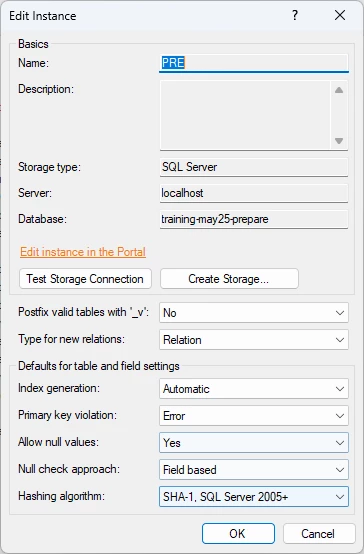
You should upgrade if:
- You’re using another default hashing algorithm than ‘SHA-1, SQL Server 2005+’.
You can skip this release if:
- You’re using Snowflake or Fabric Lakehouse as Prepare storage.
- You’re using the application default hashing algorithm ‘SHA-1, SQL Server 2005+’ as your instance default, and are not planning to change that.
- You are using another default hashing algorithm, but have already - or don’t mind to - redeploy your objects using the ‘SHA-1, SQL Server 2005+’ algorithm.
Resetting the hashing algorithm to avoid redeployment
After upgrading to TDI v. 7278.1, you can reset the hashing algorithm setting on the affected object so that the application will no longer see them as needing redeployment.
The procedure below is useful if the majority of your hashed objects do not use ‘SHA-1, SQL Server 2005+’. Otherwise, it might be easier to change the hashing algorithm for the objects that should not use ‘SHA-1, SQL Server 2005+’, rather than change the hashing algorithm for those that should.
Key stores cannot be reset using the procedure below. In addition to that, key stores will continue to be marked for deployment even when you've switched the hashing algorithm back to the original. Get in touch with TimeXtender support if you need help avoiding redeployment.
To changed the all objects using ‘SHA-1, SQL Server 2005+’ to ‘Use instance default’, follow the steps below.
- Open the affected Prepare instance.
- Right click the instance in the Solution Explorer and click Edit Instance. In the Hashing algorithm list, click SHA-1, SQL Server 2005+, then click OK.
- In the window that pops up, click Yes to change the hash algorithm on the objects that use ‘SHA-1, SQL Server 2005+’ to ‘Use instance default’.
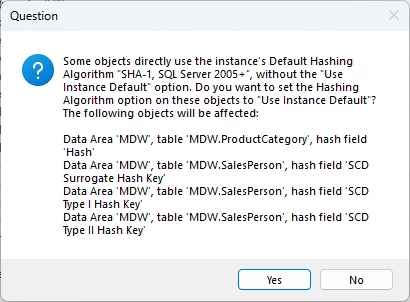
- Right click the instance in the Solution Explorer and click Edit Instance again. In the Hashing algorithm list, click the algorithm you actually want to use and then click OK.
- Change the hashing algorithm for any objects that are supposed to use ‘SHA-1, SQL Server 2005+’, e.g. objects created before you initially switched the default setting.
Note: If you have a lot of affected instances, get in touch with TimeXtender support and we can help you reset the affected objects programmatically.
