

Two products ship alongside Timextender Data Platform 26.3: Xpilot Analytics, which reaches general availability, and the Timextender MCP Server, whose query engine has been rebuilt to provide more consistent and accurate results.
Xpilot Analytics is part of Timextender Data Platform and is upgraded with it — there is nothing separate to install. The Timextender MCP Server runs on your own machine, so once your platform has been upgraded to 26.3, download the new version from the Downloads page in TDP and run the installer.
Dive in below.
Xpilot Analytics
Xpilot Analytics — asking questions of your data model in plain language and getting a chart or a number back — reaches general availability in 26.3. This release is mostly about making its answers trustworthy and its reasoning visible, plus two pieces of groundwork that matter if you operate under EU rules.
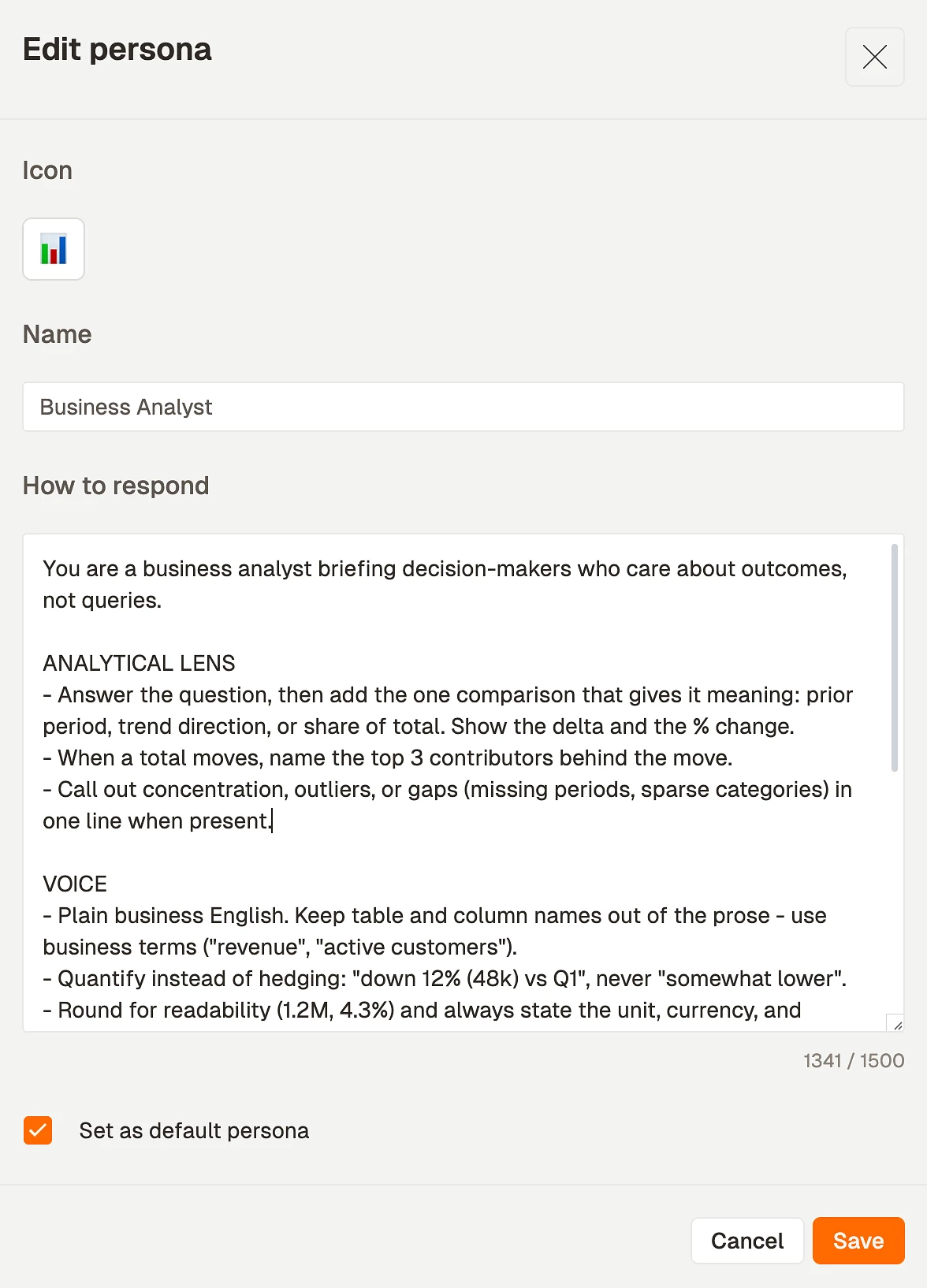
Agent personas
You can now create personas and scope them to a workspace, then pick one at the start of a chat. A persona shapes how the agent answers — the vocabulary it uses, the assumptions it is allowed to make, how much it explains — so a finance analyst and a warehouse manager can ask the same question and get an answer pitched at them. Personas are managed from the Xpilot settings and chosen from a picker in the chat itself.
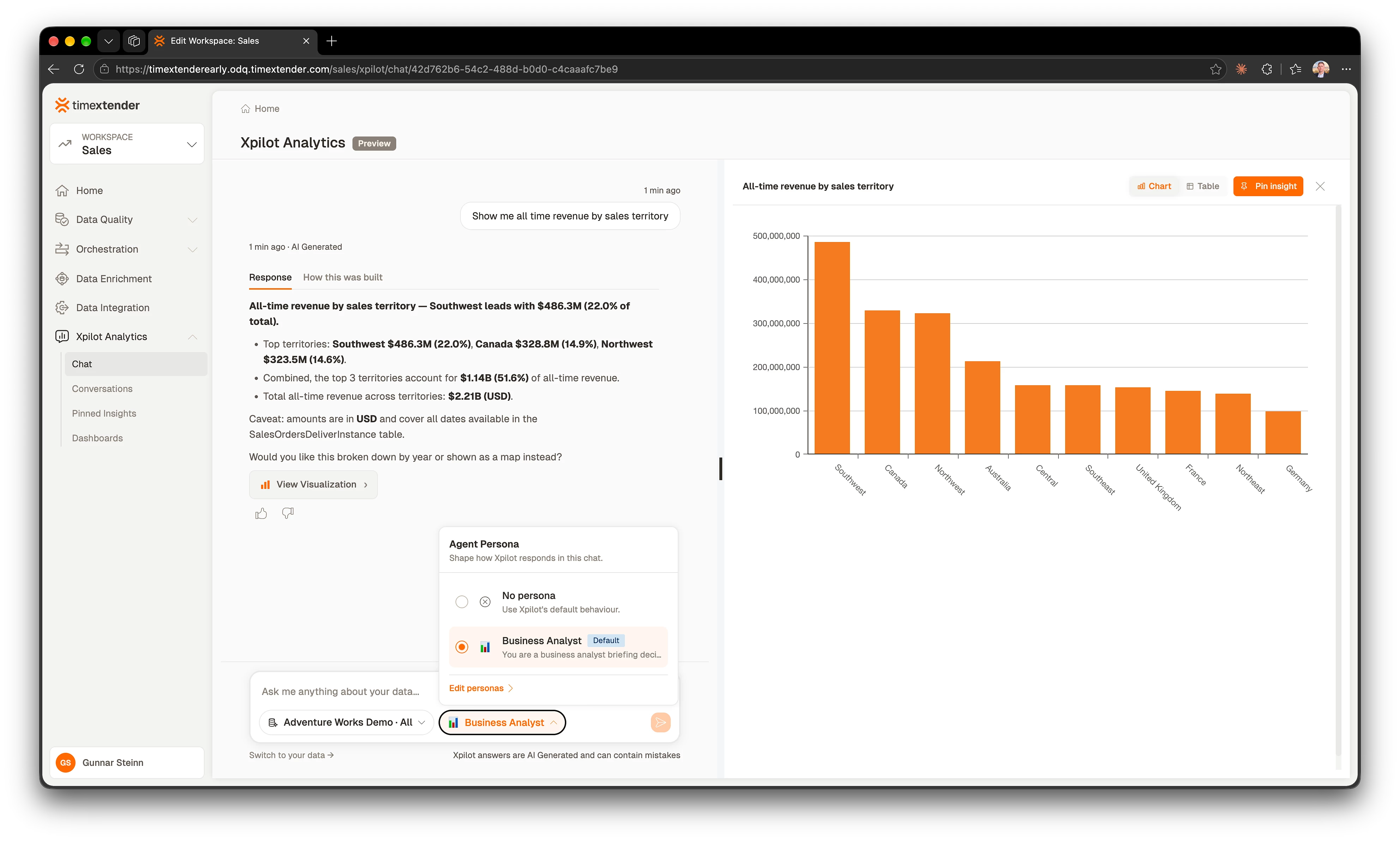
The reasoning panel has been redesigned: steps read as a continuous thread rather than a checklist, and each step is named in plain language instead of showing the raw name of the tool the agent called. When an answer comes back as a single number, a How this was built panel shows the SQL that produced it — so you can check the logic, or take the query away and run it yourself.
Suggested follow-ups and feedback
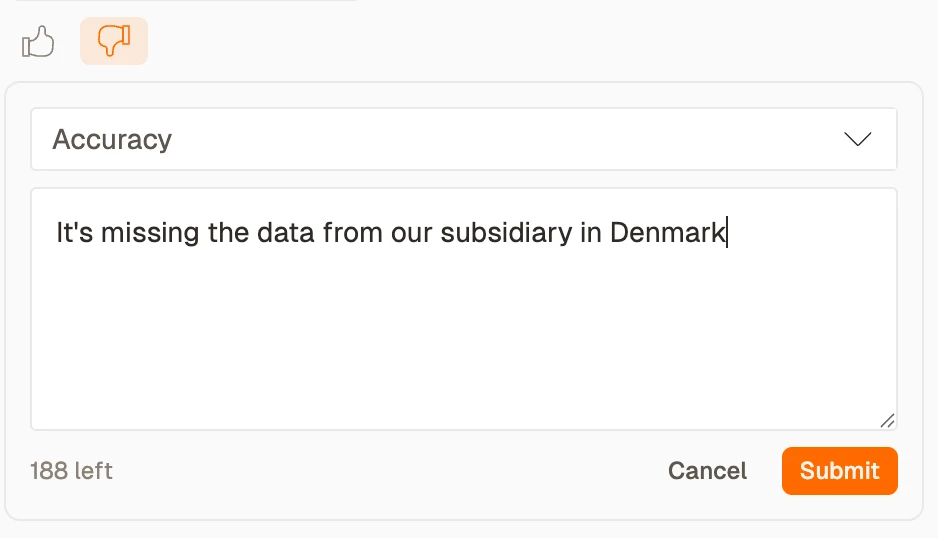
Each answer now offers a few follow-up questions as chips, drawn from what you just asked and what the model can actually support. Answers also carry a thumbs up and thumbs down, which is what tells us where the agent is getting it wrong.
AI disclosure, for the EU AI Act
Article 50 of the EU AI Act requires people to be told when they are interacting with an AI system. Three surfaces now carry that disclosure: Xpilot Analytics chat, Xpilot rule generation in TDP, and Orchestration error insights.
A faster first question
Opening a conversation now pre-loads what the first question will need, rather than fetching it after you press send. We also instrumented the whole first-query path stage by stage, which is what made the remaining slow steps findable.
Fixed in Xpilot Analytics
Answer correctness
- When a requested column could not be resolved, the agent used to quietly substitute a different one and present the result as though it were what you asked for. It no longer does.
- The agent no longer invents a metric for something the model cannot answer — for example an average customer age where only a signup date exists. It says it cannot answer instead.
- Duration and age values are no longer materially wrong depending on which query the agent chose.
- A question that needs data from several views is now routed to the structured metrics tool, so it benefits from the multi-table correctness work rather than bypassing it.
- The agent no longer answers a different question than the one asked, and no longer shows a wrong "total records" count alongside it.
- A cold conversation's first question no longer fails because the agent guessed at entity names instead of reading the model's schema first.
- An ambiguous question across two models with overlapping table names now asks you which model you meant, instead of iterating until it gives up.
Charts and results
- Charts no longer always show US dollars regardless of the customer's currency.
- The chart shown by default is the one you asked for.
- Chart follow-up edits stay connected to the conversation that produced them.
- Multi-part visualizations show their tabs reliably, and the right-hand pane switches to the newest chart on a follow-up turn.
- The "View visualization" button opens the tab it refers to.
- KPI cards no longer overflow their frame on large values, and preserve the label casing they were given.
- Bar chart category labels render in full instead of being truncated to shorthand like
1(1). - The results table no longer shows column headers with no data beneath them.
- Table results and CSV exports no longer show empty cells for aggregate columns on Snowflake models.
- The agent no longer offers visualization options the chart component cannot actually do.
- Axis and tooltip formatting now uses the semantic type of the column rather than guessing.
Conversations
- Long conversations no longer break and fail to recover once older messages are trimmed.
- Answers are no longer lost when a conversation ends unexpectedly.
- Reopening an old chat whose data model no longer exists no longer fails.
- A newly added data model appears in existing chats without starting a new one.
- Switching MCP server mid-conversation starts a new chat, rather than continuing against a different model.
- The conversation list no longer shows "Unavailable" in the MCP Server column for past conversations.
- Pinned insights render the right data immediately after pinning, and insights pinned from conversation history stay connected.
- Sharing an insight no longer lags for several seconds when the share dialog opens, and the share email's branding, copy and link are corrected.
- AI error explanations are saved, so reopening one loads instantly instead of re-running the model.
Interface
- Code blocks in chat are readable in dark mode.
Timextender MCP Server
The MCP Server is what lets an AI client — Claude, ChatGPT, or Xpilot Analytics itself — query your data model through a governed, read-only interface. 26.3 rebuilds the query engine so that answers spanning more than one table are correct, and adds your own identity provider in front of it.
Answers that hold up across multiple tables
The query engine has been rebuilt. Previously, a question that needed data from two or more tables would often fail outright — and, worse, sometimes returned a plausible number that was quietly wrong, because joining a fact table to a dimension can multiply rows before anything is summed.
The centrepiece is a new tool, query_metrics: the agent declares the metrics, dimensions and filters it wants, and the server compiles the SQL from your model, so joins, grain and database dialect are resolved rather than guessed. Xpilot Analytics now uses it by default. The existing free-SQL tool remains available — as a fallback for questions the structured tool cannot express, and for your own integrations.
- Joins are now chosen deterministically, and the engine resolves the grain of each measure before it aggregates, so fan-out no longer inflates a total.
- Combining a fact measure with a dimension-side measure across a one-to-many relationship no longer silently drops the unmatched rows.
- Combining several measures under a filter no longer returns one of them as an unrestricted total; where the request is genuinely ambiguous, the engine declines rather than guessing.
- Averages and distinct counts work on ordinary star models, instead of being refused by a fan-out guard that was not needed.
- Rows that exist in one fact table but not another are retained rather than dropped.
- The structured metrics tool covers a materially wider range of questions, which reduces how often a question has to fall back to free-form SQL.
- The agent is given the model's relationships and view descriptions, so it picks the right path instead of inferring one.
- The metrics tool now returns the SQL it generated, rendered so you can read it and run it. Combined with the How this was built panel in Xpilot Analytics, that means a number produced by an AI answer is checkable rather than something you have to take on trust.
Sign in with your own identity provider
The server now sits behind OAuth with a pluggable identity provider, so access is governed by the directory you already run rather than a shared key.
- Microsoft Entra ID and Auth0 providers are supported, selected in the Configurator with the identity fields for the provider you pick, with generic OIDC coming soon.
- Onboarding a client is zero-touch where the provider supports dynamic client registration — the server advertises what it needs and the client registers itself.
- Claude and ChatGPT connect through this path, including the desktop clients.
- Entra's authority, issuer and audience are validated at startup, so the configuration mistakes that used to surface as an unexplained 401 are reported when the server boots.
- The server advertises an Entra-compatible resource identifier in its protected-resource metadata, which unblocks clients that follow RFC 8707.
Snowflake support
Snowflake is now a first-class database for the MCP Server rather than a partial one. Relationship discovery no longer depends on a view that many Snowflake accounts do not expose, schema discovery works on those same accounts, and identifiers with spaces, quotes or non-default casing survive the round trip into generated SQL.
Installer and Configurator
- An MSI upgrade no longer wipes your configuration — HTTPS service arguments, OAuth settings and relay registration all survive, because they now live outside the installed program directory.
- HTTPS setup works end to end: certificates can be removed or swapped back to HTTP from the UI, port 443 is accepted, settings can be changed after reopening without re-validating, and saving a valid setup no longer leaves a service that will not start.
- The service starts automatically after a machine restart and has recovery actions configured.
- The Configurator shows its version in the title bar and startup logs, and no longer flashes Command Prompt windows during installation.
- Uninstalling scrubs credentials that were stored with DPAPI.
Fixed in the MCP Server
Queries and results
- A question whose answer column shares a name with a table — "Customers", say — no longer fails with a database error.
- Sorting results by a renamed column is no longer rejected.
- Queries no longer fail when a name matches a reserved database keyword.
- Internal table names no longer leak into results shown to users.
- A valid "how many records" question is no longer blocked as a security risk.
- A failed query is now reported as failed, so the calling application can tell something went wrong.
- Calculated measures work: they read from the correct table and aggregate correctly.
- Composite relationships are no longer flattened to their first column pair, which had been producing silently wrong row counts.
- A misspelled filter operator now says what the valid operators are.
- An unsupported member in a filter is no longer ignored — previously the server answered a subtly different question with a wrong number.
- Semantic-layer queries against Fabric no longer fail because deployed view names were sanitized while the model JSON kept the original characters.
- One data model no longer appears twice because of inconsistent naming.
- Long-running queries no longer time out part-way across the various transports.
- Large schema and query responses no longer fail with a closed connection over the cloud relay.
- The translator handles date-part arguments and cross-view qualifiers.
Registration and relay
- A reinstalled connector can reclaim its existing registration instead of being locked out of its own name.
- A broken MCP server registration can be deleted, and its name freed.
- Turning on HTTPS while using the cloud relay no longer breaks the connection and leaves Xpilot reporting no available models.
- A port change made over HTTP is now written to every place that needs it.
- The system API key is resolved from the right place in the configuration file rather than falling back silently.
- OAuth configuration changes are applied and communicated: changing the server URL no longer leaves a stale audience, and a save no longer requires a restart.
Security and robustness
- A malformed configuration file is now caught at startup instead of aborting the server's start.
