


Solved

How to pass multiple query parameters with the same name?

  • August 21, 2026
  • 4 replies
  • 54 views

Forum|alt.badge.img+2

Since TX Enhanced Connector doesnot allow parameters with the same name, how do i resolve the issue with:

https://baseURL/cars?exportField=model&exportField=Year&exportField=Manufacturer?

I have tried to solve it like this:
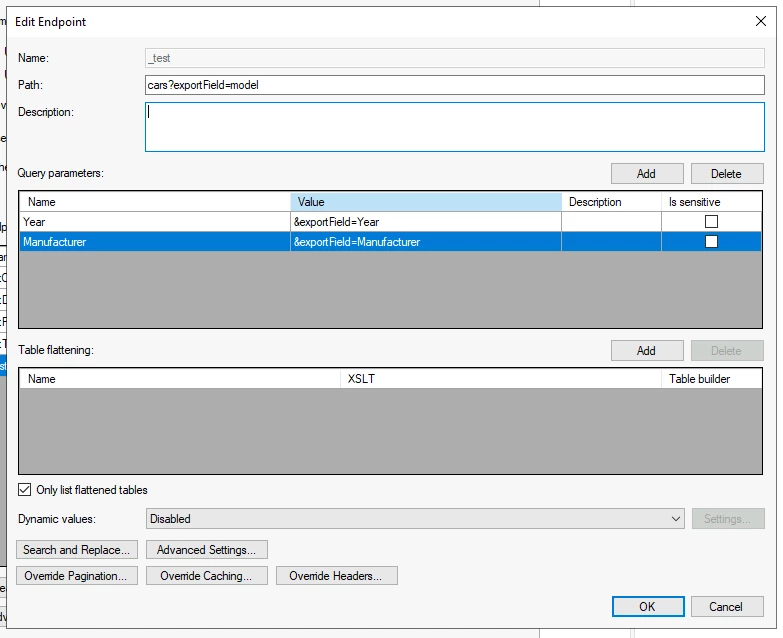
But then in logs, i see that my URL is:

https://bseURL/cars?exportField=Model&Year=exportFields=Year&Manufacturer=exportFields=Manufacturer

Which is obviously not correct.
It shouldnt be: &Year=exportFields=Year&Manufacturer=exportFieldsManufacturer
but &exportFields=Year&exportFields=Manufacturer

Best answer by Thomas Lind

Hi ​@aftabp 

I had an issue like this in spring, so I made an internal request for it. There is a feature request for making it able to use similar parameters, however it hasn’t yet been added to a development cycle. So eventually it will most likely be able to do so, but currently it isn’t known when.

And just to be clear, It will be like this when the feature is available.

Name Value
exportField Year
exportField Manufacturer
ExportField Model


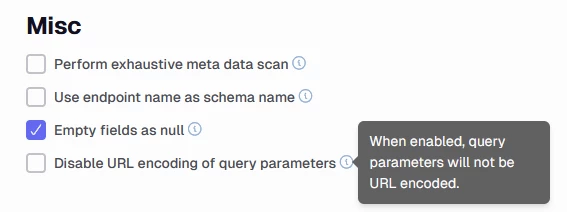
Regarding your issue with URL encoding. Have you tried to check the Disable URL encoding of query parameters under the Misc area for the endpoint?


4 replies

Thomas Lind
Community Manager
Forum|alt.badge.img+5
  • Community Manager
  • August 26, 2026

Hi ​@aftabp 

It is the same issue as this.

You can’t reuse exportFields, it can only be used once in the setup. So you will have to find a way to it to add it more than once.

I am pretty sure you have the same issue in the setup that you showed in the link above.


Christian Hauggaard
Community Manager
Forum|alt.badge.img+5

Hi ​@aftabp did Thomas’ comment above help answer your question? please let us know if you have any follow up questions


Forum|alt.badge.img+2
  • Author
  • Champion
  • September 1, 2026

I have tried two approaches.
The first one is to create one variable, and put the rest of the query as value:

Name Value
exportFields Manufaturer&exportFields=Model


This should work, because the log shows that TX manages to create correct URL, except that it replaces & and = with %26 and %3d
Insted of:
https://baseurl/cars?exportField=Year&exportFields=Model
It gives:
https://baseurl/cars?exportField=Year%26exportFields%3dModel
 

So i tried this adding an extra & for each variable name

Name Value
&exportField Year
&&exportField Manufacturer
&&&ExportField Model


This gives me:
https://{baseURL}/cars?exportField=Year&&exportField=Manufacturer&&&exportField=Model

Since vendor doesnot have possbiity to change the API, this is the best solution i came up with. It woked in POSTMAN and seems to be wotking in TX.

I would like forst approach to work.
It doesnt have any extra & in the URL

Is there a chance that in future versions of the connector, same variable name sould be used multiple times?


Thomas Lind
Community Manager
Forum|alt.badge.img+5
  • Community Manager
  • Answer
  • September 2, 2026

Hi ​@aftabp 

I had an issue like this in spring, so I made an internal request for it. There is a feature request for making it able to use similar parameters, however it hasn’t yet been added to a development cycle. So eventually it will most likely be able to do so, but currently it isn’t known when.

And just to be clear, It will be like this when the feature is available.

Name Value
exportField Year
exportField Manufacturer
ExportField Model


Regarding your issue with URL encoding. Have you tried to check the Disable URL encoding of query parameters under the Misc area for the endpoint?

