Solved

Swagger import support in Timexteender 20/Classic

  • December 17, 2025
  • 8 replies
  • 117 views

sten.lomme
Participant
Forum|alt.badge.img

Is there Swagger import support for the new TimeXtender REST data source?

Best answer by Thomas Lind

Hi ​@sten.lomme 

That is something else. We have no guides for what the differences are, only that one option exists. A comprehensive guide will be added eventually. The TDI guide explains how it works.

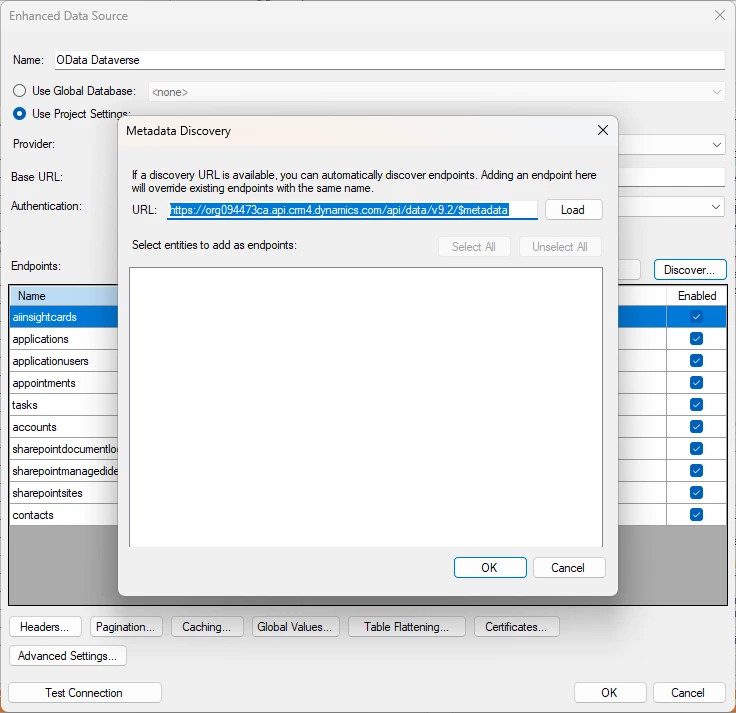
Here is how the menu looks and what you add to the field.
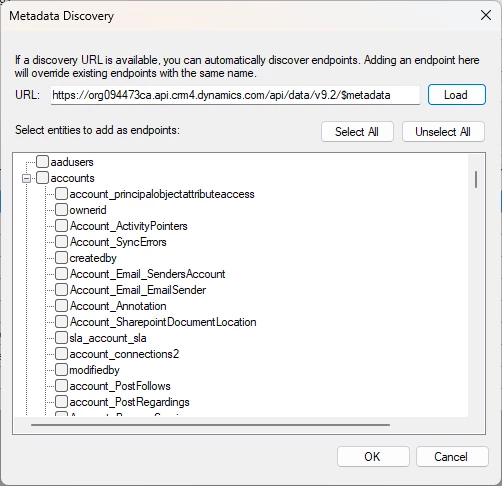
It will show the same sort of list of tables and specific fields that you can check. If you select a field it will generate it as a $select parameter, but you do not have to check them to add the table.


8 replies

rory.smith
TimeXtender Xpert
Forum|alt.badge.img+8
  • TimeXtender Xpert
  • December 18, 2025

Hi,

as far as I am aware this is not available in 20.10.x .


Thomas Lind
Community Manager
Forum|alt.badge.img+5
  • Community Manager
  • December 19, 2025

Hi ​@sten.lomme 

Rory is right, it is not available yet. It will likely be added in a future version.


sten.lomme
Participant
Forum|alt.badge.img
  • Author
  • Participant
  • December 19, 2025

How about the OData sync to get available endpoints?


Thomas Lind
Community Manager
Forum|alt.badge.img+5
  • Community Manager
  • December 23, 2025

Hi ​@sten.lomme 

You can use a Metadata Discovery URL for that, but it isn’t the same as what the Swagger import does.

You will need an URL that has this metadata for it to be usable.


sten.lomme
Participant
Forum|alt.badge.img
  • Author
  • Participant
  • December 29, 2025

Hi ​@Thomas Lind,

Thanks! Is there any documentation on the different TX features of Swagger vs OData Metadata Discovery?


Thomas Lind
Community Manager
Forum|alt.badge.img+5
  • Community Manager
  • January 5, 2026

Hi ​@sten.lomme 

I asked an AI tool as both are external programs not exclusively made by us.

An OData metadata URL exposes the formal OData data model of a service (entities, properties, navigation, functions) in CSDL/EDMX form, while a Swagger/OpenAPI URL exposes a generic REST API contract (paths, operations, schemas).

This means that a OData source could have a Swagger URL added to it.

In general they seem to behave similar in that once used they return the available endpoints and for OData can use for example the $select parameter for specific fields of the endpoint.


sten.lomme
Participant
Forum|alt.badge.img
  • Author
  • Participant
  • January 5, 2026

Hi ​@sten.lomme 

I asked an AI tool as both are external programs not exclusively made by us.

An OData metadata URL exposes the formal OData data model of a service (entities, properties, navigation, functions) in CSDL/EDMX form, while a Swagger/OpenAPI URL exposes a generic REST API contract (paths, operations, schemas).

This means that a OData source could have a Swagger URL added to it.

In general they seem to behave similar in that once used they return the available endpoints and for OData can use for example the $select parameter for specific fields of the endpoint.


 I see. Was thinking maybe TX had documentation on how to set these up in TX.


Thomas Lind
Community Manager
Forum|alt.badge.img+5
  • Community Manager
  • Answer
  • January 8, 2026

Hi ​@sten.lomme 

That is something else. We have no guides for what the differences are, only that one option exists. A comprehensive guide will be added eventually. The TDI guide explains how it works.

Here is how the menu looks and what you add to the field.

It will show the same sort of list of tables and specific fields that you can check. If you select a field it will generate it as a $select parameter, but you do not have to check them to add the table.