



Symptoms
An "Out of Memory" error is received while running a TDI package in TimeXtender Orchestration. The package may have completed successfully, but an following error is received in Orchestration.
Error: Exception of type 'System.OutOfMemoryException' was thrown.
Cause
The issue is typically caused by a process stuck in the "running" state, which leads to memory exhaustion on the application VM. When multiple scheduled packages or processes run concurrently and overlap, the combined memory load can exceed the available resources.
Resolution
-
Check TimeXtender Orchestration Execution History
- Open TimeXtender Orchestration and review the execution history to identify any packages or processes still showing a "running" state.
- Look for executions with start times that correspond to when the error occurred.
-
Check for Updates
- Ensure that you are using the latest version of TimeXtender. Check the release notes for any relevant fixes related to execution visibility and memory issues.
-
Monitor System Resources
- Monitor the system's memory usage during package execution to identify any potential bottlenecks.
- Consider increasing the available memory or optimizing the package to reduce memory consumption.
-
Adjust Execution Settings
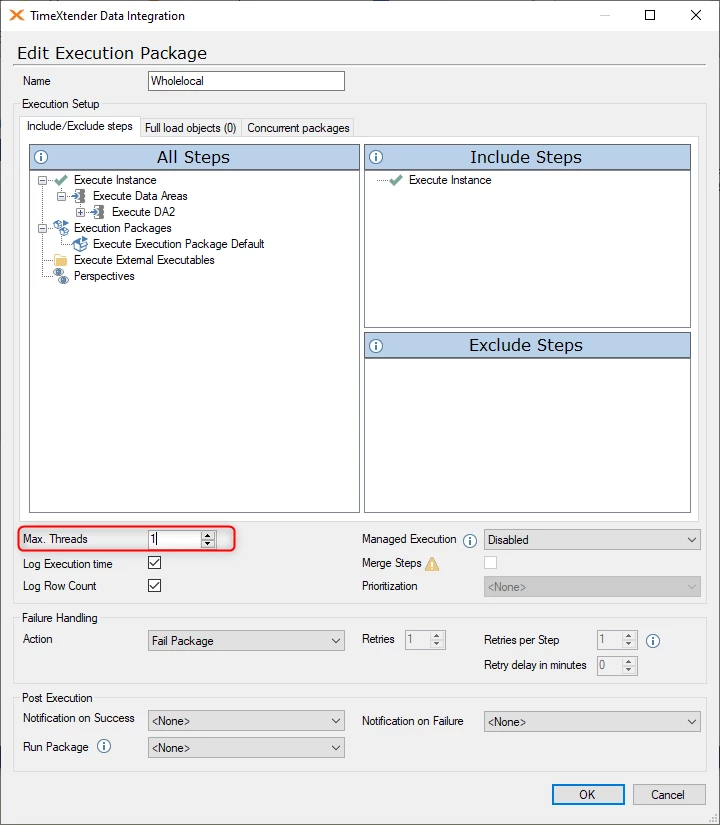
- Lower the Max. Threads setting in the TDI execution package that is scheduled by TimeXtender Orchestration. This setting controls how many concurrent threads the package uses — reducing it lowers memory consumption during execution. The Max. Threads setting is found in the Edit Execution Package dialog in TimeXtender Data Integration (TDI).
- Increase the timeout settings for your Ingest and Prepare instances.
-
Change the Orchestration Schedules to Ensure That Scheduled Packages/Processes Do Not Overlap
- Review and update the schedules in TimeXtender Orchestration to ensure that packages are not triggered concurrently.
- Staggering execution times prevents multiple heavy processes from competing for the same memory resources simultaneously.
-
Scale Up the Application VM
- If overlapping schedules cannot be avoided, consider scaling up the application VM running the execution service to provide additional memory capacity.
-
Contact Support
- If the issue persists, reach out to TimeXtender support with detailed information about the error, including the package name, error message, and any relevant logs from the Orchestration execution history.
Reference Ticket
31940
