



Symptoms
You receive an error similar to the following:
Timeout expired. The timeout period elapsed prior to completion of the operation or the server is not responding. Error during Data Processing for Table: <TABLENAME> Timeout expired. The timeout period elapsed prior to completion of the operation or the server is not responding. Stored Procedure: [dbo].[usp_XXXXXX_Clean] Parameters: @Debug = 0 @Version = 182 @LoadDate = 09-01-2012 16:59:06
Cause
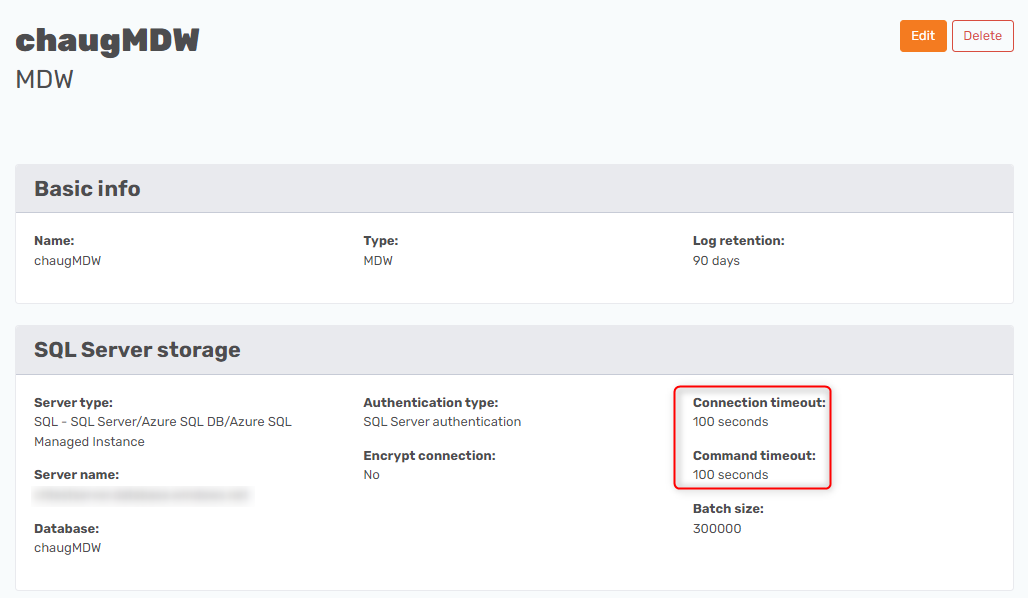
If you do not change the default timeout settings, any query on a Prepare Instance will timeout after 100 seconds.
Resolution
To change the timeout setting and solve the described timeout problem do the following on the Prepare Instance in question:
- Select Edit for the Prepare Instance in the TimeXtender Portal
- Set the Command Timeout to a higher value (e.g. 3600 for a one hour timeout)
