



The TimeXtender MCP Server bridges AI agents and governed analytics data by exposing semantic models through the Model Context Protocol (MCP). This solves the core reliability problem in AI-driven analytics: ensuring AI-generated queries use approved business definitions and validated logic instead of guessing meanings from raw database schemas. To learn more about our approach to MCP and AI Analytics, please read: How the TimeXtender MCP Server Works: Governed Semantic Models for AI Agents
Early Access
TimeXtender MCP Server is currently in Preview. Apply to our Early Access Program to get started.
Architecture
The system operates in four distinct layers within the MCP Server:
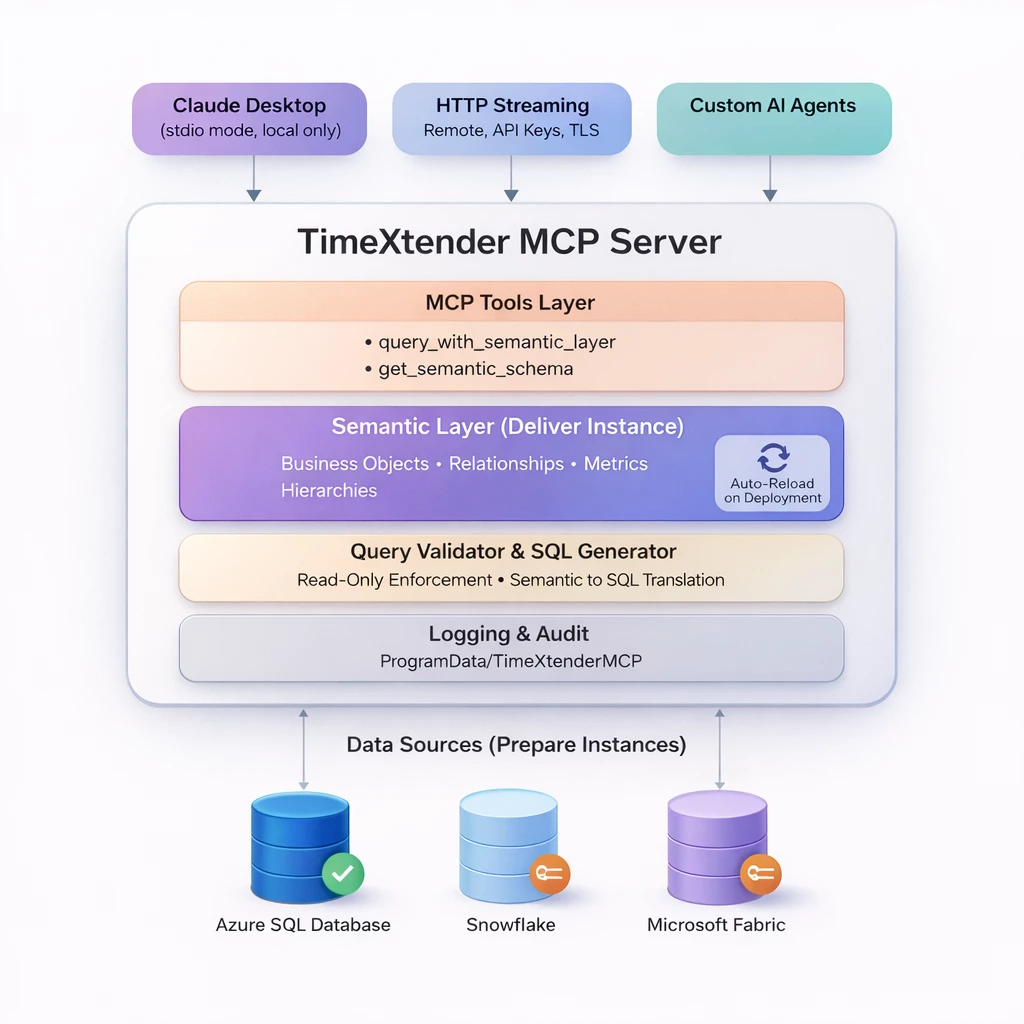
- MCP Tools Layer exposes two primary functions to connected AI clients:
query_with_semantic_layerfor executing queries andget_semantic_schemafor retrieving available business objects. These tools form the contract between AI clients and your data. - Semantic Layer contains the governed business model including entities, relationships, metrics, and hierarchies. This layer auto-reloads when you deploy model changes from TimeXtender Desktop, keeping AI clients synchronized with your latest approved definitions. Business descriptions you add to tables and fields pass directly to AI clients, improving query accuracy.
- Query Validator & SQL Generator translates semantic queries into SQL while enforcing read-only behavior. This prevents data modification even if AI behavior becomes unpredictable. The layer validates queries match the semantic model's allowed objects before execution.
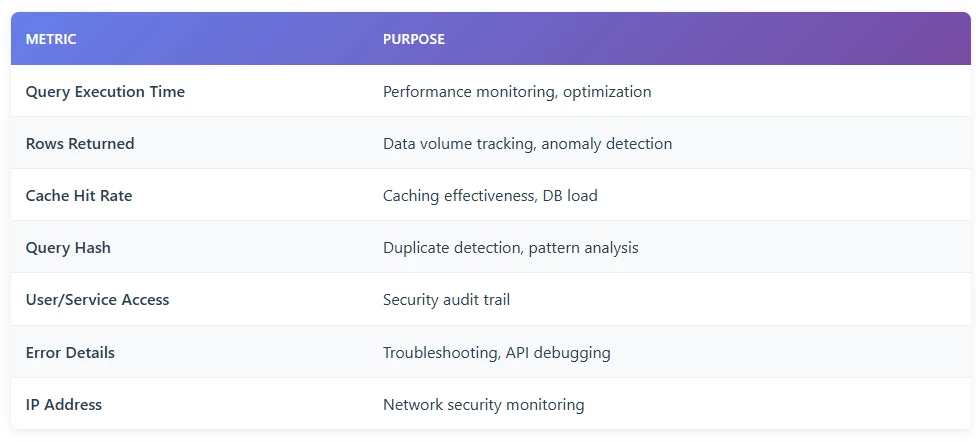
- Logging & Audit records all activity to ProgramData/TimeXtenderMCP for troubleshooting, compliance review, and usage analysis. Audit Log Default Location: C:\ProgramData\MCPDatabaseServer\ Log Metrics Captured:
- Data Sources (Prepare Instances): The MCP Server connects to Prepare instances running on Azure SQL Database, (Snowflake and Microsoft Fabric coming soon) using read-only credentials. AI clients connect through either local stdio mode (Claude Desktop, local development) or remote HTTP streaming with API keys and TLS (production deployments, custom agents).
Multiple Services Per Semantic Model
TimeXtender supports running multiple MCP services simultaneously, each exposing a different semantic model on its own port. This enables domain isolation where Finance, Sales, and Customer Success teams each query through semantic models scoped to their definitions and access rights. Each service maintains separate API keys, logging, and operational boundaries.
Multi-Service Deployment Model
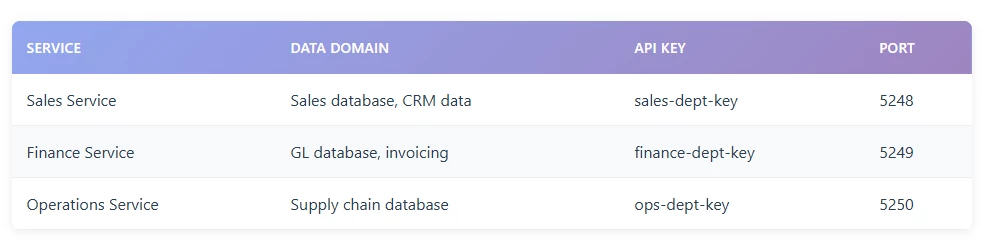
Creating multiple services prevents definition conflicts and makes governance tractable as usage scales. You configure each service by specifying the semantic model JSON file path, port number, and startup behavior.
Writing Descriptions for Effective AI Context
Field and table descriptions directly determine AI query accuracy. Unlike BI tools where users see curated visuals, AI agents explore your semantic model by reading metadata and inferring meaning from descriptions. Generic or missing descriptions force AI to guess, leading to wrong metric selection and invalid logic.
In the TimeXtender Semantic Model, tables and fields that have a description are displayed in the UI with a caret (^) suffix next to their name. This serves as a visual indicator of the contextual completeness of the metadata available to the AI model.
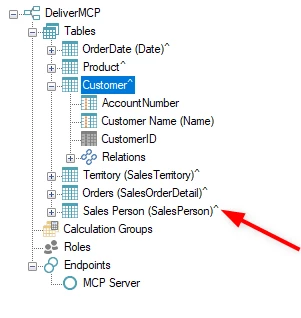
Effective descriptions answer "how should I use this?" rather than just "what is this?". For key measures, specify whether the value represents bookings, billed amounts, recognized revenue, or net after adjustments. Document the expected grain such as invoice line versus invoice versus account level. Identify which date field drives the measure: invoice date, recognition date, or close date. Include required exclusions, default filters, and whether the measure is additive across all dimensions.
For dimensions and entities, clarify business context that prevents misinterpretation. Explain data sources, update frequency, and intended use cases. If multiple similar fields exist, state which one your organization uses for reporting and why alternatives exist. When date logic matters, explicitly document whether fiscal or calendar periods apply and how quarters align.
This metadata becomes part of the context passed to AI clients during query generation. High-quality descriptions reduce ambiguity and prevent the most common failure mode: AI producing correct-looking numbers that do not match actual business definitions.
Practical Rollout Sequence
Start with one domain that has clear ownership and high question volume such as Revenue, Pipeline, or Churn. Build a semantic model that reflects how that domain reports today, not an idealized future state. Add contextual descriptions to all tables and critical fields before deployment.
Test Thoroughly
Run a controlled pilot with a fixed set of real questions that have known, trusted answers. Test consistency across rephrasing and follow-up questions. If results diverge from expected values, tighten metric definitions and relationship rules rather than adjusting prompts. Validate that the AI consistently selects correct measures, respects date logic, and avoids ambiguous dimensions.
Extend Scope & Iterate
Only after achieving stable results with known-answer questions should you expand access to broader teams. Monitor for discrepancies between AI outputs and existing reports. When conflicts arise, diagnose by reviewing which measure definition, relationship path, and time logic the AI used.
Expand to Additional Domains
Move to shared service deployment once the domain model produces consistent results across multiple users. Implement separate development and production environments so semantic model changes do not quietly shift production answers. Add the next semantic model only when the current one is reliable and actively owned. This measured approach scales learning with consistency rather than scaling confusion.
Getting Started
The technical guides that follow detail the configuration steps:
