


With the Microsoft Fabric SQL Provider, the Dynamics AX adapter in Timextender Classic can read Dynamics 365 Finance & Operations data from a Microsoft Fabric Lakehouse that Dynamics exports into, for example with Link to Fabric, instead of from an AX SQL Server or Oracle database. The provider connects to the Lakehouse's SQL Analytics Endpoint and authenticates with a Microsoft Entra service principal. Everything else about the adapter is unchanged: companies, table selection, enum labels, incremental load, and primary key deletes work as they do with a SQL AX source. For the adapter itself, see Timextender Dynamics 365 F&O Data Source: Classic (AX Adapter).
Prerequisites
In Microsoft Fabric
- A Lakehouse that Dynamics exports into, and its SQL Analytics Endpoint.
- The export must include the tables you want to read. In addition to your business tables, three tables are important:
dataarea: The company master. Without it, the adapter cannot synchronize companies.sqldictionary: AX's own table and field dictionary. It is only needed when Column metadata is set to Enhanced. See Column Metadata below.GlobalOptionsetMetadata: Microsoft's option set metadata, needed for Resolve option set labels.
In Microsoft Entra
- An app registration (service principal) with a client secret. A Fabric endpoint does not accept a SQL username and password, so the provider uses an application ID and a client secret instead.
- The service principal must have read access to the Lakehouse in Fabric.
On your machines
- The 64-bit Microsoft OLE DB Driver 19 for SQL Server (MSOLEDBSQL19) or later, on both the machine that runs the Timextender Classic client and the machine that runs the execution engine or SSIS. Version 19 installs alongside version 18, so you can keep an existing version 18 installation. The two are usually the same machine. If they are not, the client still needs the driver, because Test Connection checks the driver on the client before it tests the endpoint.
Adding the Microsoft Fabric SQL Provider
- Add a Dynamics AX adapter to your business unit. For instructions, see Timextender Dynamics 365 F&O Data Source: Classic (AX Adapter).
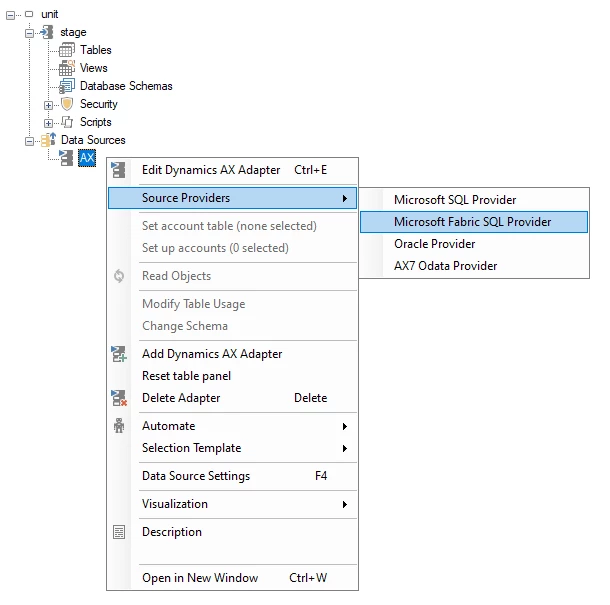
- Right-click the adapter, and then click Source Providers > Microsoft Fabric SQL Provider. The Microsoft Fabric SQL Endpoint dialog opens.
- (Optional) Select Use global database to take the connection and all other settings from a global database of the type AX Lakehouse. The provider's own fields are unavailable while it is selected, so you can skip to step 16.
- In SQL endpoint, enter the host name of the Lakehouse's SQL Analytics Endpoint from Fabric.
- In Lakehouse, enter the name of the Lakehouse.
- Enter the Application (client) ID and Client secret of the Entra app registration.
- (Optional) In Connection properties, enter any additional properties you want to append to the generated connection string.
- In Connection timeout, enter the number of seconds to wait when connecting. The default is 15.
- In Command timeout, enter the number of seconds to wait for a query. The default is 100.
- In the Use SSIS for transfer list, leave it at As Parent to use the project setting, or select another value to override it for this source.
- In the Column metadata list, select how column types reported by Fabric are corrected: None, Enhanced (default), or Set manually. See Column Metadata below.
- In Text length, enter the width to use for text columns when Column metadata is set to Set manually, and as the fallback for Enhanced. The default is 4000, which is the widest bounded
nvarchar. - (Optional) Clear Read account table schema only to read the whole endpoint. The checkbox is selected by default, so only the schema of the account table is read. Link to Fabric delivers all tables into one schema, so reading beyond it is wasted work, and on a shared endpoint it means reading other people's tables.
- (Optional) Clear Uppercase table and field names to keep the lowercase names used on the endpoint. The checkbox is selected by default, so table and field names are shown and deployed in uppercase, for example
CUSTTABLE, to match what an AX SQL source produces. The names queried at the source are never changed. - (Optional) In Label language, enter the language code for the enum labels. The default, 1033, is English (United States). Resolve option set labels is selected by default, so the labels are read from Microsoft's
GlobalOptionsetMetadatatable. Unlike AX enum labels, these labels are localized, which is why this provider asks for a language. - Click Test Connection. The test checks the driver on your machine first, and then the endpoint and credentials from the execution engine, so a failure tells you which of the two is the problem.
- Click OK.

After you add the provider, select the account table and set the company code conversion as described in the sections below.
Column Metadata
Fabric reports every string column as varchar(8000), whatever its real width, and reports the export's own key columns as strings. Column metadata decides how much of this is corrected.
| Option | What it does |
|---|---|
| None | Uses the column types reported by the source. Most text columns become nvarchar(max), which cannot be indexed and is stored outside the row. |
| Enhanced (default) | Corrects the column types using AX's own table dictionary in sqldictionary. Columns that the dictionary does not cover, or that have no width recorded, use Text length. This includes the export's own columns, which AX does not know about. |
| Set manually | Uses Text length wherever the source reports a wider column. |
Note: Enhanced requires sqldictionary in the export. If the table is missing, reading the source structure fails with an error that names the table, and it does not fall back. Because Enhanced is the default, you must set Column metadata to Set manually or None if your export does not include sqldictionary.
Enhanced also deploys the export's own Id column as uniqueidentifier rather than as text. The value is a GUID, and as a uniqueidentifier it takes 16 bytes. As text, the column is too wide to index.
Column widths change the next time you read the source structure. If a column still gets the wrong type, use Data type overrides on the data source properties to set the deployed type, for example for Id if your export does not deliver it as a GUID. Overrides also apply to the ENUMVALUE and ENUMVALUELABEL columns in the enum tables, which the adapter builds itself.
Selecting the Account Table
The adapter needs to know which table lists the companies. When you add the provider, the adapter uses dbo.dataarea, which is correct for a Link to Fabric export in the default schema. If your export is different, right-click the adapter and click Edit account table. The list shows every table on the endpoint as schema.name, so you can tell tables with the same name apart.

The key column is fno_id, not ID, because Dataverse reserves Id and renames AX's ID column. The adapter recognizes both.
The account table also decides the following:
- The schema: All other AX lookups use the schema of the account table, including
sqldictionaryandGlobalOptionsetMetadata. The Read account table schema only setting is ignored while you select the account table, so a wrong schema cannot hide the tables you need. - The table suffix: The older export mechanism delivers
dataarea_partitioned, while Link to Fabric deliversdataarea. If you select the name with the suffix, the adapter assumes that all tables have the suffix and removes it from the names it shows.
Setting the Company Code Conversion
A Fabric SQL Analytics Endpoint compares text case-sensitively, while an AX SQL Server database usually does not. This means that company codes such as DAT and dat do not match on Fabric.
- On the Dynamics AX adapter, under Company code conversion, set Lower case to AllTables.
The Lower case setting has the following values:
| Value | Effect |
|---|---|
| No | Company codes are extracted as they are. |
| CompanyTableOnly (default) | Only the company table's own key is converted to lowercase. |
| AllTables | The company column is converted to lowercase on every table that has one. |
AllTables is the only value that works with Fabric. If the company column is only converted on the company table, the company a row belongs to will not match the company list. The same applies to an AX source read over Oracle. A SQL Server source is the exception: with a case-insensitive collation, the casing makes no difference, so the setting can be wrong there without anything visibly going wrong. The company list itself keeps the source casing, so values used for filtering are converted to lowercase whether or not the column is.
Migrating a Project from a SQL AX Source
To move an existing project to Fabric, change the provider on the existing adapter instead of adding a new adapter. Changing the provider keeps the adapter's tables, fields, and selections, while a new adapter starts with no table selections.
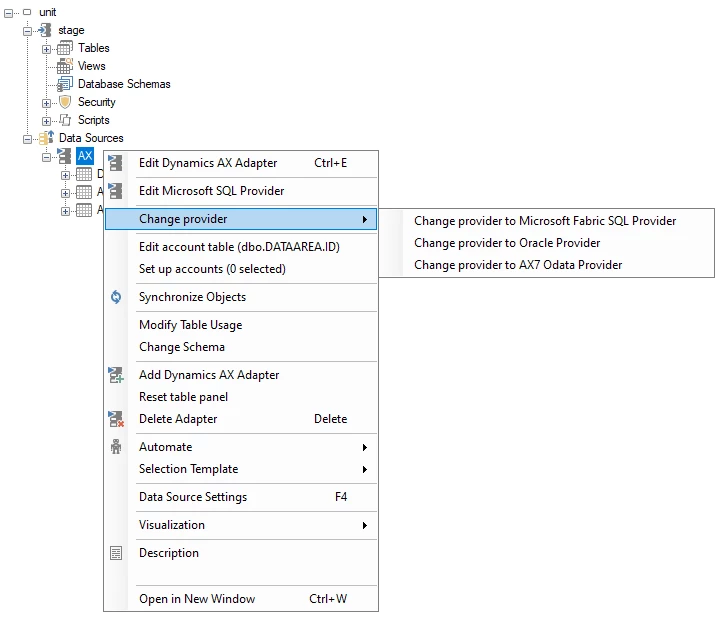
- Right-click the adapter, and then click Change provider > Change provider to Microsoft Fabric SQL Provider. Change provider replaces Source Providers once an adapter has a provider, and only lists the providers you are not already using.
- Set up the provider as described in Adding the Microsoft Fabric SQL Provider above. Make sure Uppercase table and field names is set the way you want before you select tables.
- Set the account table again. A SQL AX source uses
DATAAREA.ID, while a Fabric export usesdataareawith the key columnfno_id. - Set Lower case to AllTables, as described in Setting the Company Code Conversion above.
With Uppercase table and field names selected, the project keeps the names it already has. You can change the setting after you select tables: when you synchronize, every table and field is renamed at once, and the whole project is redeployed on the next deployment. This redeployment is safe, because deployed objects are matched by ID, not by name, so a change in case is applied as a rename. Tables with incremental load or history keep their data, and all other tables are rebuilt and reloaded.
Known Limitations
Values Longer Than the Column Width Are Truncated
If a value is longer than the column width, it is cut off in the source query. Nothing is logged, no warning is raised, and the staged row looks normal.
- The limit is the column width in characters, not bytes: 4000 by default, or the width AX records when Column metadata is set to Enhanced.
- Text with multi-byte characters is cut at the same character count as plain text.
- A value that fits the width is never shortened.
Setting Column metadata to Enhanced prevents this for every column AX describes, because AX enforces those widths at the source. Truncation can only happen on columns whose width had to be estimated.
Troubleshooting
| Message | Cause and solution |
|---|---|
Invalid object name 'dbo.dataarea' when synchronizing companies | The account table does not exist as configured. The export may not include it, it may be in another schema, or the export uses suffixed names and the table is called dataarea_partitioned. Right-click the adapter and click Edit account table to correct it. |
| An error that names the MSOLEDBSQL driver and the required version | OLE DB Driver 19 or later is not installed on that machine. Version 18 is not supported, whichever build it is: it registers without a version number in its name, so it cannot be told apart from an older version 18. The message names both machines that need the driver. |
| All text columns are unlimited | Column metadata is set to None. |
Reading the source structure fails on sqldictionary | The table is not in the export, it is in a different schema from the account table, or the service principal cannot read it. The error names the schema the adapter looked in. Add the table to the export, or set Column metadata to Set manually. |
