

The TimeXtender MCP Server bridges AI agents and governed analytics data by exposing semantic models through the Model Context Protocol (MCP). It solves the core reliability problem in AI-driven analytics: making sure AI-generated queries use approved business definitions and validated logic instead of guessing meanings from raw database schemas.
Early Access
TimeXtender MCP Server is currently in Preview. Apply to the Early Access Program to get started.
Architecture
The MCP Server runs as a single Windows service on a machine inside your environment. That one service hosts every semantic model you register, talks to the underlying data warehouse with a read-only database account, and answers AI clients that connect to it locally or over HTTPS.
The TimeXtender MCP Configurator (a separate Windows desktop application installed alongside the server) is where you register models, configure providers, generate API keys, and start the service. The Configurator writes the server's configuration file (mcp-server.json) but does not run in the data path itself.
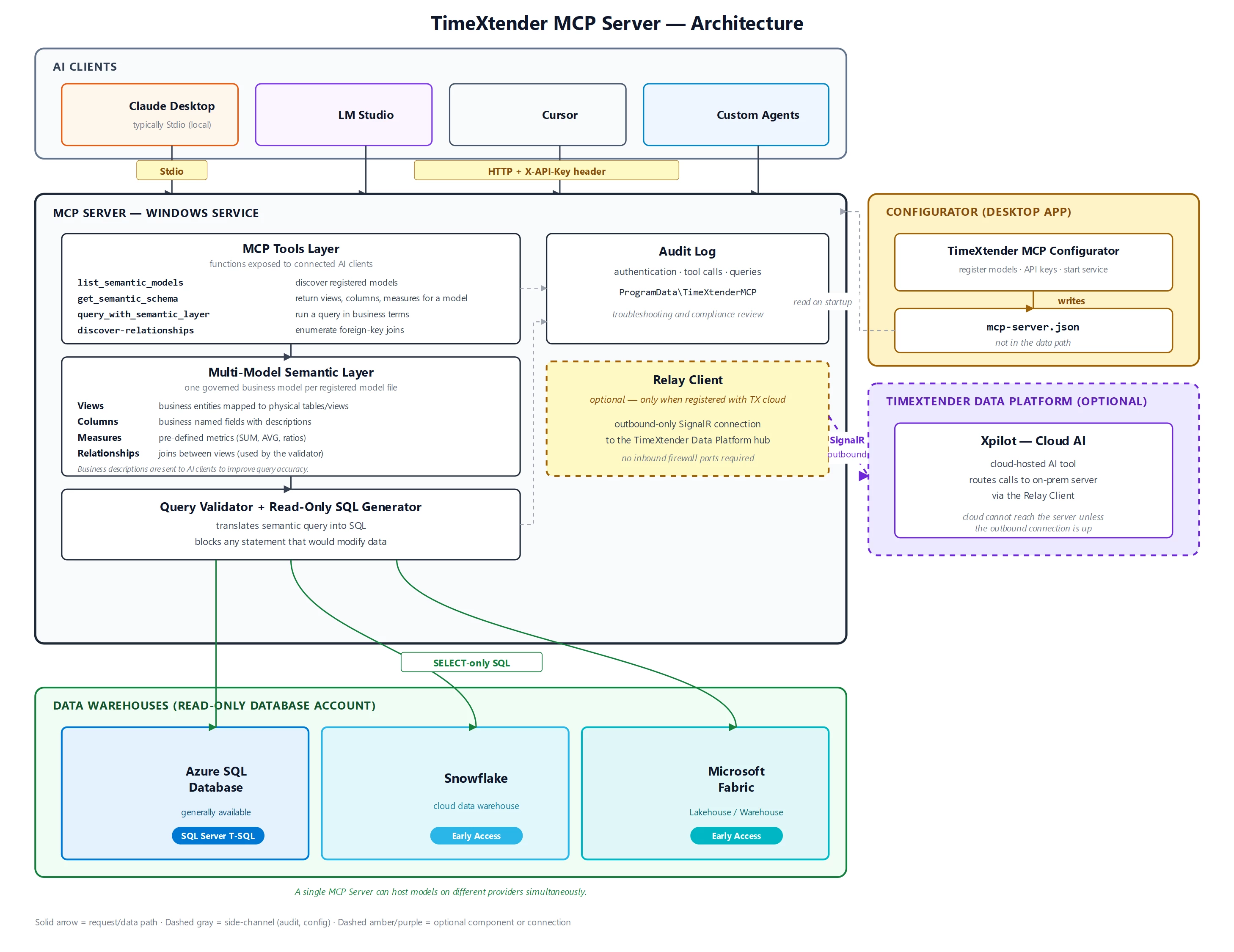
The system has four core layers inside the MCP Server:
- MCP Tools Layer exposes the functions that connected AI clients call:
list_semantic_models: discover the semantic models registered on this serverget_semantic_schema: return the views, columns, and measures for one modelquery_with_semantic_layer: run a query expressed in business termsdiscover-relationships: enumerate the foreign-key joins available to the validatorquery_metrics: run an analytical query by declaring measures, dimensions and filters
- Multi-model Semantic Layer holds the governed business model for every model you have registered. Each model contains:
- Views: business entities mapped to physical tables or database views
- Columns: business-named fields with descriptions
- Measures: pre-defined metrics such as SUM, AVG, or ratios
- Relationships: joins between views, used by the validator to keep queries safe
- Metadata: model name, schema version, and business descriptions
- Query Validator and SQL Generator translates each semantic query into SQL while enforcing read-only behavior, blocking any statement that would modify data.
- Audit log records every authentication event, tool call, and query to
%ProgramData%\TimeXtenderMCPServerfor troubleshooting and compliance review.
A fifth layer is optional:
- Relay client lets cloud-hosted AI tools (such as Xpilot in the TimeXtender Data Platform) call into your on-premises MCP Server without opening any inbound firewall ports. It maintains an outbound-only SignalR connection to the TimeXtender Data Platform hub. The Relay client only runs when you have registered the server in the TimeXtender Data Platform tab of the Configurator. See Register MCP Server with TimeXtender Cloud.
Supported data warehouses
The MCP Server connects to Prepare instances running on:
- Azure SQL Database
- Snowflake (Early Access)
- Microsoft Fabric (Early Access)
You can mix providers on the same MCP Server. For example, a Sales model on Azure SQL and a Production model on Snowflake can both run on the same service simultaneously.
Multiple Models on One Server
A single MCP Server hosts every semantic model you register on the Models tab in the Configurator. AI clients reach all of them through one endpoint URL and one Windows service.
Access to those models is governed by bundle API keys. A bundle key can grant access to one model, several models, or every model on the server, and the same server can hold keys with different scopes side by side. Common patterns include one key per team, one key per analyst, one key per AI tool, and one unrestricted admin key for evaluation. See Manage API Keys for MCP Server for the full design.
This means domain isolation (Finance, Sales, Customer Success) is achieved through scoped keys, not through running separate services per domain.
Connection Options
AI clients reach the MCP Server in one of three ways:
- Stdio mode for clients running on the same Windows machine as the MCP Server (typically Claude Desktop in local development). The Configurator generates a JSON snippet you paste into the client's configuration. No API key is required. See Connect to MCP using Stdio Mode. Claude Desktop can also use a connector created in the browser, which reaches the server over HTTPS with OAuth.
- HTTP mode with an API key for clients running anywhere on the network or for production deployments. Each client sends an
X-API-Keyheader on every request. Use HTTPS for production. See Connect to MCP using HTTP Mode and Configure HTTPS for MCP Server. - HTTP mode with OAuth 2.1 for Claude and ChatGPT connectors, where users sign in against your own Auth0 or Microsoft Entra ID tenant and no API key is distributed. See Connect to MCP using Auth0 and Connect to MCP using Microsoft Entra ID.
Optional: Cloud Connectivity for Xpilot
If you want Xpilot or other cloud-hosted AI tools to call this on-premises MCP Server, register the server with the TimeXtender Data Platform from the TimeXtender Data Platform tab in the Configurator. Registration:
- Opens a browser for TimeXtender authentication
- Picks the tenant the server belongs to
- Writes a DPAPI-encrypted relay token into
mcp-server.json
After registration, the MCP Server maintains an outbound SignalR connection to the TimeXtender Data Platform. No inbound firewall ports are required. The cloud cannot reach the server unless the server's outbound connection is up. See Register MCP Server with TimeXtender Cloud.
Practical Rollout Sequence
Start small. Pick one domain with clear ownership and a high volume of analyst questions. Build the semantic model in TimeXtender Desktop, register it on the Models tab in the Configurator, and create one or two API keys with the right scope.
Test with real questions. Run a controlled pilot with questions whose answers are already known from existing reports. Validate that the AI gives consistent answers across rephrasings of the same question. Iterate on field and table descriptions in the semantic model until accuracy is acceptable.
Expand. Add additional models for other domains. Issue scoped bundle keys so each team only sees what it owns. Move to HTTPS and, if applicable, register with the TimeXtender Data Platform so Xpilot users can reach the server.
Getting Started
Follow the articles in order:
Set up the server
Connect AI clients
Production hardening
Optional: cloud reach for Xpilot
Reference




