
TimeXtender 20.10, colloquially known as "Classic", has been replaced by TimeXtender Classic as the bearer of the TimeXtender legacy back to the very first version from 2006.
Before support for TimeXtender 20.10 ends in February 2027, we strongly recommend that you upgrade to either TimeXtender Classic or TimeXtender Data Integration. See Important information regarding TimeXtender 20.10, TimeXtender Data Integration, and TimeXtender Classic for more information.
Differences between TimeXtender 20.10 and TimeXtender Classic
TimeXtender Classic has a focus on on-prem solutions based on Microsoft SQL databases, while its sibling TimeXtender Data Integration is built to take full advantage of cloud-based infrastructure such as Microsoft Fabric, Azure Data Lake, and Snowflake.
Since TimeXtender Classic is designed to solve a more specific use case than TimeXtender 20.10, some 20.10 features are not available in Classic. We've also taken the opportunity to remove previously deprecated features to ease development going forward.
Here's a breakdown of the features and how they're handled when you upgrade:
- The ODX has been removed in favor of the business unit. On upgrade, all ODX objects and any data warehouse mappings that derive directly from an ODX will be deleted. The fields 'DW_ODXBatchId' and 'DW_ODXBatchNumber' will be converted to custom fields in the data warehouse.
- The Classic license does not include access to CData data source providers as a default. If you are currently using CData data sources, you have two options:
- Get in touch with TimeXtender to get the feature added - note that it is a paid addon.
- Convert your CData data sources to TimeXtender Enhanced data sources.
- Qlik Models and the Qlik Sense Server have been removed. All Qlik Models and their global database settings will be deleted. In TimeXtender Classic, Qlik is supported through semantic models with endpoints for QlikView and Qlik Sense.
- The deployment target setting 'SQL Data Warehouse' has been removed. As a result of the focus on on-prem solutions, TimeXtender Classic does not support SQL Data Warehouse (currently known as Dedicated SQL Pool). Any existing deployment targets set to 'SQL Data Warehouse' will be changed to 'Not Set'.
- Navision 2.60 - 4.00 data sources have been removed.
- The following deprecated objects have been removed:
- 'Split' and 'Concatenation' field mappings. All existing mappings of these types will be deleted. This functionality has long been deprecated in favor of using field transformations.
- The time table feature has been removed. Existing time tables and their fields will be converted to custom tables. The time table functionality has long been deprecated in favor of date tables.
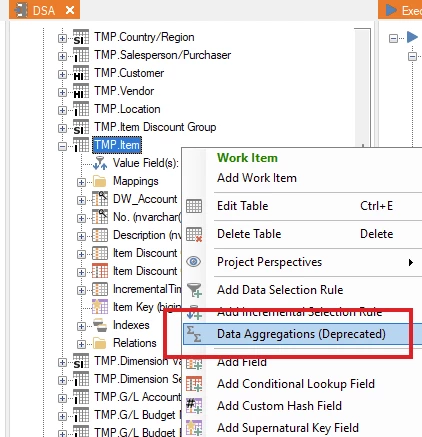
- Data aggregations. Existing aggregations will be removed.
- Mapping tables on the business unit. Existing mapping tables will be converted to custom tables.
- On tables, the following deprecated options and settings have been removed:
- The 'Enable BK hash key' option. If enabled, the corresponding field will be converted to a custom field.
- The 'Entire row hash key' option. If enabled, the corresponding field will be converted to a custom field.
- The 'Use left out join' history setting.
- The 'Enable target-based incremental load' option. If enabled, the fields 'Incremental Hash Key' and 'Incremental Value Key' will be converted to custom fields.
- On conditional lookup fields, the following deprecated options and settings have been removed:
- The 'Force sub select' option.
- The 'Use temporary table' setting for the 'Multiple lookup fields' option.
- The 'Partition by' setting for the 'SQL mode' option.
- To ensure that you're always up to date on important changes, Classic must be activated using an activation file every six months. When you download the file from the Portal, you can review important announcements about the product.
Upgrading from TimeXtender 20.10 to TimeXtender Classic
Upgrading from 20.10 to Classic is not much different from upgrading from one minor release to another. However, because of the changes listed above, the repository upgrade is much bigger than usual.
For the smoothest upgrade experience, follow the steps below.
- Get in touch with your TimeXtender partner, or TimeXtender directly, if to get a TimeXtender Classic license. If you have CData data sources, and plan to keep using CData providers, make sure to get the CData feature added to your license - note that it is a paid add-on.
- Sign in to the Portal, go to the Admin > Licenses page and download an activation file for Classic. See Activate TimeXtender Classic for more information.
Note: You cannot activate TimeXtender Classic with a TimeXtender 20.10.x license key.
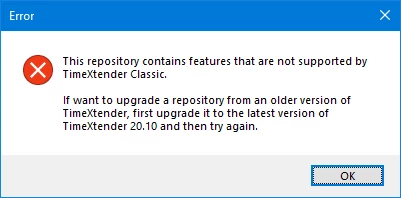
- Upgrade to the latest version of TimeXtender 20.10 to ensure you are on a version that can be upgraded to TimeXtender Classic. If you try to upgrade a repository from a version that is too old, you'll see an error message in TimeXtender Classic when you attempt the upgrade.
- Go through each project that you want to upgrade and refactor it with an eye on the list above. You decide what you want to change before the upgrade, let the upgrade script handle or leave until after the upgrade.
- If you use the ODX, we strongly recommend that you implement your data sources in the business unit before you upgrade.
- If you have CData data sources, and plan to keep them, you must update your CData providers to version 25.x.x.x, as previous versions are not available for Classic.
- If you have CData data sources, and want to avoid the fee for using CData, you must convert your CData data sources to TimeXtender Enhanced data sources using the 'Change Provider' feature in TimeXtender 20.10.
- Save the projects you want to upgrade in a new repository to protect against accidental data loss and disruption of service to the business.
- Download and install the latest version of TimeXtender Classic. Open the application and activate it. Set the repository to the database containing the projects you want to upgrade.
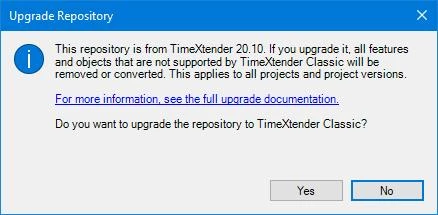
- When the application detects a repository from a version of TimeXtender 20.10 that can be upgraded, you will be asked if you want to upgrade the repository. Click 'Yes' and the upgrade will continue as usual. During the upgrade, unsupported features and objects will be removed or converted as listed in the previous section.